In the visually driven world of e-commerce, product images are one of the most critical factors that directly influence sales. Customers rely on images far more than text descriptions when evaluating a product. For sellers and brand managers on major marketplaces like Amazon, presenting high-quality and informative images is the key to standing out from the competition. However, manually managing catalogs with tens of thousands of products and ensuring every single image meets quality standards is nearly impossible.
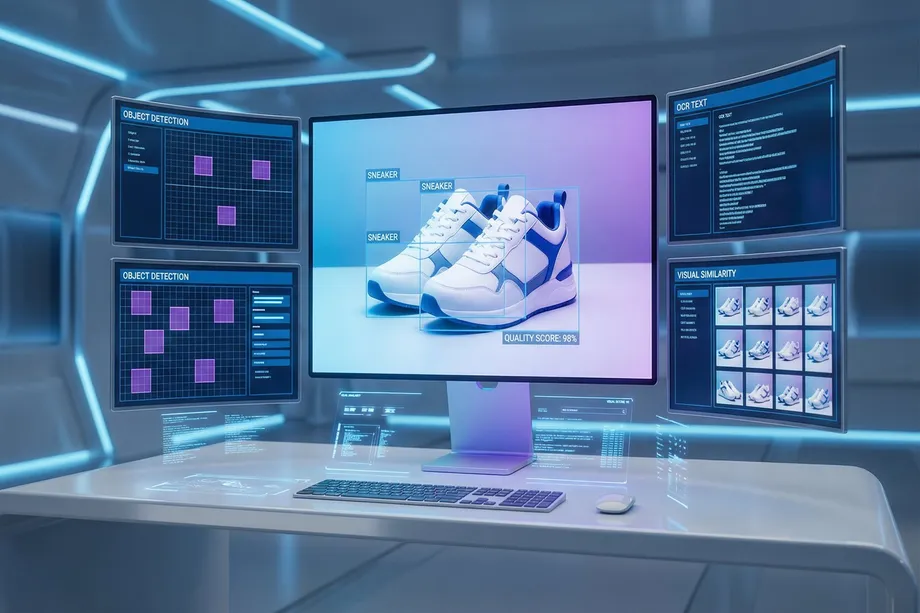
This is where Artificial Intelligence (AI) and computer vision come into play. With advanced algorithms, we can automatically analyze, classify, quality-check, and even discover visually similar products from product images. This technology not only increases operational efficiency but also enriches the customer experience and boosts sales.
In this comprehensive tutorial, we will walk through how to use modern computer vision techniques and Python libraries step by step to analyze Amazon product images. We will start by collecting product data using the Easyparser API, then perform the following analyses using powerful tools like OpenCV, TensorFlow, and PyTorch:
- Image Classification: Automatically assigning products to the correct categories.
- Object Detection: Identifying the location and boundaries of a product within an image.
- Optical Character Recognition (OCR): Extracting text (labels, specifications) from images.
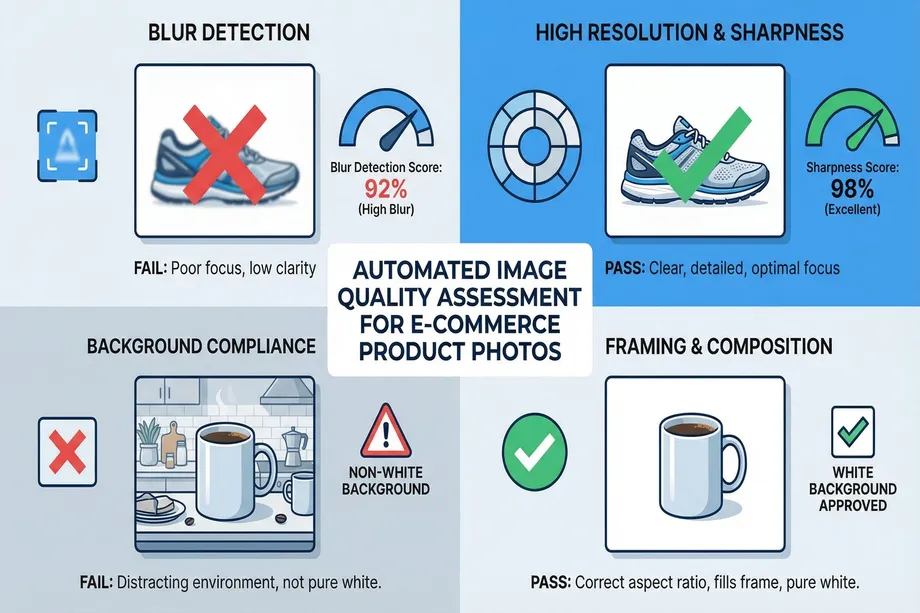
- Quality Assessment: Auditing compliance with Amazon's strict image standards (e.g., white background, resolution).
- Brand Logo Detection: Recognizing brand logos in images.
- Visual Similarity Search: Enabling customers to find similar products with a photo.
Finally, we will show how to bring all these steps together to build a bulk image processing automation pipeline at scale.
Step 1: Data Collection - Accessing Product Images with the Easyparser API
The first step in any computer vision project is accessing high-quality data for analysis. Manually downloading product images from Amazon is a time-consuming and inefficient process. Fortunately, tools like the Easyparser API automate this process, allowing us to programmatically access image data for thousands of products within seconds. Teams usually start with the Amazon Product Detail operation and pair it with Product Offer data to connect visual quality insights with pricing and seller context.
Easyparser's Detail API returns all images and related information for a product in JSON format using its ASIN (Amazon Standard Identification Number). This includes not only the main product image but also alternative images taken from different angles (variants), which broadens the scope of our analysis.
Here is a simple example of how to retrieve a specific product's images using the Easyparser API with the Python requests library:
import requests
import os
# Define your API key and target ASIN
API_KEY = "YOUR_EASYPARSER_API_KEY"
ASIN = "B08J66Y2R5"
# Send request to Easyparser Detail API
params = {
"api_key": API_KEY,
"platform": "AMZ",
"operation": "DETAIL",
"asin": ASIN,
"domain": ".com"
}
response = requests.get("https://realtime.easyparser.com/v1/request", params=params)
data = response.json()
# Collect image URLs
images = data.get("images", [])
print(f"Found {len(images)} images for ASIN: {ASIN}")
# Download images locally
for i, img in enumerate(images):
img_data = requests.get(img["link"]).content
with open(f"product_images/{ASIN}_{i}.jpg", "wb") as f:
f.write(img_data)
With this method, we can quickly collect image data for thousands of products we want to analyze and save them to a local directory. This forms the foundation of our large-scale analysis pipeline.
Step 2: Automated Image Quality Assessment with OpenCV
Amazon enforces strict rules for product images to ensure a consistent and professional shopping experience on its marketplace. Images that fail to meet these requirements can cause listings to be suppressed or receive lower rankings. For a seller with tens of thousands of products, manually checking every image is impossible. We can automate this process using OpenCV and ai image analysis techniques.
Amazon's Core Image Standards
Before we begin our analysis, let's review Amazon's most critical image requirements:
| Criterion | Requirement |
|---|---|
| Background | Must be pure white (RGB: 255, 255, 255) for the main image. |
| Resolution | Longest side must be at least 1000 pixels for zoom. 2000x2000 pixels recommended. |
| Product Ratio | Product must fill at least 85% of the image frame. |
| Sharpness | Image must be sharp, not blurry or pixelated. |
| Content | No additional text, logos, watermarks, or extra products on the main image. |
Quality Control with OpenCV
The following Python function demonstrates how to check fundamental quality metrics of a product image, such as blurriness, resolution, and background color.
import cv2
import numpy as np
def assess_image_quality(image_path):
# Analyzes core quality metrics of a product image
img = cv2.imread(image_path)
if img is None:
return {"error": "Could not read image."}
gray = cv2.cvtColor(img, cv2.COLOR_BGR2GRAY)
# 1. Blur Detection (Laplacian Variance)
laplacian_var = cv2.Laplacian(gray, cv2.CV_64F).var()
is_blurry = laplacian_var < 100
# 2. Resolution Check
h, w = img.shape[:2]
meets_min_resolution = min(h, w) >= 1000
# 3. White Background Check
corners = [img[0, 0], img[0, -1], img[-1, 0], img[-1, -1]]
avg_corner = np.mean(corners, axis=0)
has_white_bg = all(c > 240 for c in avg_corner)
return {
"blur_score": laplacian_var,
"is_blurry": is_blurry,
"resolution": (w, h),
"meets_min_resolution": meets_min_resolution,
"has_white_background": has_white_bg
}
# Example usage
result = assess_image_quality("product_images/B08J66Y2R5_0.jpg")
print(result)
# {'blur_score': 150.7, 'is_blurry': False, 'resolution': (1500, 1200),
# 'meets_min_resolution': True, 'has_white_background': True}
This function quickly evaluates whether an image meets Amazon's fundamental technical requirements. Threshold values like laplacian_var < 100 can be tuned based on the nature of your specific product images. This kind of automation allows you to scan thousands of images within minutes, instantly detecting compliance issues.
Step 3: Product Classification and Object Detection
After images pass quality control, we need to understand what they contain. Two fundamental computer vision tasks come into play here: image classification and object detection.
Image Classification assigns a single label to an entire image (e.g., "This is a shoe image"). It is used to automatically organize catalogs and place products in the correct categories. Object Detection, on the other hand, identifies the location of one or more objects within an image using bounding boxes and assigns a label to each (e.g., "There is a shoe in this region"). This is critical for more complex tasks like background removal, precise product cropping, or distinguishing multiple products in a single image.
Product Classification with TensorFlow
Training deep learning models from scratch requires massive amounts of data and computing power. Fortunately, with a technique called transfer learning, we can easily use models pre-trained on millions of images (such as ResNet, EfficientNet) for our own task. TensorFlow and Keras libraries greatly simplify this process for tensorflow image analysis workflows.
The following code shows how to classify a product image using a pre-trained ResNet50 model for product image recognition.
import tensorflow as tf
from tensorflow.keras.applications.resnet50 import ResNet50, preprocess_input, decode_predictions
from tensorflow.keras.preprocessing import image
import numpy as np
# Load pre-trained ResNet50 model
model = ResNet50(weights="imagenet")
def classify_product_image(image_path):
# Classifies a product image using ResNet50
img = image.load_img(image_path, target_size=(224, 224))
img_array = image.img_to_array(img)
img_batch = np.expand_dims(img_array, axis=0)
img_preprocessed = preprocess_input(img_batch)
predictions = model.predict(img_preprocessed)
decoded = decode_predictions(predictions, top=3)[0]
return decoded
# Example: Classifying a running shoe image
results = classify_product_image("product_images/B08J66Y2R5_0.jpg")
for i, (img_id, label, score) in enumerate(results):
print(f"{i+1}. {label}: {score:.2%}")
# 1. running_shoe: 85.14%
# 2. sneaker: 12.31%
# 3. loafer: 0.55%
This output shows the model correctly identified the image as a "running shoe" with 85% probability. This method can be used to automatically assign your products to hierarchical categories like Clothing, Shoes & Jewelry > Men > Shoes > Running.
Object Detection with PyTorch and YOLO
Sometimes knowing what a product is isn't enough - we also need to know exactly where it is in the image. YOLO (You Only Look Once) is a state-of-the-art object detection model known for its speed and accuracy. It can be easily implemented using PyTorch.
Object detection is especially valuable for finding brand logos, specific icons on packaging, or the main product in a lifestyle photo. You can train the YOLO model on a custom dataset to detect your own specific objects (such as your brand's logo). In this tutorial, we will use a pre-trained YOLOv5 model to detect general objects.
import torch
from PIL import Image
# Load pre-trained YOLOv5 model
# pip install ultralytics
model = torch.hub.load("ultralytics/yolov5", "yolov5s", pretrained=True)
def detect_objects(image_path):
# Detects objects in an image using YOLOv5
img = Image.open(image_path)
results = model(img)
results.render() # Draw bounding boxes
return results.pandas().xyxy[0]
# Example: Detect objects in a lifestyle image
detections = detect_objects("product_images/lifestyle_image.jpg")
print(detections)
# xmin ymin xmax ymax confidence class name
# 0 435.6 120.3 650.1 350.8 0.887 39 bottle
# 1 150.2 250.9 300.5 450.1 0.751 0 person
This output shows that a "bottle" and a "person" were detected at specific coordinates in the image. This information can be used, for example, to automatically crop just the product from an image showing how a product looks on a model.
Step 4: Advanced Analysis with Cloud APIs - OCR and Brand Logo Detection
Some computer vision tasks, especially Optical Character Recognition (OCR) and brand logo detection, require highly sophisticated models trained on extremely large and diverse datasets. Rather than training these models ourselves, using cloud-based APIs like Google Cloud Vision AI and Amazon Rekognition is generally more efficient and accurate. These services operate on a pay-as-you-go model and provide access to cutting-edge technology without complex infrastructure management.
| Feature | Google Cloud Vision AI | Amazon Rekognition |
|---|---|---|
| OCR (Text Reading) | Very high accuracy, supports 100+ languages. Handwriting recognition capability. | High accuracy, optimized for documents and scene text. |
| Logo Detection | Recognizes thousands of popular brand logos. | Custom Labels allows you to train your own logo model. |
| Other Features | Product search, web detection (finding copies of the image on the web), face analysis. | Content moderation, face analysis, image properties (sharpness, brightness). |
| Pricing | Tiered pricing per feature, generous free tier. | Pay-as-you-go, based on number of images analyzed. |
Text and Logo Detection with Google Cloud Vision
Google Cloud Vision API makes it easy to detect text (labels, ingredient lists, warnings) and brand logos in an image. This is extremely useful for verifying information on a product's packaging or analyzing competitor product images as part of your ai image analysis workflow.
from google.cloud import vision
import io
client = vision.ImageAnnotatorClient()
def analyze_with_google_vision(image_path):
# Analyzes an image with Google Vision API (OCR + Logo)
with io.open(image_path, "rb") as f:
content = f.read()
image = vision.Image(content=content)
# OCR - Text Detection
text_response = client.text_detection(image=image)
texts = text_response.text_annotations
extracted_text = texts[0].description if texts else ""
# Logo Detection
logo_response = client.logo_detection(image=image)
logos = [logo.description for logo in logo_response.logo_annotations]
return {"text": extracted_text, "logos": logos}
# Example output:
# {"text": "Coca-Cola Classic 330ml", "logos": ["Coca-Cola"]}
Text Detection with AWS Rekognition
Similarly, Amazon Rekognition offers a powerful solution for extracting text from images. It can be easily integrated with the boto3 Python SDK, making it a natural choice for teams already using the AWS ecosystem.
import boto3
rekognition = boto3.client("rekognition")
def detect_text_rekognition(image_path):
# Detects text in an image using AWS Rekognition
with open(image_path, "rb") as f:
content = f.read()
response = rekognition.detect_text(Image={"Bytes": content})
lines = [t["DetectedText"] for t in response["TextDetections"] if t["Type"] == "LINE"]
return lines
# Example output: ["Coca-Cola", "Classic", "330ml"]
These cloud-based services allow you to perform highly accurate and scalable analyses without the hassle of training and managing your own models. They are indispensable when analyzing standardized data like text and brand logos in product images.
Step 5: Visual Similarity Search for Product Discovery
One of the most exciting features of modern e-commerce is the ability for customers to upload a photo or click on a product image and say "find similar products." If you need cleaner source images before similarity indexing, follow our Amazon product image extraction guide to standardize your media pipeline. This technology, known as visual search, is a powerful way to personalize the customer experience and facilitate product discovery.
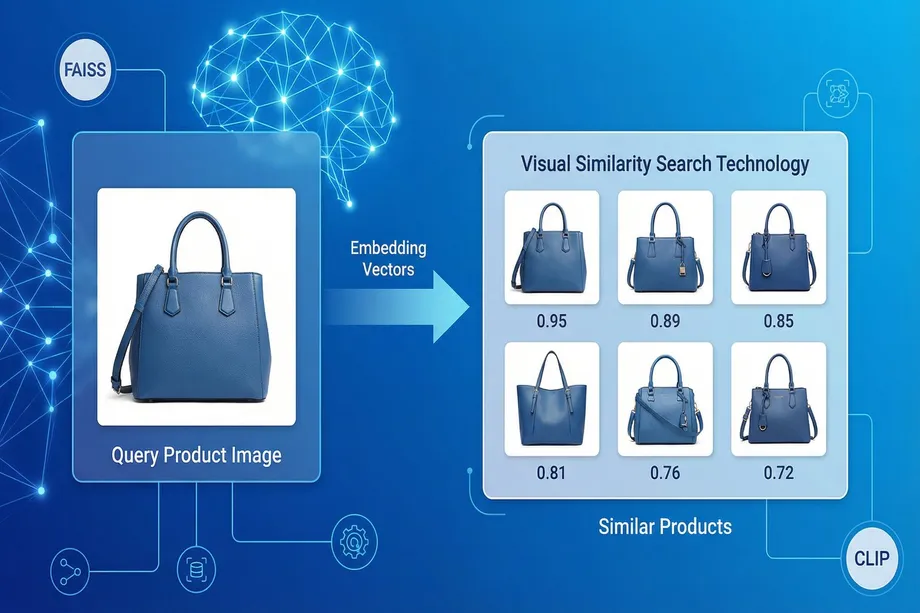
The technology behind this magic is numerical vector representations called embeddings. Advanced deep learning models create a dense vector (e.g., a 512-dimensional array of numbers) that captures the semantic essence of an image or text. Vectors of similar products are closer together in this multi-dimensional space.
Bridging Text and Images with OpenAI CLIP
One of the revolutionary models in this field is CLIP (Contrastive Language-Image Pre-training), developed by OpenAI. CLIP has the ability to represent images and text in the same semantic space. This means we can not only find other images similar to a given image, but also find the most relevant images for a text description (e.g., "blue t-shirt without a collar"). This is a game-changer for visual search in e-commerce.
Efficient Search with FAISS
To instantly find the nearest neighbors (i.e., the most similar products) among thousands or millions of product vectors, an optimized library like FAISS (Facebook AI Similarity Search), developed by Meta AI, is used. FAISS creates an efficient index for these high-dimensional vectors and performs searches within milliseconds.
The Ultralytics library brings CLIP and FAISS together, simplifying this process to just a few lines of code:
from ultralytics.solutions import VisualAISearch
from PIL import Image
# Initialize visual search engine with your product images
# This creates CLIP embeddings and a FAISS index for all images
searcher = VisualAISearch(
data="path/to/your/product_images",
device="cpu" # or "cuda" if GPU available
)
# 1. Text-to-Image Search
text_results = searcher("red summer dress with flowers")
print("Top matches:")
for result in text_results:
print(result) # (similarity_score, image_path)
# 2. Image-to-Image Search
query_img = Image.open("query_image.jpg")
image_results = searcher(image=query_img)
This technology enables customers to shop based on inspiration from an Instagram photo or a street style they saw. For sellers, it means their products can be discovered by potential buyers who might not have found them through traditional keyword search. The combination of computer vision in e-commerce and visual search is transforming how people discover and purchase products online.
Step 6: Building a Scalable Bulk Image Processing Pipeline
All the techniques we have covered so far (data collection, quality control, classification, OCR, similarity search) offer powerful analyses on individual images. However, in the real world, e-commerce platforms managing tens of thousands or even millions of products need these analyses to be automated in a scalable manner. This is where a large-scale processing pipeline comes in.
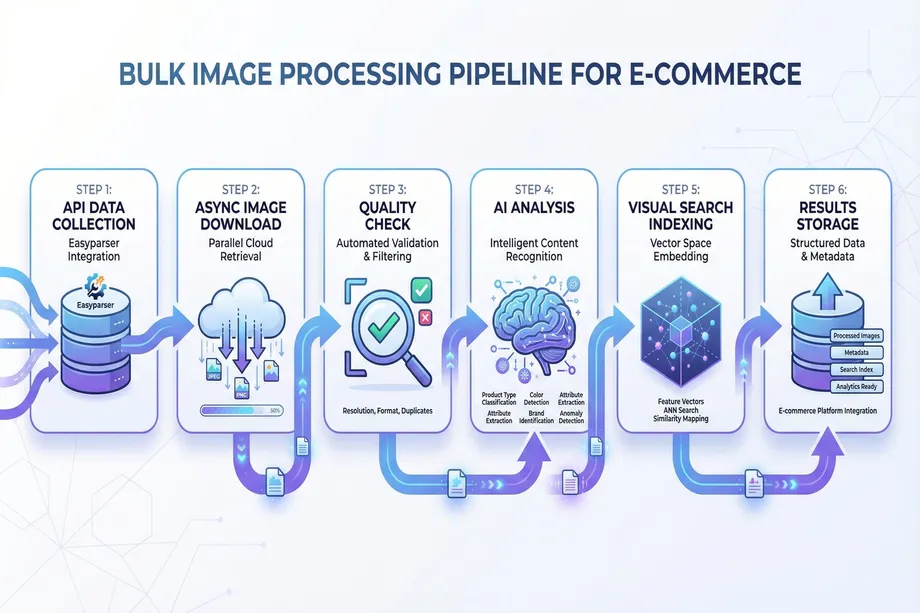
An ideal pipeline should efficiently manage the following steps:
- Data Collection: Regularly fetches the list of new or updated products and their image URLs from a source like the Easyparser API. A practical approach is discovering candidates with Search Listing before processing each ASIN.
- Image Download: Downloads thousands of images concurrently using libraries like
asyncioandaiohttpto avoid wasting time waiting for network I/O operations. - Preprocessing and Quality Control: Performs automated image quality assessment (blur, resolution, background) with opencv python for each downloaded image. Reports images that fail to meet standards.
- Parallel Analysis: Uses Python's
multiprocessingmodule to run CPU-intensive computer vision analyses (classification, object detection) in parallel across multiple CPU cores. - Cloud API Calls: Sends batch requests to APIs like Google Vision or AWS Rekognition for images that require it (e.g., those suspected of containing text).
- Embedding and Indexing: Generates CLIP embeddings from all valid images for visual search and adds them to a FAISS index.
- Results Storage: Writes all structured data obtained for each image (category, quality score, extracted text, detected objects, etc.) to a database or search engine (e.g., Elasticsearch).
Example Pipeline Architecture
import asyncio
import aiohttp
import os
from multiprocessing import Pool
# (Functions defined in previous steps: assess_image_quality, classify_product_image, etc.)
async def download_image(session, url, path):
async with session.get(url) as resp:
content = await resp.read()
with open(path, "wb") as f:
f.write(content)
async def bulk_download(image_urls, output_dir):
async with aiohttp.ClientSession() as session:
tasks = [download_image(session, url, f"{output_dir}/{i}.jpg")
for i, url in enumerate(image_urls)]
await asyncio.gather(*tasks)
def process_single_image(image_path):
# Worker function that runs all analysis steps for a single image
quality = assess_image_quality(image_path)
if quality.get("is_blurry") or not quality.get("meets_min_resolution"):
return {"path": image_path, "status": "rejected"}
return {"path": image_path, "status": "processed", "quality": quality}
async def main_pipeline(asins):
# Step 1-2: Collect data and download images concurrently
all_urls = []
for asin in asins:
all_urls.extend(get_product_images(asin))
await bulk_download(all_urls, "downloaded_images")
# Step 3-4: Parallel analysis with multiprocessing
paths = [f"downloaded_images/{i}.jpg" for i in range(len(all_urls))]
with Pool(processes=os.cpu_count()) as pool:
results = pool.map(process_single_image, paths)
print(f"Processed {len(results)} images.")
This architecture fully leverages modern Python's concurrency and parallelism capabilities to efficiently process tens of thousands of images. This automation eliminates manual effort, reduces human error, and puts your e-commerce operations on an intelligent, data-driven foundation.
Conclusion: A Data-Driven Future in E-commerce
In this tutorial, we have seen how powerful and versatile computer vision is as a tool for analyzing Amazon product images. We covered the entire process from collecting product data with the Easyparser API, performing quality control with OpenCV, classifying and detecting products with TensorFlow and PyTorch, reading text and logos with Cloud Vision APIs, and finally building intelligent visual search engines with CLIP and FAISS.
These technologies are no longer niche tools accessible only to big tech giants. Thanks to the rich library ecosystem in Python and the flexibility of cloud computing, e-commerce businesses of all sizes can integrate these capabilities into their operations. Applications like automated image quality assessment, intelligent catalog management, and personalized product discovery not only reduce costs but also directly impact revenue by increasing customer satisfaction and loyalty.
AI-powered ai image analysis will continue to become a standard practice in the future of e-commerce. Sellers and brands that adopt these technologies will build a more efficient, smarter, and more customer-centric business model, staying one step ahead of the competition. The tools are ready, the libraries are mature, and the time to start building your own computer vision in e-commerce pipeline is now.
Start analyzing Amazon data for free
Start Your Free Trial100 free credits, no credit card required.