Amazon Seller Profile API
Programmatically reveal legal identity and business addresses through features that function like the amazon seller rating data api to access comprehensive metrics across all marketplaces.


• Monthly 100 free credit!
All features No credit card
Master Seller Data with Ease
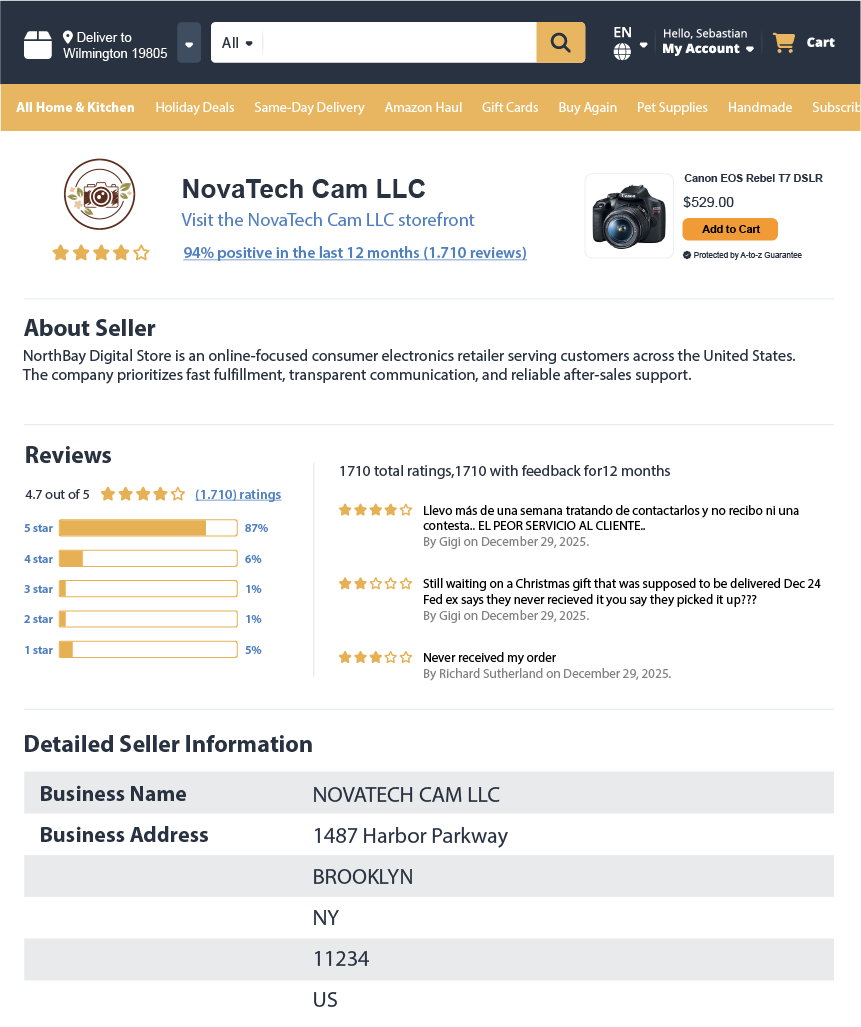
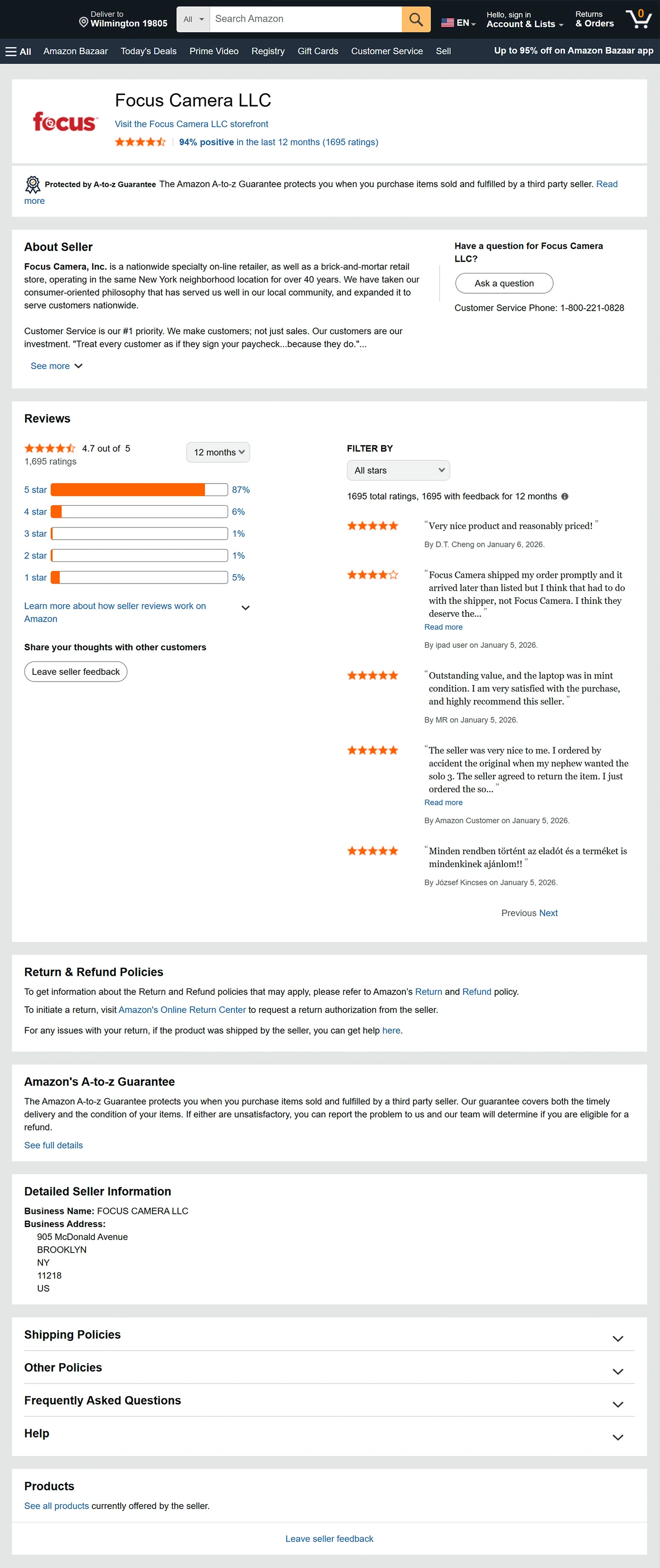
Stop relying on fragile amazon storefront scraper setups. With Easyparser, you can programmatically extract the hidden legal identity and access structured performance data using the amazon seller profile api. This amazon seller lookup tool is essential for verifying "Business Name" and "Business Address" details that are often hidden from plain view.
Built for automation and amazon brand protection tools, this service delivers a clean dataset for amazon competitor seller analysis, including:
- Legal Identity Discovery including Business Name and physical address
- Feedback Trend Analysis covering Positive, Neutral, and Negative percentages
- Granular history broken down by 30 days, 90 days, 12 months, and Lifetime
- Detailed feedback logs including latest reviews and suppressed (strikethrough) comments
- Direct Seller Communication channels via "Ask a Question" and Storefront links
- And More Fields...
No credit card  100 credit free Real-time or Bulk

Amazon Seller Profile API How-to
How to start tracking amazon seller legal identity?
- 1 Create your account
Create an account to receive 100 free monthly credits and test our high-performance amazon seller profile api.
- 2 Get your API token
Retrieve your auto-generated token from the Plan page to securely access the amazon seller lookup service.
- 3 Choose an endpoint
Get clean JSON instantly using the amazon seller business address API to retrieve real-time legal names and ratings. Choose an endpoint now.
The examples on the right show a sample request payload and response.
⚡No IP blocks, no CAPTCHAs to manage, fast real-time amazon seller profile api!
curl -X GET \
"https://realtime.easyparser.com/v1/request" \
-G \
-d api_key=YOUR_API_KEY \
-d platform=AMZ \
-d operation=SELLER_PROFILE \
-d domain=.com \
-d seller_id=AXCB29L39I26U
import requests
import json
# set up the request parameters
params = {
"api_key": "YOUR_API_KEY",
"platform": "AMZ",
"operation": "SELLER_PROFILE",
"domain": ".com",
"seller_id": "AXCB29L39I26U"
}
# make the http GET request to Easyparser API
api_result = requests.get("https://realtime.easyparser.com/v1/request", params=params)
# print the JSON response from Easyparser API
print(json.dumps(api_result.json()))
const axios = require('axios');
// set up the request parameters
const params = {
api_key: 'YOUR_API_KEY',
platform: 'AMZ',
operation: 'SELLER_PROFILE',
domain: '.com',
seller_id: 'AXCB29L39I26U'
};
// make the http GET request to Easyparser API
axios.get('https://realtime.easyparser.com/v1/request', { params })
.then(response => console.log(response.data));
<?php
// set up the request parameters
$params = array(
'api_key' => 'YOUR_API_KEY',
'platform' => 'AMZ',
'operation' => 'SELLER_PROFILE',
'domain' => '.com',
'seller_id' => 'AXCB29L39I26U'
);
// make the http GET request to Easyparser API
$url = 'https://realtime.easyparser.com/v1/request?' . http_build_query($params);
$response = file_get_contents($url);
echo $response;
?>
package main
import (
"fmt"
"io"
"net/http"
"net/url"
)
func main() {
// set up the request parameters
params := url.Values{}
params.Add("api_key", "YOUR_API_KEY")
params.Add("platform", "AMZ")
params.Add("operation", "SELLER_PROFILE")
params.Add("domain", ".com")
params.Add("seller_id", "AXCB29L39I26U")
requestUrl := "https://realtime.easyparser.com/v1/request?" + params.Encode()
// make the request to Easyparser API
resp, _ := http.Get(requestUrl)
defer resp.Body.Close()
body, _ := io.ReadAll(resp.Body)
fmt.Println(string(body))
}
using System;
using System.Net.Http;
using System.Threading.Tasks;
using System.Collections.Generic;
class Program
{
static async Task Main(string[] args)
{
// set up the request parameters
var client = new HttpClient();
var query = new Dictionary<string, string> {
{ "api_key", "YOUR_API_KEY" },
{ "platform", "AMZ" },
{ "operation", "SELLER_PROFILE" },
{ "domain", ".com" },
{ "seller_id", "AXCB29L39I26U" }
};
var queryString = await new FormUrlEncodedContent(query).ReadAsStringAsync();
var url = "https://realtime.easyparser.com/v1/request?" + queryString;
// make the request to Easyparser API
var response = await client.GetStringAsync(url);
Console.WriteLine(response);
}
}
import java.net.URI;
import java.net.http.HttpClient;
import java.net.http.HttpRequest;
import java.net.http.HttpResponse;
import java.net.URLEncoder;
import java.nio.charset.StandardCharsets;
import java.util.Map;
import java.util.LinkedHashMap;
public class EasyparserExample {
public static void main(String[] args) {
// set up the request parameters
HttpClient client = HttpClient.newHttpClient();
Map<String, String> params = new LinkedHashMap<>();
params.put("api_key", "YOUR_API_KEY");
params.put("platform", "AMZ");
params.put("operation", "SELLER_PROFILE");
params.put("domain", ".com");
params.put("seller_id", "AXCB29L39I26U");
StringBuilder sb = new StringBuilder();
for (Map.Entry<String, String> entry : params.entrySet()) {
if (sb.length() > 0) sb.append("&");
sb.append(URLEncoder.encode(entry.getKey(), StandardCharsets.UTF_8))
.append("=")
.append(URLEncoder.encode(entry.getValue(), StandardCharsets.UTF_8));
}
String url = "https://realtime.easyparser.com/v1/request?" + sb.toString();
// make the request to Easyparser API
HttpRequest request = HttpRequest.newBuilder().uri(URI.create(url)).build();
HttpResponse<String> response = client.send(request, HttpResponse.BodyHandlers.ofString());
System.out.println(response.body());
}
}

Key API Features
9 Use Cases for the Amazon Seller Profile API
Turn real-time data into automated workflows for brand protection and monitoring.
Reveal amazon seller legal name & Brand Protection
Use the system to unmask the legal entities behind unauthorized listings. Identify their physical location to take direct action.
Find amazon seller business address for Legal Enforcement
Retrieve the accurate business address required to issue official legal notices and protect your IP.
Check amazon seller feedback history & Benchmarking
Compare your feedback velocity and rating trends with your top rivals to understand your market standing.
Fulfillment Strategy Analysis (FBA vs. FBM)
Analyze the feedback array to see if a seller frequently has reviews struck through by Amazon.
Supplier Due Diligence for Wholesale
Verify the reliability and legal standing of a potential supplier by auditing their 12-month negative feedback ratio and legal registration.
Marketplace M&A and Investor Due Diligence
Perform deep due diligence on a seller's reputation and customer service history before making an acquisition or investment.
Online Arbitrage Risk Assessment
Check the 90-day and lifetime feedback trends of a competitor to ensure they are a high-performing entity.
Building Seller Intelligence SaaS Tools
Use the API for developers to build Chrome extensions that display seller legitimacy data directly.
MAP (Minimum Advertised Price) Monitoring
Identify the real identity of sellers violating MAP policies, making it easier to enforce pricing agreements across different storefronts.
Start free trial. No credit card required.
Frequently Asked Questions
Quick answers about legal identity discovery and integration.
Yes. The API extracts the official amazon seller legal identity (Business Address and Name) as registered on Amazon's legal records.
Absolutely. You can retrieve amazon seller lookup data for any marketplace, including US, UK, Germany, Japan, and more.
You only need to provide the seller_id (e.g., AXCB29L39I26U) or the full Amazon storefront URL.
Yes. We provide a real-time amazon seller profile api, ensuring you get the most current feedback counts available.
Yes. Our API retrieves strikethrough feedback comments, typically where Amazon takes responsibility for fulfillment.
By providing a verified legal identity, you can submit more accurate "Report a Violation" forms with concrete business data.
You can audit individual sellers in real-time or use our bulk integration to identify thousands of legal entities asynchronously at scale.
Yes. Unlike a fragile amazon search scraper, our API manages rotating proxies and CAPTCHAs automatically to guarantee 99.9% uptime.
Reveal legal names, addresses, and performance metrics using real-time Amazon seller data.