Amazon Best Sellers Rank API
Monitor category sales performance with our Amazon real-time BSR API. Access accurate Best Sellers Rank, category context, and review metrics for any ASIN programmatically.


• Monthly 100 free credit!
All features No credit card
Real-Time Category Sales Rank and BSR Insights
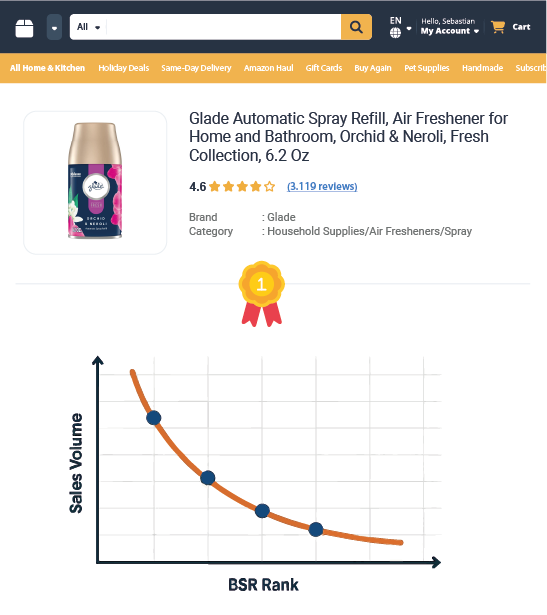
The Amazon BSR API operation provides a granular view of a product's category sales position within Amazon. By retrieving structured Amazon BSR JSON data containing exact Best Sellers Rank, category context, and review velocity, developers can build tools to monitor category momentum and competitor performance without maintaining complex scrapers.
- Real-time Amazon Best Sellers Rank by ASIN to monitor category sales position
- Specific context_name and sub_category_id to understand niche performance
- Customer rating_value and reviews to correlate sentiment with ranking
- Live price, currency, and brand_name to analyze price-elasticity
- Direct links to image_url and thumb_url for visual dashboard integration
- And More Fields...
No credit card  100 credit free Real-time or Bulk

Amazon BSR API How-to
How to Get Started with the Best Sellers Rank API Operation
- 1 Create Your Account
Sign up today to receive free monthly credits and start tracking Amazon Best Sellers Rank by ASIN instantly.
- 2 Retrieve Your API Token
Get your secure, auto-generated API token from your Plan Page to authorize your requests.
- 3 Query the Endpoint
Send an ASIN-based request using the BEST_SELLERS_RANK type. This is the most direct way to track Amazon Best Sellers Rank and category sales rank by ASIN, delivering clean, structured JSON data in seconds. Choose an endpoint now.
Monitor BSR changes, analyze category performance, and track category sales rank shifts without scraping or manual checks.
The examples on the right show a sample request payload and response.
⚡ No IP blocks, no CAPTCHAs just fast, reliable Amazon BSR data.
curl -X GET \
"https://realtime.easyparser.com/v1/request" \
-G \
-d api_key=YOUR_API_KEY \
-d platform=AMZ \
-d operation=BEST_SELLERS_RANK \
-d domain=.com \
-d asin=B0CPTCQJFZ
import requests
import json
# set up the request parameters
params = {
"api_key": "YOUR_API_KEY",
"platform": "AMZ",
"operation": "BEST_SELLERS_RANK",
"domain": ".com",
"asin": "B0CPTCQJFZ"
}
# make the http GET request to Easyparser API
api_result = requests.get("https://realtime.easyparser.com/v1/request", params=params)
# print the JSON response from Easyparser API
print(json.dumps(api_result.json()))
const axios = require('axios');
// set up the request parameters
const params = {
api_key: 'YOUR_API_KEY',
platform: 'AMZ',
operation: 'BEST_SELLERS_RANK',
domain: '.com',
asin: 'B0CPTCQJFZ'
};
// make the http GET request to Easyparser API
axios.get('https://realtime.easyparser.com/v1/request', { params })
.then(response => console.log(response.data));
<?php
// set up the request parameters
$params = array(
'api_key' => 'YOUR_API_KEY',
'platform' => 'AMZ',
'operation' => 'BEST_SELLERS_RANK',
'domain' => '.com',
'asin' => 'B0CPTCQJFZ'
);
// make the http GET request to Easyparser API
$url = 'https://realtime.easyparser.com/v1/request?' . http_build_query($params);
$response = file_get_contents($url);
echo $response;
?>
package main
import (
"fmt"
"io"
"net/http"
"net/url"
)
func main() {
// set up the request parameters
params := url.Values{}
params.Add("api_key", "YOUR_API_KEY")
params.Add("platform", "AMZ")
params.Add("operation", "BEST_SELLERS_RANK")
params.Add("domain", ".com")
params.Add("asin", "B0CPTCQJFZ")
requestUrl := "https://realtime.easyparser.com/v1/request?" + params.Encode()
// make the request to Easyparser API
resp, _ := http.Get(requestUrl)
defer resp.Body.Close()
body, _ := io.ReadAll(resp.Body)
fmt.Println(string(body))
}
using System;
using System.Net.Http;
using System.Threading.Tasks;
using System.Collections.Generic;
class Program
{
static async Task Main(string[] args)
{
// set up the request parameters
var client = new HttpClient();
var query = new Dictionary<string, string> {
{ "api_key", "YOUR_API_KEY" },
{ "platform", "AMZ" },
{ "operation", "BEST_SELLERS_RANK" },
{ "domain", ".com" },
{ "asin", "B0CPTCQJFZ" }
};
var queryString = await new FormUrlEncodedContent(query).ReadAsStringAsync();
var url = "https://realtime.easyparser.com/v1/request?" + queryString;
// make the request to Easyparser API
var response = await client.GetStringAsync(url);
Console.WriteLine(response);
}
}
import java.net.URI;
import java.net.http.HttpClient;
import java.net.http.HttpRequest;
import java.net.http.HttpResponse;
import java.net.URLEncoder;
import java.nio.charset.StandardCharsets;
import java.util.Map;
import java.util.LinkedHashMap;
public class EasyparserExample {
public static void main(String[] args) {
// set up the request parameters
HttpClient client = HttpClient.newHttpClient();
Map<String, String> params = new LinkedHashMap<>();
params.put("api_key", "YOUR_API_KEY");
params.put("platform", "AMZ");
params.put("operation", "BEST_SELLERS_RANK");
params.put("domain", ".com");
params.put("asin", "B0CPTCQJFZ");
StringBuilder sb = new StringBuilder();
for (Map.Entry<String, String> entry : params.entrySet()) {
if (sb.length() > 0) sb.append("&");
sb.append(URLEncoder.encode(entry.getKey(), StandardCharsets.UTF_8))
.append("=")
.append(URLEncoder.encode(entry.getValue(), StandardCharsets.UTF_8));
}
String url = "https://realtime.easyparser.com/v1/request?" + sb.toString();
// make the request to Easyparser API
HttpRequest request = HttpRequest.newBuilder().uri(URI.create(url)).build();
HttpResponse<String> response = client.send(request, HttpResponse.BodyHandlers.ofString());
System.out.println(response.body());
}
}


Glade Automatic Spray Refill, Air Freshener for Home and Bathroom, Orchid & Ner...
Key API Features
Strategic Use Cases for the Amazon BSR API
Turn raw BSR and category sales rank data into actionable insights for trend spotting, competitor analysis, and automated repricing strategies.
Trend Spotting & Niche Discovery
Monitor BSR movements across categories to identify rapidly rising products before market saturation. Detect category momentum in real time.
Competitor Health Monitoring
Track competitor BSR daily. A sudden improvement in sales rank can signal a successful campaign or price reduction that requires an immediate strategic response.
Price-to-Rank Correlation
Analyze how changes in price directly impact the best_sellers rank. Find the "sweet spot" where profit margin and Amazon sales velocity are perfectly balanced.
Review Velocity Analysis
Correlate reviews.total_count growth with BSR improvements. Distinguish between steady category momentum and aggressive rebate-driven campaigns.
Category Benchmarking
Functioning effectively as an Amazon category rank API, this tool allows you to use sub_category_id and context_name to compare products within their specific niche rather than the broad marketplace, ensuring apples-to-apples comparison.
Inventory Planning Signals
Use BSR trends as a proxy for sales velocity. If a product's rank improves consistently, trigger inventory alerts to prevent stockouts.
Algorithmic Ad Spend Optimization
Adjust PPC bids dynamically based on BSR and category momentum. If a product hits target BSR thresholds, automatically reduce ad spend to maximize profitability and ROAS.
Seasonal Demand Forecasting
Map BSR volatility against calendar events. Identify specific sub-categories that spike during holidays or seasons to time your inventory and marketing pushes accurately.
Brand Share-of-Voice Analysis
Aggregate BSR data by brand_name within specific categories. Identify which brands are capturing the most visibility and dominating the top 100 slots programmatically.
Start free trial. No credit card required.
Frequently Asked Questions about the Amazon BSR API
Quick answers regarding ranking accuracy, category contexts, and interpreting performance signals efficiently.
The API provides real-time data. When you make a request to our Amazon real time BSR API, we fetch the live BSR, price, and review count directly from the Amazon marketplace at that exact moment.
The Amazon BSR API is designed to track rank trends and visibility. If you need concrete sales data, such as "bought in past month" metrics or historical purchase estimates, please refer to our Sales Analysis API.
This operation performs as a precise Amazon BSR by ASIN API, focusing on the specific ASIN provided to track its Best Sellers Rank. To retrieve a full list of variation ASINs (sizes, colors) for a parent product, we recommend using the Product Detail API.
The BSR API returns the current Buy Box price. To access a comprehensive list of all sellers, competitive pricing offers, and inventory levels for a product, you should utilize the Product Offer API.
The Best Sellers Rank API focuses on the product's primary BSR within the main context_name and provides the sub_category_id for reference. If you need keyword-based organic and sponsored search positions instead, use the Amazon Search Results API.
If a product currently has no Best Sellers Rank (due to being new or having no recent sales), the API will still return available Amazon BSR JSON data. The bestseller object will be returned with a rank of 0 and empty strings for the context fields, allowing your application to handle these cases without errors.
Yes, we scrape the displayed total_count and rating_value alongside the rank. This allows you to correlate social proof updates directly with ranking changes.
Yes. By changing the domain parameter, you can retrieve BSR data for products in the US, UK, DE, JP, and other supported Amazon regions.
Analyze Amazon Best Sellers Rank, category sales trends, and review dynamics with one powerful API request.