Amazon Package Dimensions API
Optimize shipping costs and audit FBA fees using amazon package dimensions api, product weight, and verified shipping dimensions.


• Monthly 100 free credit!
All features No credit card
Data-Driven Logistics and Dimension Insights
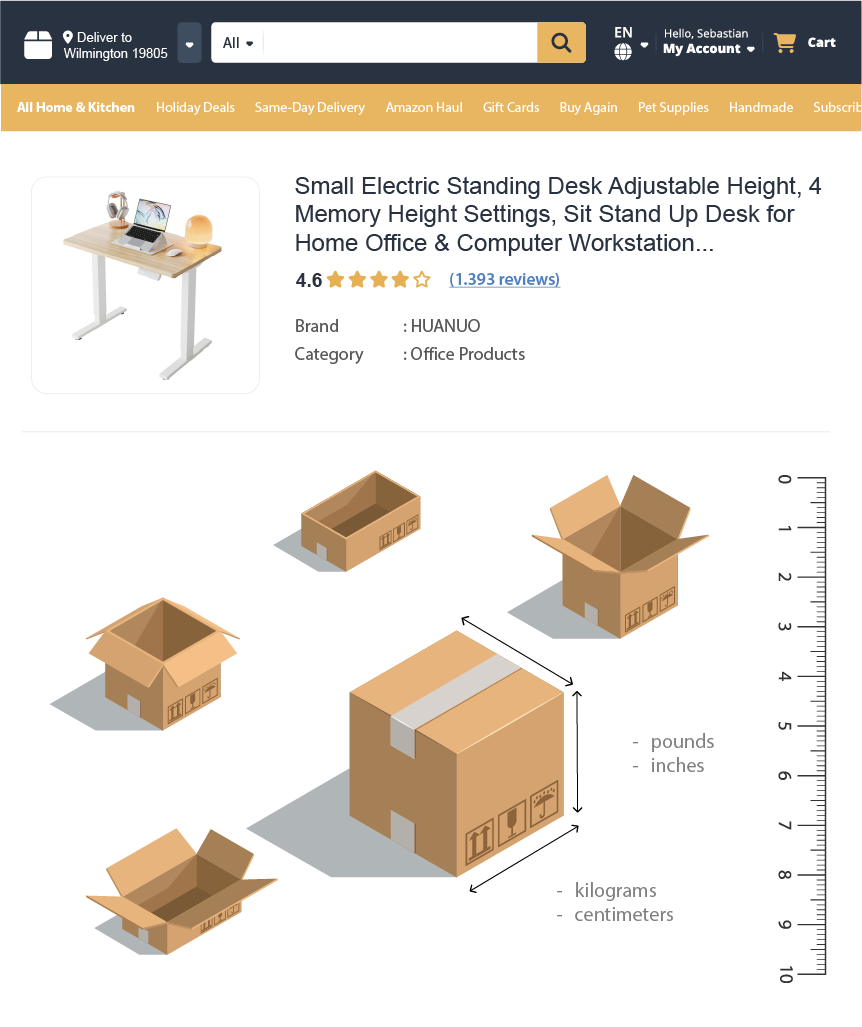
The Dimension operation is a high-performance service designed to pull amazon product dimension specifications and amazon shipping dimensions data directly from Amazon.
By retrieving structured JSON outputs from this endpoint, you can stop guessing about shipping costs and start optimizing margins using reliable FBA Fee Calculator Data inputs. When available, product.dimensions reflects the item's own in-use or assembled size, while package.dimensions represents the boxed shipping size Amazon uses operationally.
- Accurate amazon shipping dimensions data including height, width, and length used for fulfillment calculations.
- Exact package weight values required for dimensional weight and shipping cost analysis.
- Distinction between
package.dimensionsfor shipping andproduct.dimensionsfor the item's actual size in use. - Packaged size and box-level measurements used by Amazon logistics systems.
- Retrieval of price, brand, and high-quality image for logistics-aware cataloging.
- And More Fields...
No credit card  100 credit free Real-time or Bulk

Amazon Dimension API How-to
How to Get Started with the Amazon Dimension API
- 1 Create Your Account
Sign up today to receive 100 free monthly credits and test the dimension data instantly.
- 2 Retrieve Your API Token
Get your secure, auto-generated API token from your Plan page to authorize requests.
- 3 Query the Endpoint
Send an ASIN-based request and receive amazon package dimensions, amazon package weight, and shipping-ready data in structured JSON within seconds. Choose an endpoint now.
Perform detailed amazon logistics research, validate FBA Fee Calculator Data, and access verified shipping size and weight metrics easily.
The examples on the right show a sample request payload and response.
⚡ No IP blocks, no CAPTCHAs, fast, reliable Amazon logistics data responses
curl -X GET \
"https://realtime.easyparser.com/v1/request" \
-G \
-d api_key=YOUR_API_KEY \
-d platform=AMZ \
-d operation=PACKAGE_DIMENSION \
-d domain=.com \
-d asin=B0F9X3FDYY
import requests
import json
# set up the request parameters
params = {
"api_key": "YOUR_API_KEY",
"platform": "AMZ",
"operation": "PACKAGE_DIMENSION",
"domain": ".com",
"asin": "B0F9X3FDYY"
}
# make the http GET request to Easyparser API
api_result = requests.get("https://realtime.easyparser.com/v1/request", params=params)
# print the JSON response from Easyparser API
print(json.dumps(api_result.json()))
const axios = require('axios');
// set up the request parameters
const params = {
api_key: 'YOUR_API_KEY',
platform: 'AMZ',
operation: 'PACKAGE_DIMENSION',
domain: '.com',
asin: 'B0F9X3FDYY'
};
// make the http GET request to Easyparser API
axios.get('https://realtime.easyparser.com/v1/request', { params })
.then(response => console.log(response.data));
<?php
// set up the request parameters
$params = array(
'api_key' => 'YOUR_API_KEY',
'platform' => 'AMZ',
'operation' => 'PACKAGE_DIMENSION',
'domain' => '.com',
'asin' => 'B0F9X3FDYY'
);
// make the http GET request to Easyparser API
$url = 'https://realtime.easyparser.com/v1/request?' . http_build_query($params);
$response = file_get_contents($url);
echo $response;
?>
package main
import (
"fmt"
"io"
"net/http"
"net/url"
)
func main() {
// set up the request parameters
params := url.Values{}
params.Add("api_key", "YOUR_API_KEY")
params.Add("platform", "AMZ")
params.Add("operation", "PACKAGE_DIMENSION")
params.Add("domain", ".com")
params.Add("asin", "B0F9X3FDYY")
requestUrl := "https://realtime.easyparser.com/v1/request?" + params.Encode()
// make the request to Easyparser API
resp, _ := http.Get(requestUrl)
defer resp.Body.Close()
body, _ := io.ReadAll(resp.Body)
fmt.Println(string(body))
}
using System;
using System.Net.Http;
using System.Threading.Tasks;
using System.Collections.Generic;
class Program
{
static async Task Main(string[] args)
{
// set up the request parameters
var client = new HttpClient();
var query = new Dictionary<string, string> {
{ "api_key", "YOUR_API_KEY" },
{ "platform", "AMZ" },
{ "operation", "PACKAGE_DIMENSION" },
{ "domain", ".com" },
{ "asin", "B0F9X3FDYY" }
};
var queryString = await new FormUrlEncodedContent(query).ReadAsStringAsync();
var url = "https://realtime.easyparser.com/v1/request?" + queryString;
// make the request to Easyparser API
var response = await client.GetStringAsync(url);
Console.WriteLine(response);
}
}
import java.net.URI;
import java.net.http.HttpClient;
import java.net.http.HttpRequest;
import java.net.http.HttpResponse;
import java.net.URLEncoder;
import java.nio.charset.StandardCharsets;
import java.util.Map;
import java.util.LinkedHashMap;
public class EasyparserExample {
public static void main(String[] args) {
// set up the request parameters
HttpClient client = HttpClient.newHttpClient();
Map<String, String> params = new LinkedHashMap<>();
params.put("api_key", "YOUR_API_KEY");
params.put("platform", "AMZ");
params.put("operation", "PACKAGE_DIMENSION");
params.put("domain", ".com");
params.put("asin", "B0F9X3FDYY");
StringBuilder sb = new StringBuilder();
for (Map.Entry<String, String> entry : params.entrySet()) {
if (sb.length() > 0) sb.append("&");
sb.append(URLEncoder.encode(entry.getKey(), StandardCharsets.UTF_8))
.append("=")
.append(URLEncoder.encode(entry.getValue(), StandardCharsets.UTF_8));
}
String url = "https://realtime.easyparser.com/v1/request?" + sb.toString();
// make the request to Easyparser API
HttpRequest request = HttpRequest.newBuilder().uri(URI.create(url)).build();
HttpResponse<String> response = client.send(request, HttpResponse.BodyHandlers.ofString());
System.out.println(response.body());
}
}


Small Electric Standing Desk Adjustable Height, 4 Memory Heig...
Key API Features
Strategic Use Cases for the Amazon Package Dimensions API
Turn real-time amazon shipping dimensions data into automated workflows for FBA auditing, logistics planning, and competitive packaging analysis.
FBA Fee Auditing & Recovery
Detect incorrectly measured listings by validating amazon package dimensions and amazon package weight, helping recover lost margin.
Shipping Cost Optimization
Compare volumetric weight with actual weight to identify packaging improvements that reduce fulfillment and shipping costs.
Logistics & Supply Chain Planning
Use size and weight specifications to calculate container utilization, inbound shipment efficiency, and warehouse space planning.
Competitor Packaging Benchmarking
Analyze competitor listings to identify packaging efficiency advantages based on amazon box dimensions.
Listing Content Verification
Cross-check listing specifications against amazon product dimension specifications to reduce returns caused by inaccurate size data.
Inventory Cost Control
Identify oversized or heavy items early to avoid unexpected long-term storage and fulfillment fees.
New Product Viability Assessment
Evaluate shipping size and weight before sourcing to avoid launching products with structurally unprofitable logistics costs.
Inbound Shipment Optimization
Plan cartonization and pallet layouts using reliable dimension data to reduce inbound FBA shipping expenses.
Portfolio-Level Margin Analysis
Run bulk dimension analysis across multiple ASINs to identify margin leaks caused by size-tier misclassification.
Start free trial. No credit card required.
Frequently Asked Questions about the Amazon Package Dimensions API
Quick answers about the Amazon Package Dimensions API, including shipping dimensions, package weight accuracy, data freshness, and common logistics integration scenarios.
package.dimensions shows the boxed shipping size used in logistics and FBA calculations. When available, product.dimensions shows the item's own size in use or assembled form, which may be very different from the carton size.
Yes. Dimension and weight data reflect the most current shipping metadata available at query time.
The service is marketplace-aware. US marketplaces return inches and pounds, while EU marketplaces return centimeters and kilograms.
By using amazon package dimensions, amazon package weight, and shipping dimensions vs. product dimensions, you can generate reliable FBA Fee Calculator Data programmatically.
Yes. Depending on the listing, the response can include main_image, media, and thumb_image objects, along with fields such as brand, title, link, fee_category, and gl.
Yes. Query multiple ASINs to benchmark amazon box dimensions and overall package efficiency.
Absolutely. The system supports high-volume requests for large-scale logistics research and automation.
Yes. Dimension and weight insights help predict storage and fulfillment costs before inventory arrives at Amazon warehouses.
Audit package dimensions, weight, and fulfillment costs in one request.