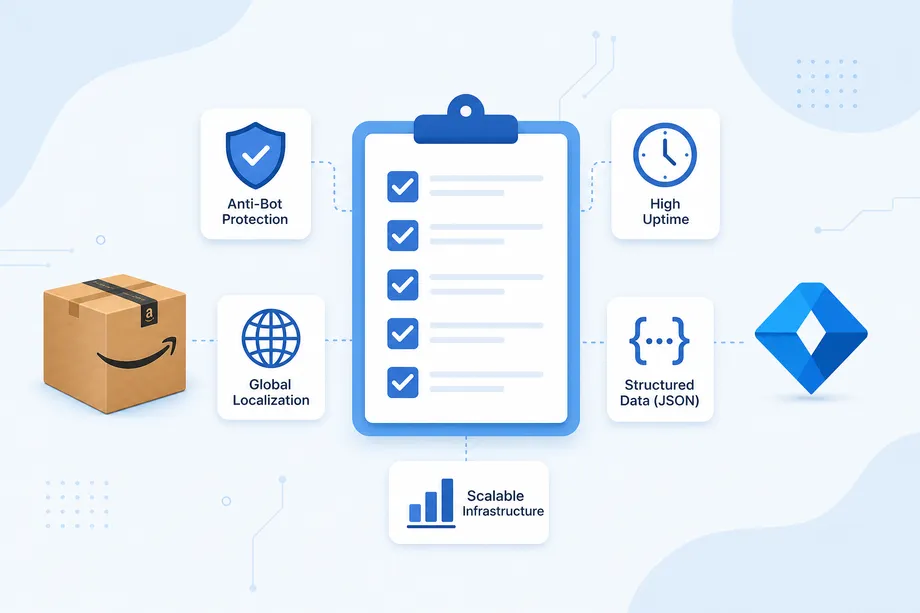
In the hyper-competitive world of e-commerce and data-driven applications, speed is not just a feature-it's a fundamental requirement. A slow API can lead to frustrated users, increased infrastructure costs, and missed business opportunities. This guide provides a comprehensive look into api performance optimization, exploring the strategies that can transform your API from a sluggish bottleneck into a high-speed, reliable service. We will cover everything from multi-layer caching and database tuning to advanced patterns like request batching, all crucial for effective api performance optimization.
The Critical Role of Multi-Layer Caching in API Performance Optimization
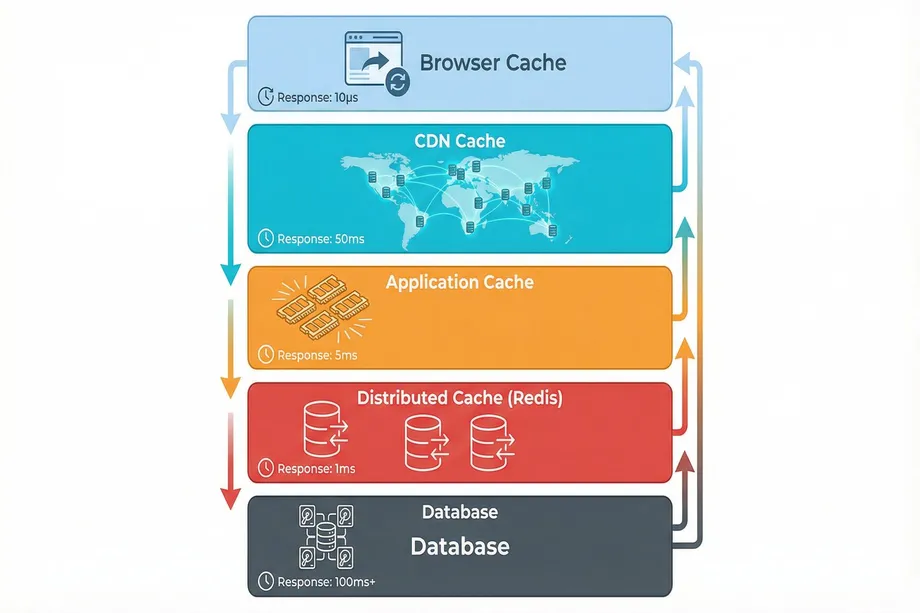
The fastest API call is the one you never have to make. The second fastest is the one that hits a cache. Caching is the cornerstone of api performance optimization, acting as a high-speed data buffer that dramatically reduces the load on your primary database. A well-implemented caching strategy can decrease database load by over 90% and cut response times from seconds to milliseconds. Modern systems employ a multi-tier architecture for this.
| Cache Layer | Location | Typical TTL | Use Case |
|---|---|---|---|
| Browser Cache | Client-Side | Minutes to Days | Static assets (CSS, JS), user-specific data |
| CDN Cache | Edge Servers | Hours to Days | Public images, static API responses |
| Application Cache | In-Memory | Seconds to Minutes | Frequently accessed data ('hot data') |
| Distributed Cache | Redis, Memcached | Minutes to Hours | Session data, shared state, rate limiting |
Advanced Caching Patterns
Beyond simple key-value storage, several patterns govern how your application interacts with the cache. The Cache-Aside pattern, also known as Lazy Loading, is the most common approach. The application first checks the cache. If the data is missing (a cache miss), it retrieves it from the database and then writes it to the cache for future requests. This is simple and ensures only requested data is cached, preventing memory waste.
Write-Through caching takes a different approach. Data is written to both the cache and the database simultaneously. This guarantees cache consistency but adds latency to write operations. It's ideal for scenarios where data consistency is more important than write speed.
The Stale-While-Revalidate pattern offers a perfect balance between speed and freshness. When data is requested, the cached (potentially stale) version is returned immediately. Simultaneously, a background process is triggered to fetch the fresh data and update the cache. The user gets an instant response, and subsequent requests receive the updated data. This is a key technique for superior api performance optimization, especially for high-traffic applications where every millisecond counts.
Database Tuning: The Unseen Bottleneck
Often, the biggest source of API latency lies hidden in the database. A single unoptimized query can bring your application to a crawl. Database optimization is a critical component of api performance optimization that many developers overlook until it becomes a problem.
Solving the N+1 Query Problem
The N+1 problem is a classic performance killer. It occurs when an application makes one initial query to fetch a list of items and then makes N subsequent queries to fetch related data for each item. For example, if you fetch 100 orders and then query for the items in each order separately, you end up with 101 database queries instead of one. This can be solved by using a single, more complex query with JOINs to fetch all required data in one trip, reducing database round trips from hundreds to just one.
# BAD: N+1 Query Problem
for order in orders:
order.items = get_items_for_order(order.id) # Fires a new query for each order
# GOOD: Single Query with JOIN
SELECT * FROM orders
LEFT JOIN order_items ON orders.id = order_items.order_id
WHERE orders.user_id = 123;
Strategic Database Indexing
Indexes are the unsung heroes of database performance. Without proper indexes, your database must scan every row in a table to find the data you need-a process that becomes exponentially slower as your data grows. Creating indexes on frequently queried columns can reduce query time from seconds to milliseconds. However, indexes are not free. They consume storage space and slow down write operations, so you must be strategic. Focus on columns used in WHERE clauses, JOIN conditions, and ORDER BY statements. Composite indexes, which span multiple columns, are particularly powerful for queries that filter on multiple fields simultaneously.
Connection Pooling
Establishing a new database connection for every API request is resource-intensive. The TCP handshake, authentication, and initialization can add 50-100ms of latency per request. Connection pooling maintains a pool of active database connections that can be reused across multiple requests, significantly reducing the overhead and improving overall api performance optimization. Most modern frameworks and ORMs support connection pooling out of the box. The key is tuning the pool size. Too few connections create a bottleneck during traffic spikes. Too many connections waste resources and can overwhelm the database server. A good starting point is 10-20 connections per application instance, adjusted based on your specific load patterns.
Managing Traffic: Rate Limiting and Request Batching
To protect against abuse and ensure fair usage, most APIs implement rate limiting. For consumers of APIs, especially for large-scale data extraction from platforms like Amazon, this presents a challenge. Understanding and working with rate limits is essential for building scalable data pipelines.
Understanding Rate Limiting Algorithms
Rate limiting protects APIs from being overwhelmed by too many requests. The Token Bucket algorithm is one of the most popular approaches. Imagine a bucket that holds tokens, with each API request consuming one token. Tokens are added to the bucket at a fixed rate. If the bucket is full, new tokens are discarded. When a request arrives, it can only proceed if there is a token available. This allows for bursts of traffic (using accumulated tokens) while maintaining an average rate over time. The Leaky Bucket algorithm is similar but enforces a stricter, more uniform rate by processing requests at a constant pace, regardless of how many are queued.
Effective Client-Side Rate Limiting
Implementing a client-side rate limiter that respects the API's X-RateLimit-Remaining and Retry-After headers is crucial. When you receive a 429 (Too Many Requests) response, your code should automatically back off and retry after the specified delay. This prevents wasted requests and ensures your application stays within the API's limits. For large-scale operations, consider implementing exponential backoff-doubling the wait time after each failed attempt-to avoid overwhelming the API during recovery periods.
The Power of Request Batching
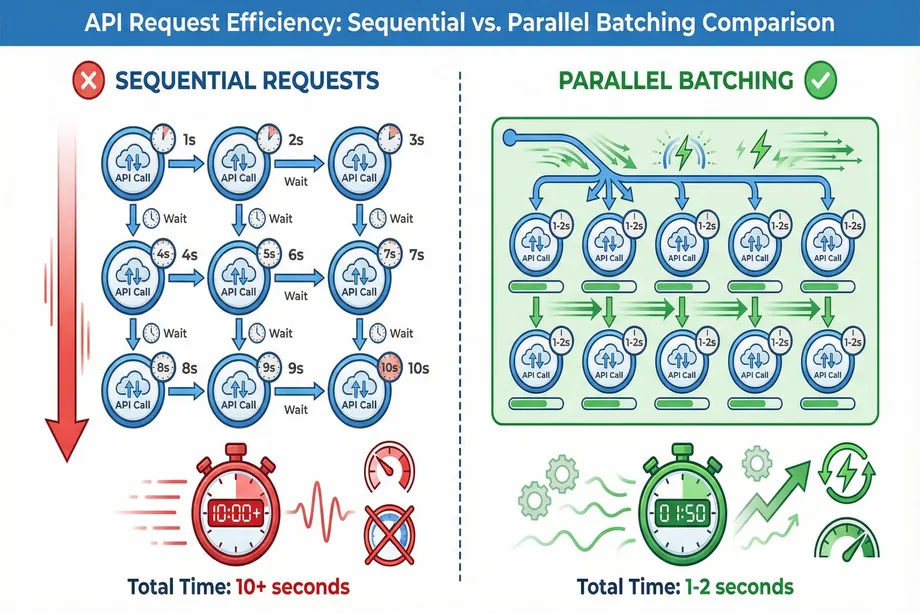
Instead of making thousands of individual API calls, request batching allows you to bundle them into a single, asynchronous operation. This is a game-changer for large-scale data tasks. For example, fetching data for 1,000 Amazon products individually could take hours and trigger rate limits. With a bulk API, the same task can be completed in minutes. Request batching reduces network overhead, minimizes rate limit consumption, and dramatically improves throughput. For developers and analysts working with large datasets, this technique is indispensable.
The Amazon Data Challenge: Why Standard APIs Fall Short
Amazon's marketplace is one of the most challenging environments for data extraction. With millions of products, constantly changing prices, and aggressive anti-bot measures, extracting Amazon data at scale requires specialized infrastructure. Standard web scraping tools often fail due to IP blocks, CAPTCHA challenges, and rate limits. Even if you successfully extract data, processing it efficiently requires sophisticated caching and batching strategies. This is where purpose-built solutions become invaluable. The complexity of Amazon's anti-scraping systems means that manual implementation of all these optimization techniques can take months of development and ongoing maintenance.
Easyparser: Built-in API Performance Optimization for Amazon Data
While these strategies can be implemented manually, modern services like Easyparser provide them out-of-the-box, specifically tailored for the challenges of Amazon data extraction. This focus on built-in api performance optimization is what sets it apart from generic scraping tools and APIs.
Easyparser achieves sub-3-second response times-2-5x faster than competitors-through a combination of these advanced techniques. Its intelligent caching system uses a dynamic, multi-layer architecture with the stale-while-revalidate pattern. Product prices might have a 5-minute TTL, while descriptions have a 24-hour TTL, ensuring optimal freshness and speed. The Bulk API can process thousands of product requests in a single asynchronous job, returning results in minutes instead of hours. Most importantly, Easyparser handles all of Amazon's anti-scraping measures, including IP rotation, CAPTCHA solving, and smart retries, delivering a 98.2% success rate without any manual intervention.
import requests
API_KEY = "YOUR_API_KEY"# Get your key from app.easyparser.com
ASIN = "B098FKXT8L"
params = {
"api_key": API_KEY,
"platform": "AMZ",
"operation": "DETAIL",
"asin": ASIN,
"domain": ".com"
}
response = requests.get("https://realtime.easyparser.com/v1/request", params=params)
data = response.json() # Blazing fast response
print(f"Title: {data.get('product', {}).get('title')}")
Conclusion: Speed as a Strategy
In today's digital economy, api performance optimization is not a luxury; it's a strategic necessity. By implementing advanced caching, thoughtful database tuning, and smart traffic management, you can significantly enhance user experience and reduce operational costs. For those dealing with the unique challenges of large-scale web data extraction, services like Easyparser demonstrate that world-class performance can be achieved out-of-the-box, freeing up developers to focus on creating value from data, not just acquiring it. The journey to effective api performance optimization is continuous, but these foundational strategies will put you on the path to success.
Start running your own Amazon analysis for free
Start Your Free Trial100 free credits, no credit card required.