
Amazon API Error Handling: A Production-Ready Python Guide to Retries, Backoff, and Circuit Breakers
When building data pipelines on top of Amazon scraping APIs, your application is only as reliable as the connections it depends on. A single network hiccup, a temporary rate limit, or an Amazon anti-bot response can bring your entire pricing intelligence or inventory monitoring workflow to a grinding halt. For businesses that rely on fresh Amazon data, these interruptions mean stale prices, missed opportunities, and flawed competitive strategies.
Imagine your automated Amazon repricing system failing silently overnight because the API returned a temporary 503 Service Unavailable. By morning, your prices are outdated and competitors have taken the Buy Box. This is where a robust error-handling strategy becomes non-negotiable. It's the safety net that keeps your Amazon data pipelines running smoothly even when the network doesn't cooperate.
This guide provides a definitive, production-ready roadmap to mastering Amazon API error handling in Python. We'll move beyond basic try-except blocks to explore sophisticated patterns like Exponential Backoff, Circuit Breakers, and Idempotency. You'll get complete, copy-pasteable Python code and learn how Easyparser abstracts away this complexity so you can focus on Amazon data, not downtime.
The Two Faces of Failure: Transient vs. Permanent Errors
Not all Amazon API errors are the same. The first step in building a resilient system is differentiating between problems that will resolve on their own and those that won't. This distinction is the core principle of an effective retry strategy when working with Amazon data APIs.
- Transient Errors (Retryable): These are temporary, unpredictable issues. The Amazon-side server is momentarily overwhelmed, rate limiting your requests, or the network between you and the API endpoint hiccupped. Retrying after a strategic delay usually succeeds.
- Permanent Errors (Non-Retryable): These are fundamental problems with the request itself. An invalid API key (
401), a malformed ASIN parameter (400), or a missing endpoint (404) will fail on every retry - fix the request, don't loop on it.
Wasting retries on permanent errors burns through your API credits and adds noise to your logs. The table below classifies common HTTP status codes you'll encounter when working with Amazon scraping APIs.
| Status Code | Meaning | Error Type | Should You Retry? |
|---|---|---|---|
400 Bad Request | Invalid ASIN, domain, or parameter. | Permanent | No. Fix the request parameters. |
401 Unauthorized | Invalid or expired API key. | Permanent | No. Refresh your API credentials. |
403 Forbidden | Plan limit reached or endpoint not permitted. | Permanent | No. Check your plan permissions. |
429 Too Many Requests | Rate limit exceeded. | Transient | Yes, after the delay in the Retry-After header. |
500 Internal Server Error | Upstream error from the API server. | Transient | Yes. The server may recover quickly. |
502 Bad Gateway | Proxy or gateway returned an invalid response. | Transient | Yes. Often a brief network issue. |
503 Service Unavailable | API server is temporarily overloaded. | Transient | Yes. The service is expected back online shortly. |
504 Gateway Timeout | Amazon page took too long to respond. | Transient | Yes. Classic timeout - retry with backoff. |
Don't Just Retry, Retry Smart: Exponential Backoff with Jitter
When a transient error hits your Amazon API call, retrying immediately is counterproductive. If Amazon's infrastructure is under load or your scraping API is rate-limiting you, hammering the endpoint again right away makes things worse. The smarter approach is Exponential Backoff: increase the delay between retries exponentially. This gives the upstream service time to recover.
However, if thousands of parallel workers all retry on the same backoff schedule, they can create a coordinated "thundering herd" that overwhelms the service all over again. Adding Jitter - a small random offset to each delay - staggers the retries and distributes the load across the window.

Here is how to implement a retry decorator in Python with exponential backoff and jitter for Amazon API calls:
import time
import random
from functools import wraps
def retry_with_backoff(retries=5, backoff_in_seconds=1):
def decorator(func):
@wraps(func)
def wrapper(*args, **kwargs):
attempts = 0
while attempts < retries:
try:
return func(*args, **kwargs)
except Exception as e:
attempts += 1
print(f"Attempt {attempts} failed: {e}. Retrying...")
sleep_time = backoff_in_seconds * (2 ** attempts) + random.uniform(0, 1)
time.sleep(sleep_time)
raise RuntimeError(f"All {retries} retries failed.")
return wrapper
return decorator
Beyond Retries: Circuit Breakers and Idempotency for Amazon Pipelines
For production-grade Amazon data pipelines, simple retries aren't enough. You need patterns that prevent your application from amplifying a bad situation.
The Circuit Breaker Pattern: Know When to Stop
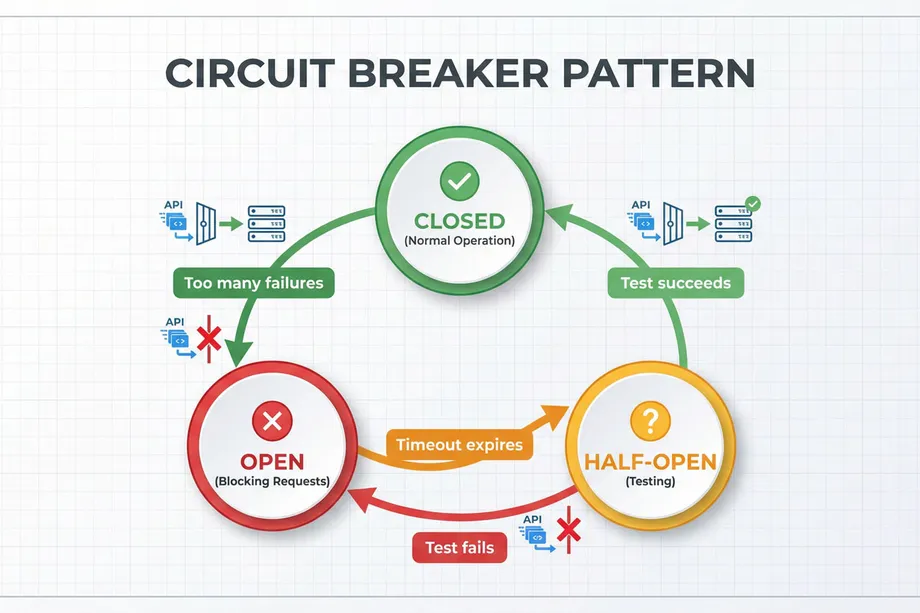
If an Amazon scraping API is experiencing an outage, continuing to fire requests wastes your credits and adds unnecessary load. The Circuit Breaker pattern monitors failures and, after hitting a threshold, "trips" to pause further requests for a set period - giving the upstream service time to stabilise.
It operates in three states:
- CLOSED: Normal operation. Amazon API requests flow freely.
- OPEN: Too many failures detected. All requests are rejected immediately without being sent, preserving credits and reducing load.
- HALF-OPEN: After a timeout, a single test request is allowed through. Success closes the circuit; failure re-opens it.
Idempotency: The Safety Net for Amazon Data Writes
What happens if you retry a request that already succeeded but whose response was lost in transit? For read operations like Amazon product lookups, retrying is safe. But for any write or stateful operation - like recording a price change to your database - you may end up with duplicate entries. Using an Idempotency Key (a unique identifier per transaction sent in the request header) prevents the server from processing the same operation twice, even if the network delivers it multiple times.
Putting It All Together: A Production-Ready Amazon API Client in Python
Let's combine these concepts into a robust AmazonAPIClient class using the requests and urllib3 libraries. This client handles retries, exponential backoff, and Amazon-specific status codes automatically, making it suitable for pricing monitors, inventory trackers, and bulk ASIN enrichment pipelines.
import requests
import logging
from urllib3.util.retry import Retry
from requests.adapters import HTTPAdapter
class AmazonAPIClient:
def __init__(self, base_url, retries=3, backoff_factor=0.5):
self.base_url = base_url
self.session = self._create_session(retries, backoff_factor)
def _create_session(self, retries, backoff_factor):
session = requests.Session()
retry_strategy = Retry(
total=retries,
status_forcelist=[429, 500, 502, 503, 504],
backoff_factor=backoff_factor
)
adapter = HTTPAdapter(max_retries=retry_strategy)
session.mount("http://", adapter)
session.mount("https://", adapter)
return session
def get_amazon_product(self, asin, api_key, domain=".com"):
params = {
"api_key": api_key,
"platform": "AMZ",
"operation": "DETAIL",
"asin": asin,
"domain": domain
}
try:
response = self.session.get(f"{self.base_url}/v1/request", params=params)
response.raise_for_status()
return response.json()
except requests.exceptions.RequestException as e:
logging.error(f"Amazon API request failed for ASIN {asin}: {e}")
return None
The Easy Way: How Easyparser Handles Amazon API Errors For You
While building your own resilient Amazon API client is a valuable engineering exercise, it's often not the best use of your time. Easyparser is purpose-built for Amazon data extraction and handles these complexities internally, so you can focus on your business logic instead of retry loops.
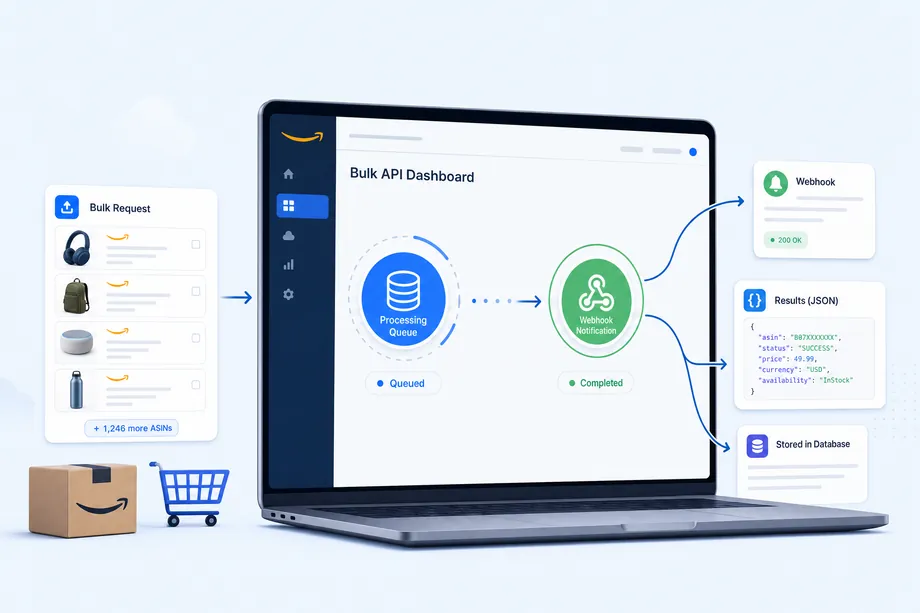
Easyparser's Bulk API is the clearest example. Instead of managing thousands of individual Amazon product requests - each one potentially hitting a rate limit or timeout - you submit a single job with up to 5,000 ASINs. Here's how it simplifies error handling for Amazon data pipelines:
- Asynchronous Processing: Submit a bulk job and get back a
job_idimmediately. Easyparser collects the Amazon data in the background while your application continues running. - Built-in Amazon Retries: Easyparser automatically retries failed Amazon requests using optimised backoff strategies tuned for Amazon's infrastructure. No custom retry logic needed on your end.
- Webhook Notifications: When the job finishes, Easyparser sends a payload to your
callback_urlcontaining the job status and individualresult_ids for each ASIN. - Error Isolation: If one ASIN in a bulk job fails, the rest are unaffected. You get maximum data yield and can re-queue only the failed items.
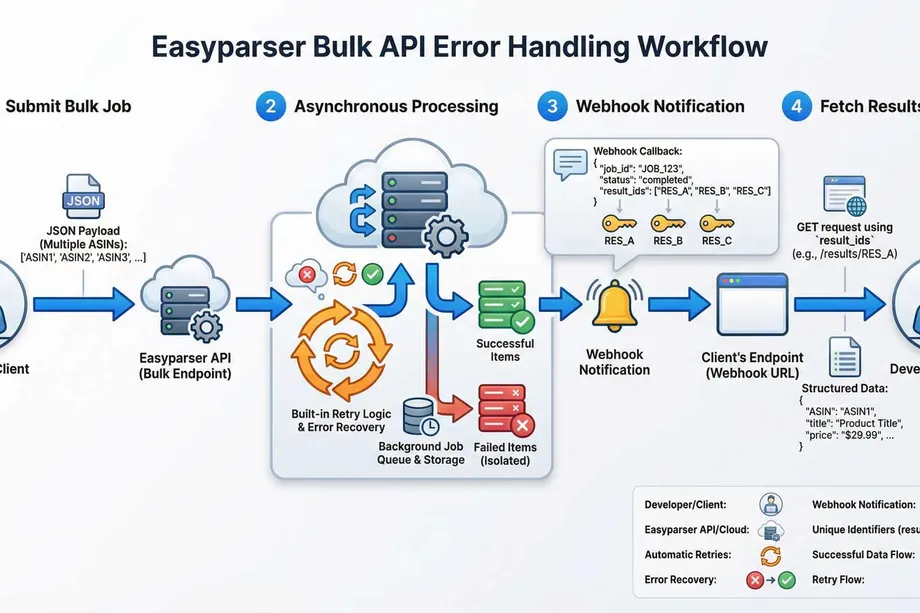
This asynchronous, webhook-driven model means you're not managing network connections, Amazon timeouts, or retry budgets. You react to a completion notification and fetch clean, structured Amazon product data. It's a more resilient, credit-efficient, and developer-friendly approach to large-scale Amazon data collection.
Conclusion: From Fragile Amazon Scripts to Resilient Pipelines
Effective Amazon API error handling is the difference between a fragile script that breaks at the first rate-limit response and a production-grade pipeline that delivers reliable product data day and night. By implementing smart retries with exponential backoff, protecting your resources with circuit breakers, and ensuring safety with idempotency, you build Amazon data workflows that withstand the unpredictable nature of distributed systems.
Or, you can leverage a service that has already solved these problems at scale. Easyparser's Bulk API provides a powerful abstraction layer that handles Amazon-specific errors, rate limits, and retries automatically - letting you build sophisticated Amazon data pipelines faster and with greater confidence.
Start building with the Easyparser API today
Start Your Free Trial100 free credits, no credit card required.