

• Monthly 100 free credit!
All features No credit card
Monitor seller reputation and service excellence in real-time with a single API request.
• Monthly 100 free credit!
All features No credit card

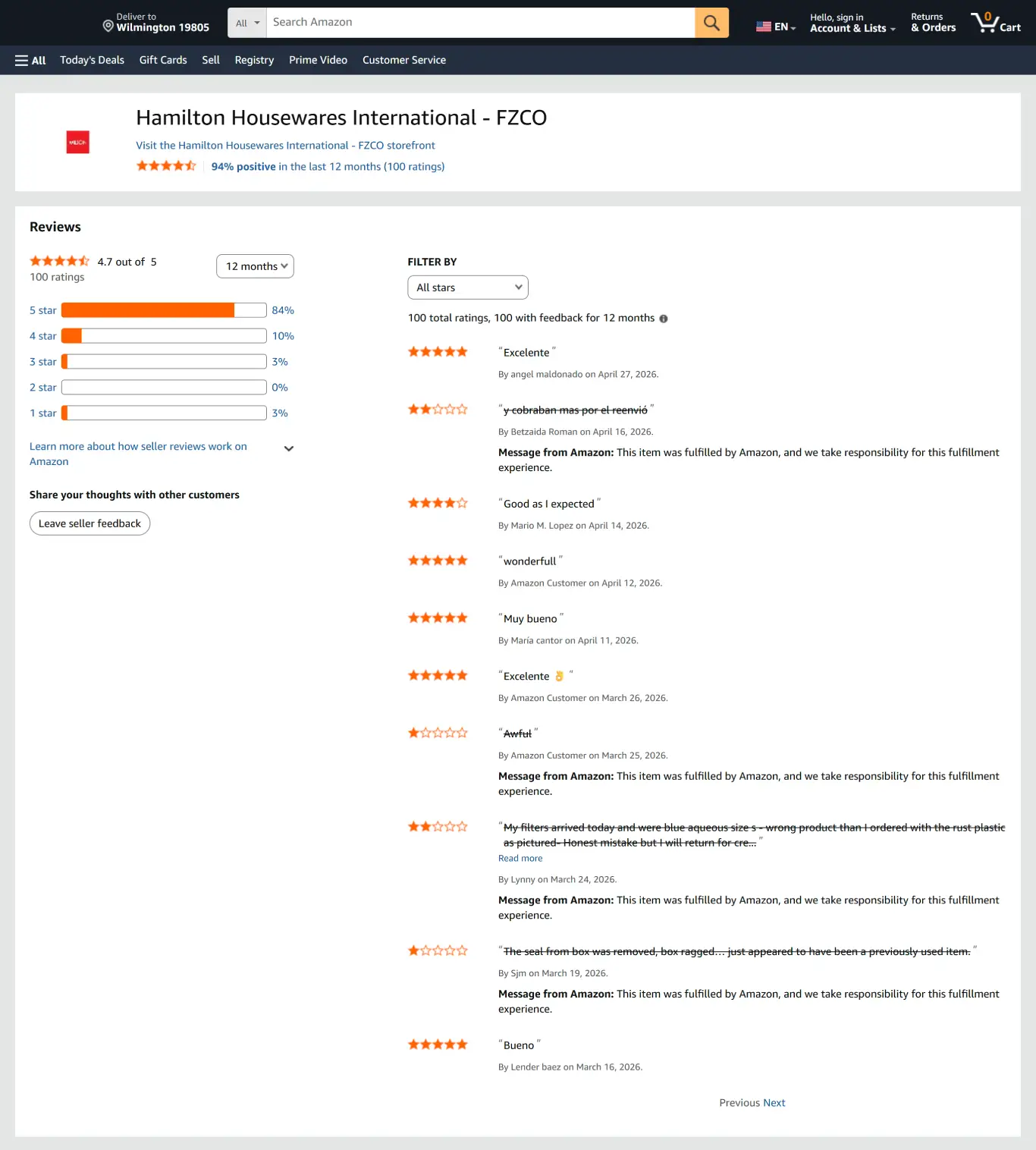
Stop guessing about a competitor's logistics or your own service quality. With Easyparser, you get instant access to deep seller feedback data using just a Seller ID. It functions perfectly as an amazon seller feedback api by seller id, and works just like an amazon seller ratings api or amazon seller review api.
This seller feedback api is built for reliability and scale, providing a clean, comprehensive dataset that includes:
No credit card  100 credit free Real-time or Bulk

Sign up today to receive 100 free monthly credits and test our amazon seller feedback api.
Get your token from the Plan page to securely access real-time reputation data.
Send a request using the SELLER_FEEDBACK type and identify operational strengths, recurring complaints, and logistical weaknesses instantly. Choose an endpoint now.
Perform competitor benchmarking, audit 3PL performance, and maintain high-standard seller profiles easily.
⚡ No IP blocks, no CAPTCHAs to manage, fast Amazon seller data API response!
curl -X GET \
"https://realtime.easyparser.com/v1/request" \
-G \
-d api_key=YOUR_API_KEY \
-d platform=AMZ \
-d operation=SELLER_FEEDBACK \
-d domain=.com \
-d seller_id=A9U20DL23XRAV \
-d history_range=all \
-d min_rating=1 \
-d max_rating=5
import requests
import json
# set up the request parameters
params = {
"api_key": "YOUR_API_KEY",
"platform": "AMZ",
"operation": "SELLER_FEEDBACK",
"domain": ".com",
"seller_id": "A9U20DL23XRAV",
"history_range": "all",
"min_rating": "1",
"max_rating": "5"
}
# make the http GET request to Easyparser API
api_result = requests.get("https://realtime.easyparser.com/v1/request", params=params)
# print the JSON response from Easyparser API
print(json.dumps(api_result.json()))
const axios = require('axios');
// set up the request parameters
const params = {
api_key: 'YOUR_API_KEY',
platform: 'AMZ',
operation: 'SELLER_FEEDBACK',
domain: '.com',
seller_id: 'A9U20DL23XRAV',
history_range: 'all',
min_rating: '1',
max_rating: '5'
};
// make the http GET request to Easyparser API
axios.get('https://realtime.easyparser.com/v1/request', { params })
.then(response => console.log(response.data));
<?php
// set up the request parameters
$params = array(
'api_key' => 'YOUR_API_KEY',
'platform' => 'AMZ',
'operation' => 'SELLER_FEEDBACK',
'domain' => '.com',
'seller_id' => 'A9U20DL23XRAV',
'history_range' => 'all',
'min_rating' => '1',
'max_rating' => '5'
);
// make the http GET request to Easyparser API
$url = 'https://realtime.easyparser.com/v1/request?' . http_build_query($params);
$response = file_get_contents($url);
echo $response;
?>
package main
import (
"fmt"
"io"
"net/http"
"net/url"
)
func main() {
// set up the request parameters
params := url.Values{}
params.Add("api_key", "YOUR_API_KEY")
params.Add("platform", "AMZ")
params.Add("operation", "SELLER_FEEDBACK")
params.Add("domain", ".com")
params.Add("seller_id", "A9U20DL23XRAV")
params.Add("history_range", "all")
params.Add("min_rating", "1")
params.Add("max_rating", "5")
requestUrl := "https://realtime.easyparser.com/v1/request?" + params.Encode()
// make the request to Easyparser API
resp, _ := http.Get(requestUrl)
defer resp.Body.Close()
body, _ := io.ReadAll(resp.Body)
fmt.Println(string(body))
}
using System;
using System.Net.Http;
using System.Threading.Tasks;
using System.Collections.Generic;
class Program
{
static async Task Main(string[] args)
{
// set up the request parameters
var client = new HttpClient();
var query = new Dictionary<string, string> {
{ "api_key", "YOUR_API_KEY" },
{ "platform", "AMZ" },
{ "operation", "SELLER_FEEDBACK" },
{ "domain", ".com" },
{ "seller_id", "A9U20DL23XRAV" },
{ "history_range", "all" },
{ "min_rating", "1" },
{ "max_rating", "5" }
};
var queryString = await new FormUrlEncodedContent(query).ReadAsStringAsync();
var url = "https://realtime.easyparser.com/v1/request?" + queryString;
// make the request to Easyparser API
var response = await client.GetStringAsync(url);
Console.WriteLine(response);
}
}
import java.net.URI;
import java.net.http.HttpClient;
import java.net.http.HttpRequest;
import java.net.http.HttpResponse;
import java.net.URLEncoder;
import java.nio.charset.StandardCharsets;
import java.util.Map;
import java.util.LinkedHashMap;
public class EasyparserExample {
public static void main(String[] args) {
// set up the request parameters
HttpClient client = HttpClient.newHttpClient();
Map<String, String> params = new LinkedHashMap<>();
params.put("api_key", "YOUR_API_KEY");
params.put("platform", "AMZ");
params.put("operation", "SELLER_FEEDBACK");
params.put("domain", ".com");
params.put("seller_id", "A9U20DL23XRAV");
params.put("history_range", "all");
params.put("min_rating", "1");
params.put("max_rating", "5");
StringBuilder sb = new StringBuilder();
for (Map.Entry<String, String> entry : params.entrySet()) {
if (sb.length() > 0) sb.append("&");
sb.append(URLEncoder.encode(entry.getKey(), StandardCharsets.UTF_8))
.append("=")
.append(URLEncoder.encode(entry.getValue(), StandardCharsets.UTF_8));
}
String url = "https://realtime.easyparser.com/v1/request?" + sb.toString();
// make the request to Easyparser API
HttpRequest request = HttpRequest.newBuilder().uri(URI.create(url)).build();
HttpResponse<String> response = client.send(request, HttpResponse.BodyHandlers.ofString());
System.out.println(response.body());
}
}

Turn seller feedback data into operational, competitive, and reputation intelligence.
Analyze top competitors to understand their shipping standards and how they handle customer issues.
Audit your own feedback to resolve recurring complaints before they impact your Account Health.
Verify whether items arrive as described via external audits of 3PL or FBA performance.
Perform comprehensive amazon seller due diligence to evaluate historical service quality before acquisitions or partnerships.
Scrape amazon seller ratings and comments and feed raw feedback text into BI tools to identify operational pain points and trends.
Use feedback comments to track real-world delivery performance and improve packaging integrity.
Monitor seller health metrics that directly influence Buy Box eligibility and winning percentage.
Identify negative feedback patterns to improve response strategies and service standards.
Conduct deep dives into seller performance and market sentiment to identify niche opportunities.
Start free trial. No credit card required.
Quick answers about seller feedback data, rating filters, page depth, and real-time JSON responses.
It returns essential data from the seller profile, including star ratings from 1 to 5, full customer comments, rater names, profile links, and temporal metadata.
No. To ensure maximum accuracy and performance, the system exclusively accepts seller_id as the mandatory parameter. URLs are not supported for this specific operation to prevent data mismatch and ensure stable automation results.
All requests fetch live data directly from Amazon. The ratings and comments reflect the most current state of the seller's profile at the time of the API call.
Yes. Access to historical service quality and shipping reliability makes it ideal for vetting potential suppliers and managing risk in sourcing.
In Real-Time mode, you can fetch up to 5 pages per request for instant results. For large-scale audits, our Bulk integration offers massive flexibility, allowing you to send up to 5.000 requests simultaneously and target any specific page depth, such as page 100 or beyond.
Yes. You can use min_rating and max_rating parameters to specifically target negative feedback from 1 to 2 stars or positive praise from 4 to 5 stars.
No. We handle all proxy rotation and anti-bot measures automatically for your amazon seller feedback scraping needs. You can focus on consuming the data without worrying about blocks.
You receive structured JSON that can be easily integrated into dashboards, Google Sheets, or internal BI systems.
Fetch accurate seller reputation, ratings, and comments in seconds.