Navigating the world of Amazon selling requires a deep understanding of product identifiers. Whether you are launching a new private label product, adding an existing item to the catalog, or expanding into international marketplaces, terms like ASIN, UPC, EAN, ISBN, and GTIN will constantly appear. These identifiers are the backbone of Amazon's vast catalog, ensuring that millions of products are correctly categorized, tracked, and sold. This comprehensive guide explores what each identifier means, how they function, and how they relate to one another in 2026.
What Are Amazon Product Identifiers?
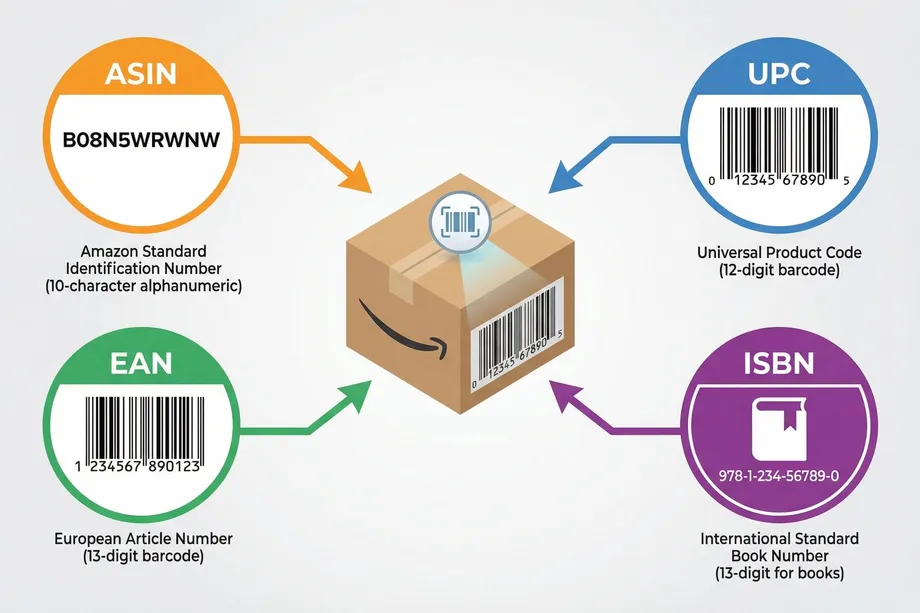
Product identifiers are unique codes used globally to distinguish one product from another. In the context of Amazon, these codes are essential for creating accurate listings, managing inventory, and ensuring customers receive the exact item they ordered. The primary identifiers used on Amazon include the Amazon Standard Identification Number (ASIN), Universal Product Code (UPC), European Article Number (EAN), and International Standard Book Number (ISBN). Collectively, many of these fall under the umbrella term Global Trade Item Number (GTIN).
Amazon enforces strict rules regarding these identifiers. Using invalid codes or codes purchased from unauthorized third-party resellers can lead to listing suppression or permanent removal. Amazon cross-references identifiers with the GS1 database, the global authority for barcodes, to verify authenticity and brand ownership.
What Is an ASIN? Amazon's Internal Identifier Explained
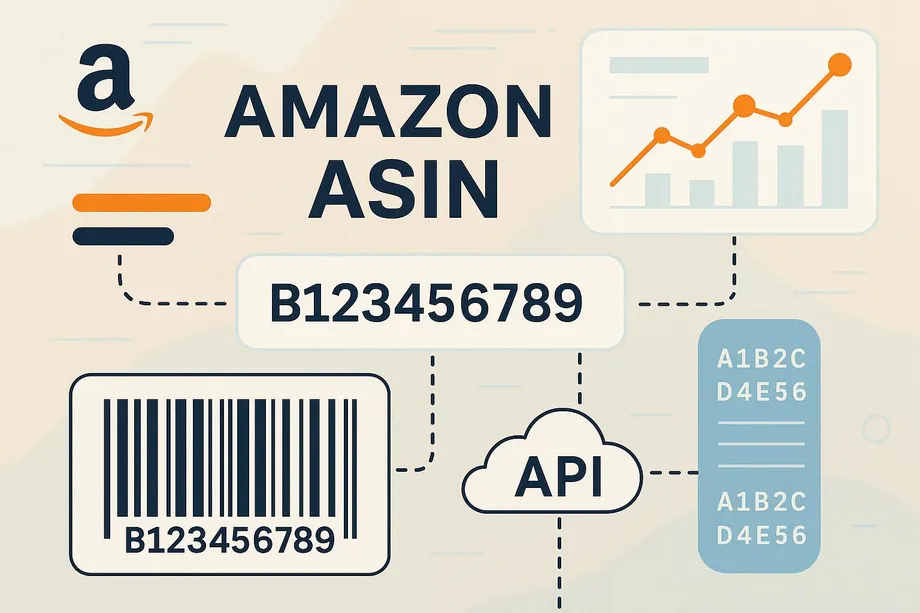
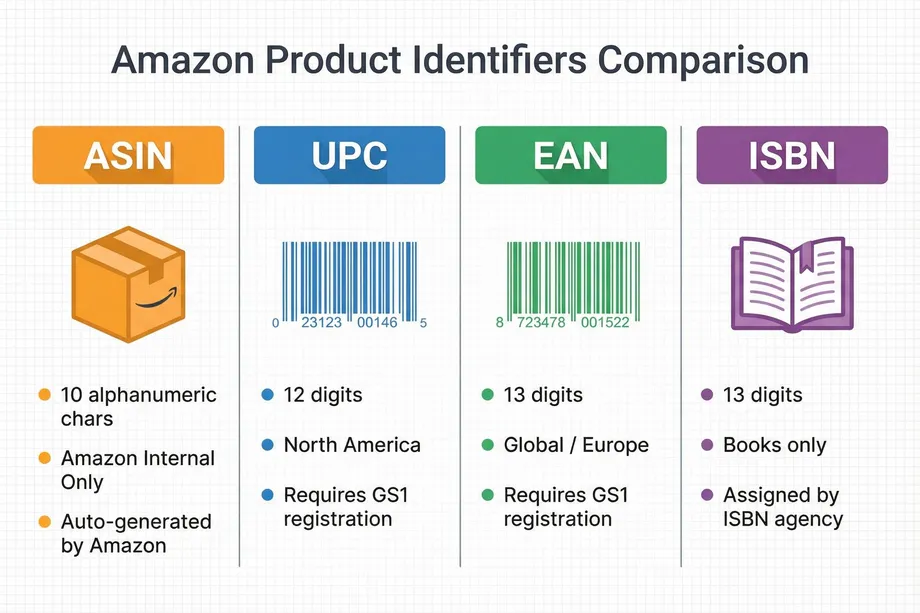
The Amazon Standard Identification Number (ASIN) is a 10-character alphanumeric code assigned by Amazon to every product in its catalog. Unlike UPCs or EANs, which are globally recognized across various retail platforms, an ASIN is unique to the Amazon ecosystem. It serves as Amazon's internal tracking mechanism for cataloging products, managing inventory across fulfillment centers, and organizing search results.
When you create a new product listing using a valid external identifier like a UPC or EAN, Amazon automatically generates a corresponding ASIN. If the product already exists in the catalog, Amazon will prompt you to link your offer to the existing ASIN to prevent duplicate listings. You can easily find a product's ASIN in its Amazon URL or within the Product Details section of the listing page.
What Is a UPC?
The Universal Product Code (UPC) is a 12-digit barcode widely used in North America (the United States and Canada) for tracking trade items in stores. It is one of the most common types of GTINs. UPCs are essential for retail point-of-sale systems and inventory management. When selling on Amazon, a UPC is typically required to create a new product listing, unless the product qualifies for an exemption.
Why Amazon Requires GS1-Registered Codes
Amazon strictly requires that UPCs and other GTINs be obtained directly from GS1 (Global Standards 1). GS1 is the only official provider of globally unique barcodes. In the past, sellers often purchased cheap barcodes from third-party resellers. However, Amazon now actively verifies UPCs against the GS1 database. If the company information registered with GS1 does not match the brand name on the Amazon listing, Amazon will suppress the listing. This policy ensures product authenticity and protects brands from counterfeiting.
What Is an EAN? The Global Alternative to UPC
The European Article Number (EAN), also known as International Article Number, is a 13-digit barcode standard used globally, primarily outside of North America. Like the UPC, it is a type of GTIN managed by GS1. The EAN functions identically to the UPC but includes an extra digit that often indicates the country of registration. If you are sourcing products internationally or selling in European marketplaces, you will frequently encounter EANs instead of UPCs.
What Is an ISBN? For Books and Publications on Amazon
The International Standard Book Number (ISBN) is a unique commercial book identifier barcode. Every published book, whether physical or digital (e-book), requires an ISBN, with the exception of some self-published works. Historically 10 digits long, ISBNs were expanded to 13 digits in 2007 to align with the EAN format. On Amazon, books are the only category where the ISBN and the ASIN are often used interchangeably or map directly to one another.
ASIN vs UPC vs EAN vs ISBN: Side-by-Side Comparison
| Identifier | Length | Scope | Primary Use Case |
|---|---|---|---|
| ASIN | 10 alphanumeric characters | Amazon Internal | Amazon cataloging and inventory tracking. |
| UPC | 12 digits | Global (Primarily North America) | Retail point-of-sale and general product identification. |
| EAN | 13 digits | Global (Primarily outside NA) | Retail point-of-sale and general product identification. |
| ISBN | 13 digits (formerly 10) | Global | Identifying books and publications. |
How Amazon Maps UPC/EAN to ASIN During Listing Creation
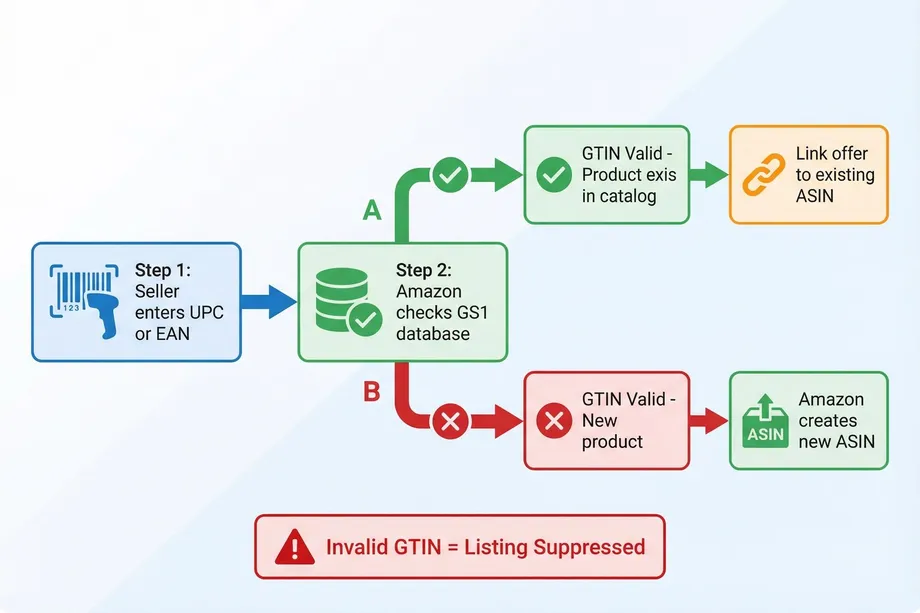
The relationship between external identifiers (UPC/EAN) and Amazon's internal identifier (ASIN) is fundamental to the catalog structure. When a seller attempts to list a product, they input the UPC or EAN. Amazon's system searches its database to see if an ASIN is already associated with that specific GTIN. If a match is found, the seller must list their offer under the existing ASIN. This identifier mapping ensures that multiple sellers offering the same product share a single product detail page, creating a cleaner shopping experience for customers.
If no match is found, the seller is creating a new product in the Amazon catalog. Amazon verifies the GTIN with GS1, and upon successful validation, generates a brand new ASIN linked permanently to that UPC or EAN.
Parent ASIN vs Child ASIN: How Variations Work
When products come in different variations, such as size or color, Amazon uses a Parent-Child ASIN structure. The Parent ASIN is a non-buyable entity that groups the variations together. It does not have its own UPC or inventory. The Child ASINs are the actual buyable products (e.g., a medium red t-shirt). Each Child ASIN must have its own unique UPC/EAN and is assigned its own unique ASIN by Amazon. This structure allows customers to select different variations from a single product detail page.
What Is a GTIN Exemption and When Do You Need One?
A GTIN exemption allows sellers to list products on Amazon without providing a standard product ID like a UPC, EAN, or ISBN. This is particularly useful for specific types of sellers. You might need a GTIN exemption if you sell handmade or custom products, private label products where you are the manufacturer and do not use barcodes, or product bundles consisting of multiple items.
To apply for a GTIN exemption, sellers must submit a request through Seller Central, providing the brand name, category, and clear images of the product and packaging demonstrating that no barcode is present. Once approved, sellers can create listings for that specific brand and category without entering a GTIN, and Amazon will still generate an ASIN for the product.
Common Listing Errors Caused by Wrong Identifiers
Mishandling product identifiers can lead to significant issues on Amazon. One of the most common errors is listing suppression due to invalid UPCs. If Amazon detects that a UPC was purchased from a third-party reseller and does not match the GS1 database for your brand, the listing will be removed. Another frequent issue is duplicate ASIN creation. Sellers sometimes purchase new UPCs for products that already exist on Amazon to avoid competing on the same listing. This violates Amazon policy and can result in account suspension. Finally, mapping errors can occur if a seller accidentally lists their product against the wrong ASIN, leading to customer complaints and negative reviews when the wrong item is received.
How to Find Any Product's ASIN, UPC, or EAN on Amazon
Finding a product's ASIN is straightforward. It is always visible in the product's URL, typically after "/dp/". It is also listed in the "Product details" section further down the page. However, finding the UPC or EAN directly on Amazon is more challenging, as Amazon does not display these external identifiers publicly. Sellers often rely on specialized tools or APIs to perform identifier mapping and convert ASINs back to their original UPCs or EANs for competitive analysis or inventory synchronization.
For developers and data analysts needing to extract this information at scale, utilizing a dedicated Amazon scraping API is the most efficient method. Easyparser provides robust operations specifically designed for this purpose. The PRODUCT_LOOKUP operation allows you to seamlessly convert UPCs, EANs, or ISBNs into ASINs, while the Product Lookup API retrieves comprehensive product data based on the identifier. For bulk operations, the Easyparser Bulk API can process thousands of identifier lookups in a single request.
import requests
API_KEY = "YOUR_API_KEY" # Get your key from app.easyparser.com
IDENTIFIER = "0012000809941"
params = {
"api_key": API_KEY,
"platform": "AMZ",
"operation": "PRODUCT_LOOKUP",
"identifier": IDENTIFIER,
"identifier_type": "EAN",
"domain": ".com"
}
response = requests.get("https://realtime.easyparser.com/v1/request", params=params)
data = response.json()
products = data.get("result", {}).get("search_result", {}).get("products", [])
asin = products[0]["asin"] if products else None
print(f"First ASIN result for {IDENTIFIER}: {asin}")
Understanding the distinctions between ASIN, UPC, EAN, and ISBN is crucial for any Amazon seller. Properly managing these identifiers ensures compliance with Amazon's policies, facilitates accurate inventory tracking, and ultimately contributes to a smoother, more profitable selling experience.
Start your Amazon data journey for free
Start Your Free Trial100 free credits, no credit card required.