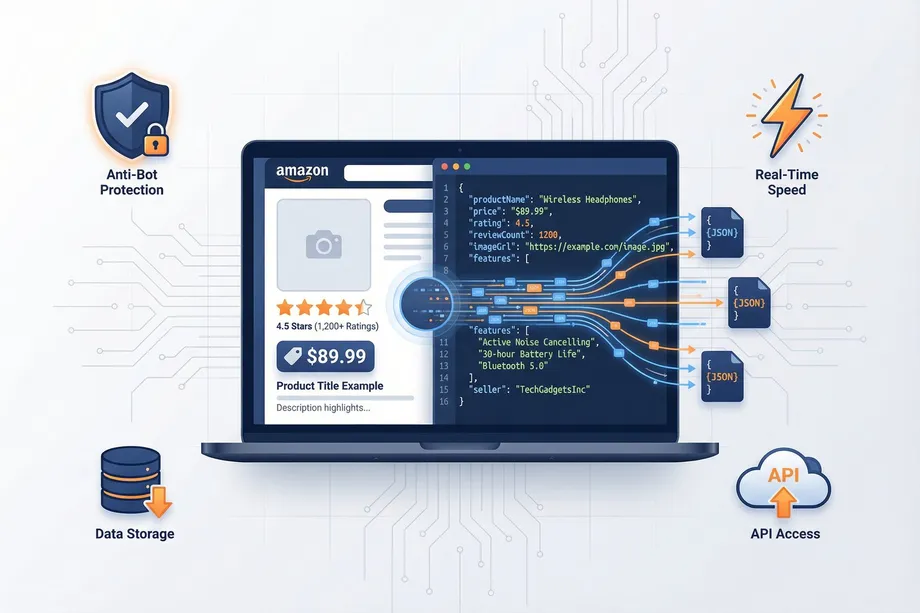
In the competitive landscape of Amazon data APIs, making the right choice can be the difference between a successful project and a frustrating, costly failure. To cut through the marketing noise, we conducted a comprehensive, data-driven comparison of the top Amazon APIs on the market, focusing on the four pillars that truly matter:
- Speed: How fast can you get the data you need?
- Developer Experience (DX): How easy is it to build, scale, and maintain your integration?
- Pricing: Is the model flexible, transparent, and cost-effective?
- Geo-Targeting: How sophisticated are the tools for regional data collection?
We evaluated Easyparser against two key competitors: a specialized Amazon API (Competitor A) and a large, general-purpose web scraping API (Competitor B).

Why Amazon API Choice Matters: The Hidden Costs of the Wrong Tool
Choosing the wrong Amazon API is not just an inconvenience - it has measurable business consequences that compound over time. Most teams focus on the headline price and miss the total cost of ownership. Here are the hidden costs that can turn a "cheaper" API into the most expensive decision you make this year.
The Developer Time Tax
A poorly designed API with inconsistent responses, vague error messages, or no bulk processing capability can easily consume 10–20 extra engineering hours per month in debugging, workarounds, and maintenance. At a standard developer rate of $75–$150/hour, that's $750–$3,000/month in invisible overhead - far more than any price difference between API tiers.
The Reliability Penalty
APIs with success rates below 95% create a cascading data quality problem. If 1 in 20 requests fails, your price monitoring data has gaps. Your repricing engine makes decisions based on stale or missing data. Your category analysis has blind spots. A seemingly small 5% failure rate can translate into 5,000 missing data points per 100,000 requests - enough to materially affect business decisions.
The Scalability Cliff
Many APIs that appear affordable at 10,000 requests/month become prohibitively expensive at 100,000 or 1,000,000 requests/month. Without bulk processing, the cost-per-request stays flat while your infrastructure costs scale linearly. Easyparser's Bulk API fundamentally changes this equation by allowing parallel processing, which reduces both time and per-unit cost at scale.
The Four Pillars of a Great Amazon API
1. Speed: More Than Just a Number
As we demonstrated in our dedicated speed test, Easyparser is significantly faster than the competition. But speed isn't just about single requests. It's about how the entire system is architected for performance, from a faster core API to a powerful Bulk API that can process thousands of requests in minutes, not hours.
2. Developer Experience: The Multiplier Effect
A superior developer experience, as detailed in our DX deep-dive, is a force multiplier. Easyparser's combination of a clean API design, asynchronous bulk processing, and webhook notifications provides a development environment that is simply unmatched. This leads to faster development cycles, lower maintenance costs, and more scalable solutions.
3. Pricing: Flexibility and Transparency
Pricing models can be confusing and restrictive. Easyparser's credit-based system offers a transparent and flexible alternative to the rigid, often expensive, tiers of competitors. You pay for what you use, with the freedom to scale up or down as your needs change.
4. Geo-Targeting: From Basic to Business Intelligence
While all competitors offer some form of geo-targeting, Easyparser's Address Management system is a true differentiator. It provides a dedicated UI for managing an unlimited number of addresses, turning a basic technical feature into a powerful business intelligence tool for regional analysis.
Speed Deep Dive: Real Benchmark Numbers
Our speed benchmark tested each API with 100 requests for the same ASIN under identical conditions. The results confirm that Easyparser's performance advantage is consistent and significant - and grows dramatically at scale when the Bulk API is factored in.
| Scenario | Easyparser | Competitor A | Competitor B |
|---|---|---|---|
| Single request (average) | 7.5 seconds | 15 seconds | 18 seconds |
| 100 products (sequential) | 12.5 minutes | 25 minutes | 30 minutes |
| 1,000 products (Bulk API) | ~2 minutes | 4.2 hours | 5 hours |
| 5,000 products (Bulk API) | ~10 minutes | 20+ hours | 25+ hours |
The single-request speed difference (7.5s vs 15–18s) is meaningful for real-time applications. But the Bulk API numbers tell a more dramatic story: processing 1,000 products takes Easyparser approximately 2 minutes. The same task via sequential single requests takes Competitor A 4.2 hours and Competitor B 5 hours. That is a 126x speed advantage - not an incremental improvement, but a fundamentally different capability. For businesses running daily product monitoring at scale, this difference alone justifies the switch.
The Head-to-Head Feature Breakdown
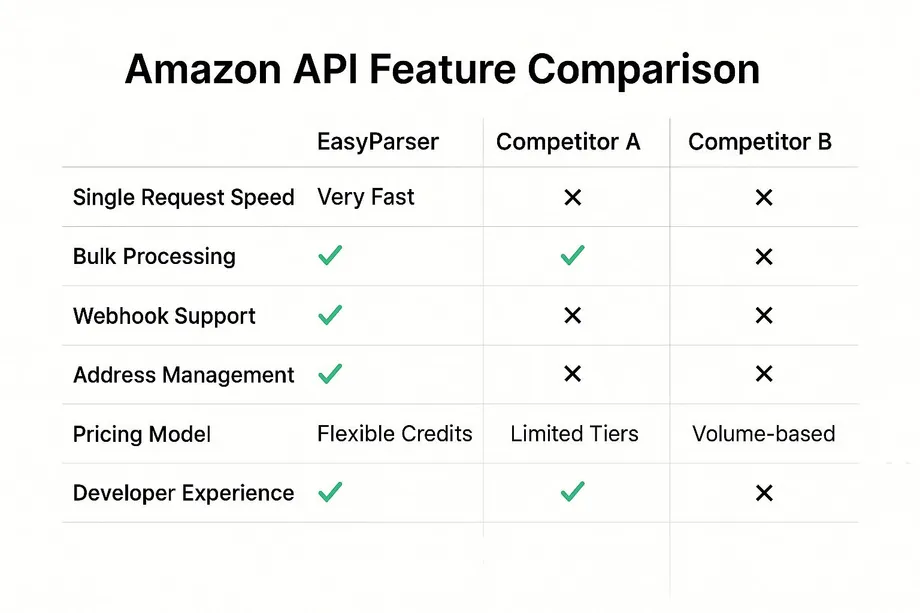
Here's how the three APIs stack up on key features:
Pricing Calculator: Real-World Cost Comparison
Pricing is often the deciding factor for teams operating within a budget. The table below shows estimated monthly costs at three common usage levels. Easyparser's credit-based model - where only successful requests are charged - makes it both cheaper upfront and more cost-efficient at every scale.
| Monthly Volume | Easyparser | Competitor A (est.) | Competitor B (est.) |
|---|---|---|---|
| 10,000 requests/month | ~$5 (covered by Starter tier) | ~$50–$80 | ~$99–$150 |
| 100,000 requests/month | $49 (Starter plan) | ~$200–$300 | ~$300–$500 |
| 1,000,000 requests/month | ~$250 (Growth tier) | ~$1,500+ | ~$2,000+ |
Beyond the raw price, there are two structural advantages to Easyparser's pricing model. First, credits are only deducted on successful responses - a failed request costs you nothing. Second, unused credits roll over under certain plans, so you never lose value from slower months. These features make Easyparser's effective cost-per-useful-datapoint significantly lower than competitors who charge per attempt regardless of success.
Migration Guide: Switching to Easyparser
Switching Amazon APIs can sound intimidating, but most developers complete the migration in under an hour. Here is a simple, step-by-step process that minimizes risk and downtime.
- Sign Up and Get Your API Key (5 minutes): Create a free Easyparser account at app.easyparser.com/signup. Your API key is immediately available in the dashboard - no approval process required.
- Map Your Existing Calls (15 minutes): Identify all the places in your codebase where you call your current Amazon API. For each call, find the equivalent Easyparser operation: DETAIL for product pages, SEARCH for keyword queries, OFFER for seller listings, and BULK_DETAIL for large batch jobs.
- Update Your Code (30–60 minutes): Replace the API endpoint URL, authentication header or parameter, and any parameter names that differ. Easyparser uses a simple GET request with
api_key,platform,operation, andasinas the core parameters. Most integrations require changing fewer than 10 lines of code. - Test on the Free Demo Plan (1 day): Run your test suite against Easyparser using your 100 free monthly credits. Verify that the JSON response structure matches your expectations and that all fields your application depends on are present.
- Gradual Traffic Cutover (1–2 days): Once testing passes, route a small percentage of live traffic to Easyparser while keeping your old API as a fallback. Gradually increase the percentage over 24–48 hours as you gain confidence, then fully decommission the old integration.
Easyparser's support team is available throughout the migration process. Most teams report that the migration is straightforward and that the improved response times and success rates are immediately noticeable in production.
When to Use Each API: Decision Framework
Rather than declaring a single winner in every situation, here is a practical framework for choosing the right Amazon API based on your specific context and constraints.
Choose Easyparser When:
- You are building a production data pipeline that needs to run reliably every day with minimal maintenance overhead. The 98.2% success rate and stable JSON schema make Easyparser the safest choice for mission-critical workflows.
- Your data volume is between 10,000 and 10,000,000 requests per month - this is Easyparser's sweet spot where the pricing model is most competitive and the Bulk API provides the most leverage.
- You need bulk processing. If your use case ever involves collecting data for more than 100 ASINs in a single workflow, Easyparser's BULK_DETAIL operation is a transformative advantage over any API that only offers sequential single requests.
- Developer time is a constraint. The combination of clean documentation, consistent schema, and fast onboarding makes Easyparser the most time-efficient choice for teams with limited engineering bandwidth.
Evaluate Competitors When:
- Your use case primarily involves non-Amazon platforms and you need a general-purpose scraping solution that covers dozens of sites.
- You have highly specialized requirements - such as browser automation or JavaScript rendering - that go beyond standard Amazon product data extraction.
- Your team already has deep expertise with a specific competitor's API and the migration cost would outweigh the benefits in the short term.
In practice, the vast majority of Amazon-specific data use cases - price monitoring, product research, competitive intelligence, catalog enrichment - are best served by a dedicated Amazon API like Easyparser rather than a general-purpose solution. The specialized architecture produces faster, more accurate results at a significantly lower total cost of ownership.
The Verdict: Choosing the Right Tool for the Job
The right choice of API depends on your specific needs, but our analysis reveals a clear picture:
- Choose Easyparser if: You need a high-performance, developer-friendly, and cost-effective solution specifically designed for the complexities of Amazon data. You value a great developer experience, scalable bulk processing, and a flexible pricing model.
- Consider Competitor A if: You have a large budget, your geo-targeting needs are minimal, and you don't require bulk processing capabilities.
- Consider Competitor B if: Your primary need is general web scraping across multiple platforms, and you have the technical resources to manage a more complex, less-specialized tool.
In the end, the choice is clear. For businesses and developers who demand the best in speed, developer experience, and value, Easyparser is the definitive choice for Amazon data extraction.
Ready to see the difference for yourself? Start your free trial of Easyparser today.
Try the best-rated Amazon API for free
Start Your Free Trial100 free credits, no credit card required.