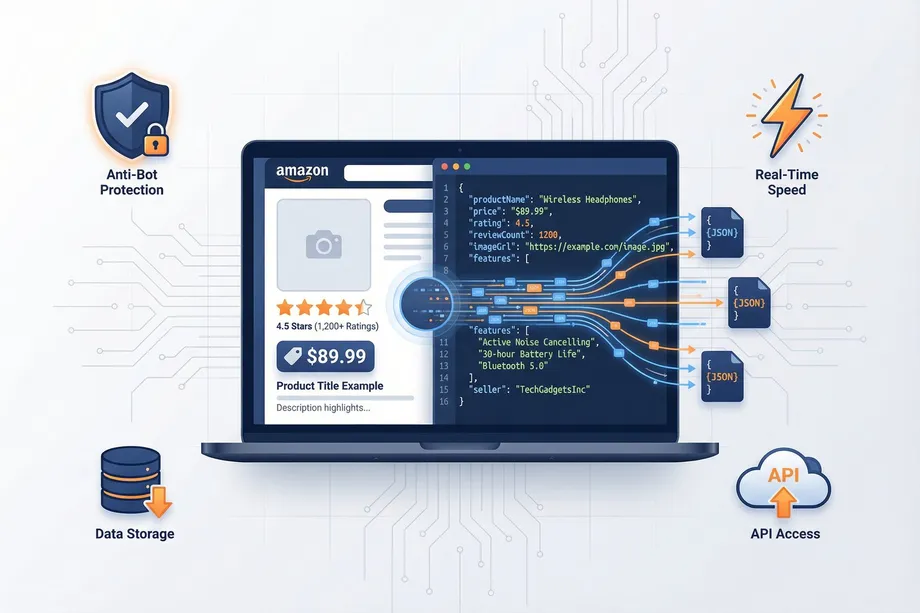
When choosing an Amazon API, it's easy to get caught up in the headline features: success rates, data points, and pricing. But there's a crucial, often overlooked, factor that can have a massive impact on your project's success: developer experience (DX).
A great developer experience means a clean, well-documented API that's easy to integrate, a logical and consistent design, and powerful features that solve real-world problems. A poor DX, on the other hand, can lead to frustration, wasted development hours, and a brittle, hard-to-maintain integration.
The Hidden Cost of Poor Developer Experience
Poor developer experience has a direct and measurable cost that most teams fail to account for when evaluating APIs. Let's break it down with real numbers.
Time Lost to Poorly Designed APIs
Consider a development team spending 5 extra hours per month dealing with an API that has inconsistent error messages, undocumented edge cases, and no bulk processing capability. At a blended developer rate of $100/hour, that's $500/month in pure overhead - more than the cost of most API plans. Over a year, that's $6,000 in wasted engineering time, not counting the opportunity cost of features that didn't get built because the team was debugging API integrations.
Now consider the debugging overhead when an API returns ambiguous error codes. A well-designed API returns structured error objects like {error: 'INVALID_ASIN', message: 'The ASIN B0000000X is not a valid Amazon product identifier'}. A poorly designed one returns HTTP 500 with no body, or an HTML error page, or inconsistent field names across different error types. Each debugging session costs 30–60 minutes. Over a year, these add up to a significant, invisible tax on your engineering budget.
The Maintenance Burden
APIs that change without notice, deprecate fields without warning, or require frequent credential rotations impose an ongoing maintenance burden. Every unplanned API change is an unplanned engineering task. Easyparser uses versioned endpoints and provides advance notice of any breaking changes, which means your integration stays stable without constant monitoring and emergency patching.
What Makes a Great Developer Experience?
At Easyparser, we believe that a superior developer experience is built on four key pillars:
- Powerful, Asynchronous Operations: Modern data collection isn't about one-off requests. It's about processing thousands of products at scale. That's why we built our Bulk API with asynchronous processing and webhook integration from day one.
- Clean, Consistent API Design: A logical and predictable API design makes it easy for developers to get up and running quickly. Our API is designed to be intuitive and easy to use, with clear and consistent naming conventions.
- Comprehensive, Actionable Documentation: Great documentation is more than just a list of endpoints. It's a guide that helps developers solve real-world problems. Our documentation is packed with code examples, tutorials, and best practices.
- Flexible, Transparent Pricing: A credit-based pricing model gives developers the flexibility to pay for what they use, without being locked into expensive, restrictive tiers.
Webhook Integration: Event-Driven Architecture for Amazon Data
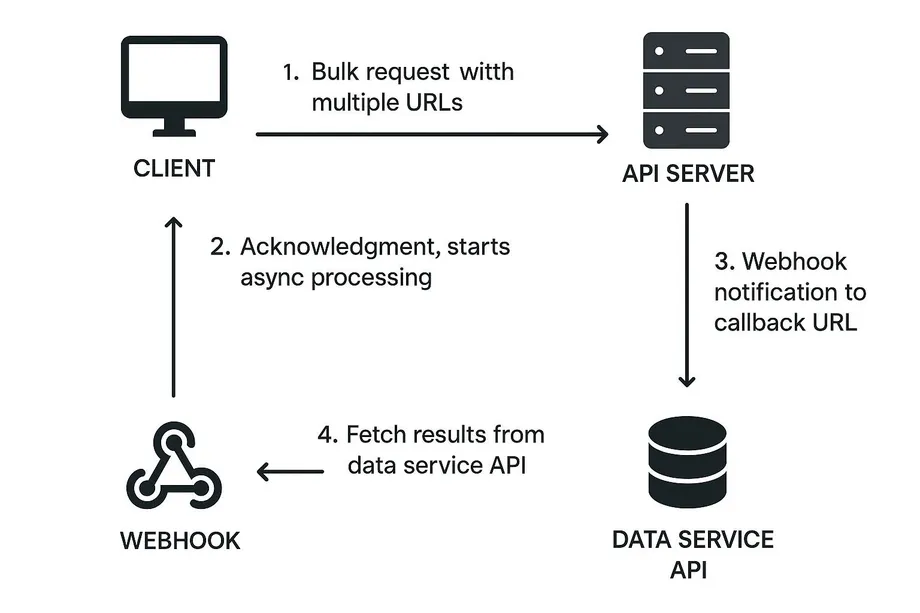
One of the most powerful - and most underused - features of a modern API is webhook support. Instead of polling an endpoint every few seconds to check if a bulk job is finished, webhooks allow you to adopt an event-driven architecture where your application reacts instantly when data is ready.
With Easyparser's webhook integration, the workflow looks like this:
- Submit a bulk job with your ASIN list and a
webhook_urlparameter pointing to your server endpoint - Easyparser acknowledges the job and begins processing in the background
- Your application continues doing other work - no blocking, no polling
- When all results are ready (typically 2–10 minutes for large jobs), Easyparser sends a POST request to your webhook URL with the full results payload
- Your handler processes the data and stores or acts on it immediately
Here is a minimal Python/Flask example of a webhook handler that receives Easyparser results:
from flask import Flask, request, jsonify
import json

app = Flask(__name__)

@app.route('/easyparser-webhook', methods=['POST'])
def handle_bulk_results():
    payload = request.json
    job_id = payload.get('job_id')
    results = payload.get('results', [])

    processed = 0
    for product in results:
        asin = product.get('asin', 'N/A')
        title = product.get('title', 'N/A')
        price = product.get('price', 'N/A')
        # Store in database, trigger alerts, update pricing engine...
        processed += 1

    print('Job ' + str(job_id) + ': processed ' + str(processed) + ' products')
    return jsonify({'status': 'ok', 'processed': processed})

if __name__ == '__main__':
    app.run(port=5000)
This webhook-driven pattern eliminates polling overhead, reduces server-side load, and makes your data pipeline naturally event-driven. For teams building real-time pricing engines or inventory monitoring systems, webhooks are not just a convenience - they are a fundamental architectural enabler.
Bulk Processing: The Developer's Secret Weapon
One of the biggest challenges in Amazon data collection is processing large volumes of data efficiently. While some APIs force you to make thousands of individual requests, Easyparser's Bulk API allows you to process up to 5,000 URLs in a single request. This asynchronous approach has several key advantages:
- Reduced Complexity: Instead of managing thousands of individual API calls, you can manage a single bulk job.
- Increased Efficiency: Our system processes your requests in parallel, delivering results faster than you could with individual requests.
- Improved Reliability: With webhook notifications, you don't have to constantly poll for results. We'll let you know when your data is ready.
// Easyparser - Clean, asynchronous bulk processing (Node.js)
const axios = require('axios');

async function submitBulkJob(asins, webhookUrl) {
  const params = new URLSearchParams({
    api_key: 'YOUR_API_KEY',
    platform: 'AMZ',
    operation: 'BULK_DETAIL',
    asins: asins.join(','),
    webhook_url: webhookUrl,
    output: 'json'
  });

  const response = await axios.post(
    'https://realtime.easyparser.com/v1/bulk',
    params
  );

  return response.data;
}

submitBulkJob(
  ['B0FB21526X', 'B08N5WRWNW', 'B08P3QVFMK'],
  'https://your-app.com/easyparser-webhook'
).then(job => console.log('Bulk job created:', job.job_id));
Documentation Quality: Why It Matters More Than Features
A feature that is not documented is effectively a feature that doesn't exist. Developers can only use what they can find, understand, and implement quickly. This makes documentation quality one of the most impactful - yet rarely measured - dimensions of developer experience.
What Good Documentation Looks Like
Easyparser's documentation is structured around tasks, not just endpoints. Instead of listing every parameter in abstract terms, each section answers the question "how do I accomplish X?" with runnable code examples in multiple languages. Every endpoint page includes:
- A clear description of what the endpoint does and when to use it
- Complete parameter reference with types, defaults, and constraints
- Worked examples in Python, Node.js, PHP, and cURL
- A sample JSON response showing every field that can be returned
- Common error codes with explanations and suggested fixes
- Rate limits, credit consumption, and performance notes
This level of detail means developers spend minutes understanding an endpoint rather than hours. It also dramatically reduces the volume of support tickets, which is a win for both developers and the Easyparser team.
Onboarding in Under 30 Minutes
Great developer experience starts before you write a single line of code. The onboarding process - from discovering the API to getting your first successful response - should take minutes, not days. Here is the complete Easyparser quickstart:
- Create your free account (2 minutes): Go to app.easyparser.com/signup and register. No credit card required. You immediately receive the Demo plan with 100 monthly credits.
- Copy your API key (1 minute): Your API key is visible on the dashboard immediately after login. It is a single string that authenticates all your requests.
- Run your first request (5 minutes): Copy one of the code examples from the documentation, replace
YOUR_API_KEYwith your actual key, and run it. Within 7–8 seconds you will receive a full product data JSON response. - Explore the response (10 minutes): Browse the JSON structure - title, price, images, Buy Box data, ratings, reviews, variants. Identify which fields your application needs and map them to your data model.
- Build your integration (30–60 minutes for simple use cases): Wire up the API call to your application logic. For bulk use cases, add the webhook handler and test the end-to-end flow using the Easyparser test webhook feature.
Total time from zero to production-ready integration: under 2 hours for most use cases. Compare that to setting up a DIY scraper with proxy management, CAPTCHA handling, and parser maintenance - a process that realistically takes 2–4 weeks of engineering effort.
API Design Principles: What Separates Easyparser
Good API design is invisible when done right - you just write code and it works. Bad API design is conspicuous: you spend time reading documentation twice, wondering why a field is missing, or handling inconsistent response shapes. Here are the specific design principles that make Easyparser easier to work with than its competitors.
Consistent JSON Schema
Every DETAIL response returns the same top-level field structure, regardless of the product type, marketplace, or data availability. If a field is not available for a particular product, it is returned as null rather than being omitted from the response. This means your application code never needs to check if 'price' in response - the field is always present, even if its value is null. Consistent schema eliminates an entire class of bugs that plague integrations with less disciplined APIs.
Predictable Error Handling
Every error response from Easyparser follows the same structure: a machine-readable error code, a human-readable message, and where applicable, a suggestion for how to resolve the issue. HTTP status codes are used semantically: 400 for client errors (bad parameters), 401 for authentication failures, 429 for rate limit violations, and 5xx for server-side issues. This predictability means you can write a single error handler that covers all cases, rather than writing defensive code for every possible response shape.
Credit-Only-on-Success Model
Easyparser only deducts a credit when a request returns a successful data response. If the request fails for any reason - network timeout, Amazon blocking, invalid ASIN, internal error - the credit is not charged. This design principle aligns Easyparser's incentives with yours: the API is only profitable when it successfully delivers data, which motivates continuous investment in reliability and success rate improvements.
How Easyparser Compares to the Competition
When it comes to developer experience, not all Amazon APIs are created equal. Here's a quick comparison of how Easyparser stacks up against the competition:
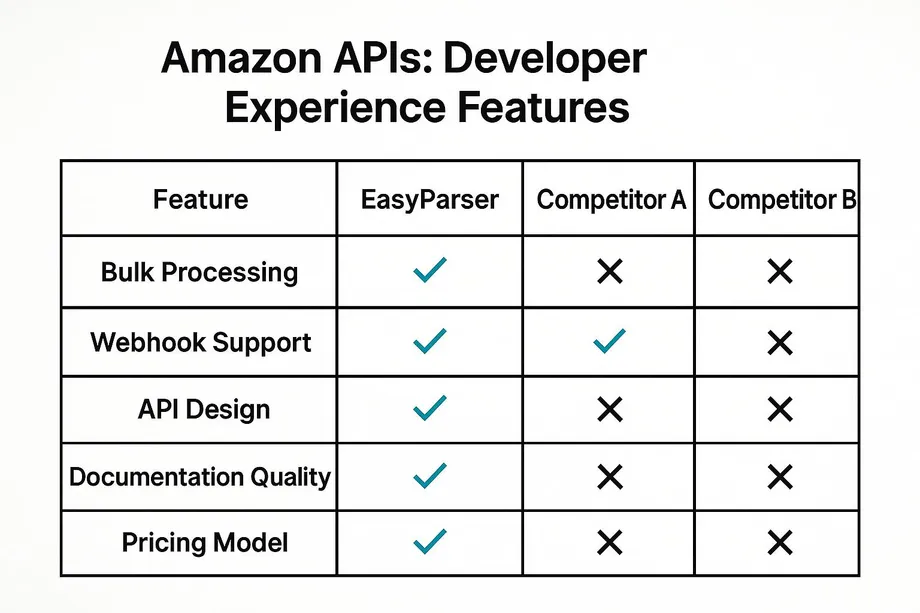
As you can see, while some competitors may offer some of these features, Easyparser is the only API that combines powerful bulk processing, webhook integration, a clean API design, and a flexible pricing model into a single, developer-focused package.
The Bottom Line: A Better DX Means a Better ROI
Choosing an Amazon API with a superior developer experience isn't just about making your developers' lives easier. It's about making a smart business decision. A better DX leads to:
- Faster Time-to-Market: Your team can build and launch integrations faster.
- Lower Development Costs: Less time spent on development means lower costs.
- Increased Reliability: A well-designed API leads to more robust and reliable integrations.
- Greater Scalability: With features like bulk processing, you can scale your data collection efforts without re-architecting your entire system.
Ready to experience the difference a developer-focused Amazon API can make? Sign up for a free Easyparser trial and see for yourself.
Try the best-rated Amazon API for free
Start Your Free Trial100 free credits, no credit card required.