The final quarter of the year transforms Amazon into a global hub of frenzied shopping activity. Events like Black Friday, Cyber Monday, and last-minute holiday sales create a gold rush for consumers seeking bargains and for sellers aiming to maximize revenue. But beneath the surface of flashy banners lies a complex system of deals, coupons, and promotions. This guide will demystify Amazon's holiday deals for everyone: the savvy shopper, the strategic seller, and the data-driven developer.
The Shopper's Playbook: Navigating the Sea of Savings
For customers, the holiday season is a prime time to score incredible discounts. However, the sheer volume of offers can be overwhelming. Understanding the different types of promotions is key to finding the best value.
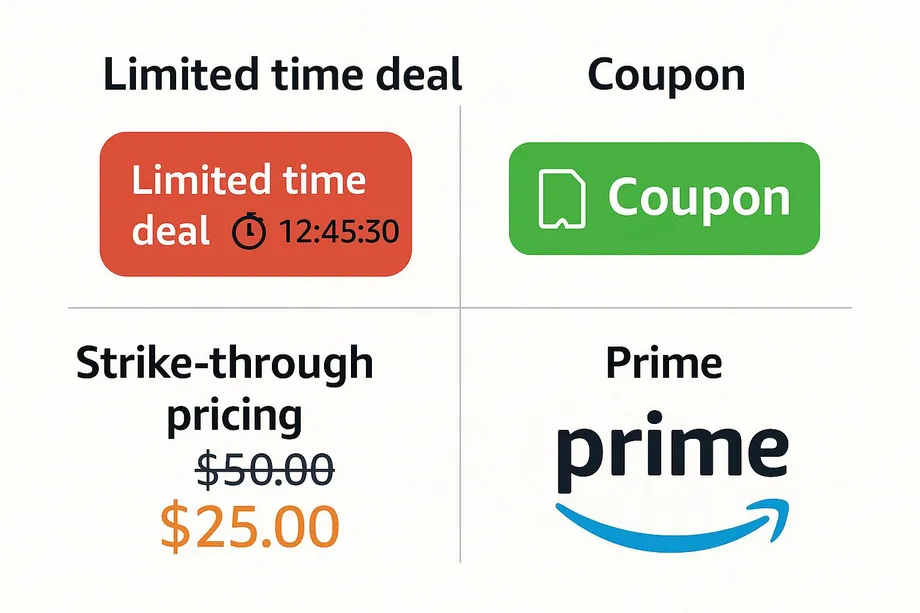
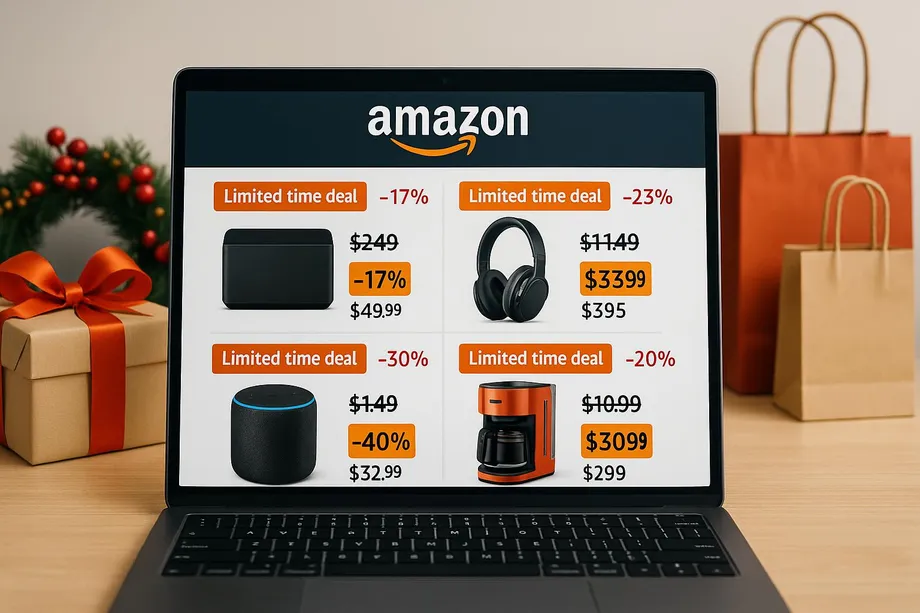
- Limited Time Deals & Lightning Deals: These are time-sensitive offers, often with a limited quantity available. You'll see a red "Limited time deal" badge, a countdown timer, and a progress bar showing how many have been claimed. They create a sense of urgency and are perfect for impulse buys on high-demand products.
- Coupons: Displayed as a green or orange badge, these require an extra click to "clip" the coupon. The discount is then applied at checkout. These are common for everyday items and can often be combined with other sales for maximum savings.
- Strike-Through Pricing: This is the most common type of discount, where Amazon shows the "List Price" or "Was Price" crossed out next to the new, lower price. It provides a clear, immediate visual of the savings.
A smart shopper combines these opportunities finding a product with a strike-through price that also has a clippable coupon is the ultimate holiday deal win.
The Seller's Strategy: Standing Out in a Crowded Market
For sellers, the holiday season is a double-edged sword. The potential for massive sales is enormous, but so is the competition. Running promotions is essential for visibility. Participating in events like Black Friday and Cyber Monday places your product in front of millions of shoppers on Amazon's highly-trafficked deals pages.
The key is to build a strategy that balances visibility with profitability. Sellers must account for Amazon's promotional fees, which have evolved over the years. The goal is to use deals to drive sales velocity, which in turn can improve your product's organic ranking and your chances of winning the coveted Buy Box long after the holiday banners come down.
The Developer's Toolkit: Extracting Deal Data with Easyparser
Manually tracking thousands of holiday deals is impossible. For repricing software, deal aggregators, or market analysis tools, programmatic access to this data is crucial. This is where an API like Easyparser becomes indispensable. The DETAIL operation can retrieve all the nuanced pricing and promotional data from a product page in a single, structured JSON response.
Let's look at how to identify deal information in the API response. The most critical data is located within the buybox_winner object.
Decoding the Easyparser `DETAIL` Response
When you make a request for a product on sale, the `buybox_winner` object contains all the pricing details. Here are the key fields to look for:
price: The current selling price.rrp: The "Recommended Retail Price" or "List Price." The difference betweenrrp.valueandprice.valueis the discount.deal_badge: An object that appears when a promotion like a "Limited time deal" is active. It contains the label and type of the deal.coupon: An object that provides details about a clippable coupon, including the discount amount or percentage and the coupon text.
Python Example: Fetching Product Deal Data
The following Python script demonstrates how to request product details for an ASIN and check for active deals using the Easyparser API.
import requests
import json
# Example ASIN for a product often on sale
product_asin = "B09G959DTR"
# Set up the request parameters for the DETAIL operation
params = {
"api_key": "YOUR_API_KEY",
"platform": "AMZ",
"domain": ".com",
"operation": "DETAIL",
"asin": product_asin
}
# Make the http GET request to Easyparser API
api_result = requests.get("https://realtime.easyparser.com/v1/request", params)
response_data = api_result.json()
# Check for and print deal information
buybox_winner = response_data.get("result", {}).get("detail", {}).get("buybox_winner", {})
if buybox_winner:
current_price = buybox_winner.get("price", {}).get("value")
list_price = buybox_winner.get("rrp", {}).get("value")
deal_badge = buybox_winner.get("deal_badge", {})
coupon = buybox_winner.get("coupon", {})
print(f"Current Price: {current_price}")
print(f"List Price: {list_price}")
if list_price and current_price:
savings = round(list_price - current_price, 2)
print(f"Savings: {savings}")
if deal_badge:
print(f"Active Deal: {deal_badge.get('label')}")
if coupon:
print(f"Available Coupon: {coupon.get('badge_text')}")
Sample JSON Output
Here is a simplified example of what the buybox_winner object might look like in the JSON response for a product with a "Limited time deal" and a coupon.
{
  "buybox_winner": {
    "price": {
      "value": 249.00,
      "currency": "USD",
      "symbol": "$"
    },
    "rrp": {
      "value": 299.00,
      "currency": "USD",
      "symbol": "$"
    },
    "deal_badge": {
      "label": "Limited time deal",
      "type": "DEAL_BADGE_TYPE_LIMITED_TIME_DEAL"
    },
    "coupon": {
      "badge_text": "Save $20.00 with coupon",
      "discount_amount": 20.00
    }
  }
}
Conclusion: Turning Holiday Chaos into Opportunity
Amazon's holiday shopping season is a complex ecosystem of discounts, promotions, and fierce competition. For shoppers, it's an opportunity to find amazing deals by looking beyond the surface. For sellers, it's a critical time to drive sales and growth through strategic promotions. And for developers, it represents a rich dataset that, when accessed with a powerful tool like Easyparser, can fuel automated, data-driven applications that provide a competitive edge. By understanding the data behind the deals, you can turn the chaos of the holiday season into a clear and actionable opportunity.
Holiday Deal Calendar: Key Amazon Events & Data Patterns
Amazon's promotional calendar follows predictable annual patterns, with several major events driving the most significant pricing activity of the year. Understanding when to monitor - and what data signals to expect - helps you build smarter, more proactive deal-tracking systems.
| Event | Typical Timing | Avg. Discount Depth | Key API Signals |
|---|---|---|---|
| Prime Day | July (2 days) | 20–50% off electronics | deal_badge active, countdown visible |
| Black Friday | Late November | 15–40% off broad categories | rrp vs price divergence peaks |
| Cyber Monday | Monday after Thanksgiving | 10–35% off tech & software | coupon badges spike across listings |
| Post-Holiday Clearance | Late Dec – January | 30–60% off seasonal goods | Prices drop below 90-day average |
A critical pattern to watch: in the weeks leading up to these events, Amazon and third-party sellers gradually inflate list prices (the rrp field) to make the eventual discount appear more dramatic. A robust deal detection system accounts for this by maintaining 60–90 day price baselines rather than relying solely on the displayed list price. Products with a genuine discount show a current price significantly below their real-world historical average, not just below an artificially inflated list price set last week.
Building a Holiday Deal Alert System
Rather than manually checking hundreds of product pages during the holiday rush, you can build an automated deal alert system using the Easyparser API. The following Python script monitors a list of ASINs, checks each for active deal_badge and coupon fields, and fires an alert when deals are found within your target price range.
import requests
WATCHLIST = [
{'asin': 'B09G959DTR', 'max_price': 200.00, 'name': 'Product A'},
{'asin': 'B0F25371FH', 'max_price': 35.00, 'name': 'Product B'},
]
def scan_for_deals(watchlist, api_key):
found = []
for item in watchlist:
params = {'api_key': api_key, 'platform': 'AMZ',
'operation': 'DETAIL', 'asin': item['asin'], 'domain': '.com'}
data = requests.get('https://realtime.easyparser.com/v1/request', params).json()
bw = data.get('result', {}).get('detail', {}).get('buybox_winner', {})
price = bw.get('price', {}).get('value')
deal_badge = bw.get('deal_badge', {})
coupon = bw.get('coupon', {})
if price and price <= item['max_price']:
alert = {'name': item['name'], 'asin': item['asin'], 'price': price}
if deal_badge: alert['deal'] = deal_badge.get('label')
if coupon: alert['coupon'] = coupon.get('badge_text')
found.append(alert)
return found
active_deals = scan_for_deals(WATCHLIST, 'YOUR_API_KEY')
for deal in active_deals: print(deal)
Run this script every 15–30 minutes during major sale events via a cron job or cloud function. Extend it by adding your notification logic - email via smtplib, Slack via an incoming webhook, or push notifications via Firebase - to get alerted the moment a product hits your target price with an active deal badge.
Bulk Deal Monitoring: Track Thousands of Products Before the Rush
For developers building deal aggregator platforms or repricing engines, individual API calls are not scalable during peak shopping events. The Easyparser Bulk API lets you scan hundreds of ASINs in a single async job, receiving all results via webhook when processing completes - typically under two minutes for 100 products. This makes it practical to run a full catalog scan every 30 minutes throughout Black Friday weekend.
import requests, json
def bulk_deal_scan(asin_list, api_key, webhook_url):
tasks = [{'platform': 'AMZ', 'operation': 'DETAIL',
'asin': asin, 'domain': '.com'} for asin in asin_list]
response = requests.post('https://realtime.easyparser.com/v1/bulk/create',
json={'api_key': api_key, 'callback_url': webhook_url, 'tasks': tasks})
return response.json()
# Your webhook handler filters results for active deals
def extract_active_deals(bulk_results):
deals = []
for item in bulk_results:
bw = item.get('result', {}).get('detail', {}).get('buybox_winner', {})
if bw.get('deal_badge') or bw.get('coupon'):
deals.append({
'asin': item.get('asin'),
'price': bw.get('price', {}).get('value'),
'deal_label': bw.get('deal_badge', {}).get('label'),
'coupon': bw.get('coupon', {}).get('badge_text')
})
return deals
By running bulk scans every 30 minutes during Black Friday weekend and feeding results into a deal leaderboard, you can surface the best live deals across your entire tracked catalog in near real-time - giving your users a significant advantage over those relying on manual browsing.
Price Inflation Detection: Spot Fake Holiday Deals
One of the most important consumer protection tools you can build is fake deal detection. Many sellers inflate their list prices (the rrp field) in the weeks before sale events, creating the appearance of a 40% discount that is, in reality, the product's normal price. The only reliable counter-measure is comparing the current price against genuine historical price data.
import sqlite3
def is_genuine_deal(asin, current_price, db_path='price_tracker.db'):
# Compare current price against 90-day price history
conn = sqlite3.connect(db_path)
rows = conn.execute(
'''SELECT price FROM prices WHERE asin = ?
AND ts > datetime('now', '-90 days') ORDER BY ts''',
(asin,)).fetchall()
if len(rows) < 10:
return None # Not enough history to evaluate
historical_prices = [r[0] for r in rows]
avg_90d = sum(historical_prices) / len(historical_prices)
min_90d = min(historical_prices)
discount_vs_avg = (avg_90d - current_price) / avg_90d * 100
is_year_low = current_price <= min_90d * 1.02
print(f'Current: ${current_price:.2f} | 90-day avg: ${avg_90d:.2f} | Min: ${min_90d:.2f}')
print(f'Discount vs historical avg: {discount_vs_avg:.1f}%')
print(f'Genuine deal (near year low): {is_year_low}')
return is_year_low and discount_vs_avg > 10
This function returns True only if the current price is near the 90-day low and represents a genuine discount versus the historical average. If a product is listed as '40% off' but its current price is identical to its average price over the last three months, the deal is misleading. Surfacing this analysis to users - or using it to filter alerts - dramatically improves the quality and trustworthiness of your deal tracking product.
Start building with the Easyparser API today
Start Your Free Trial100 free credits, no credit card required.