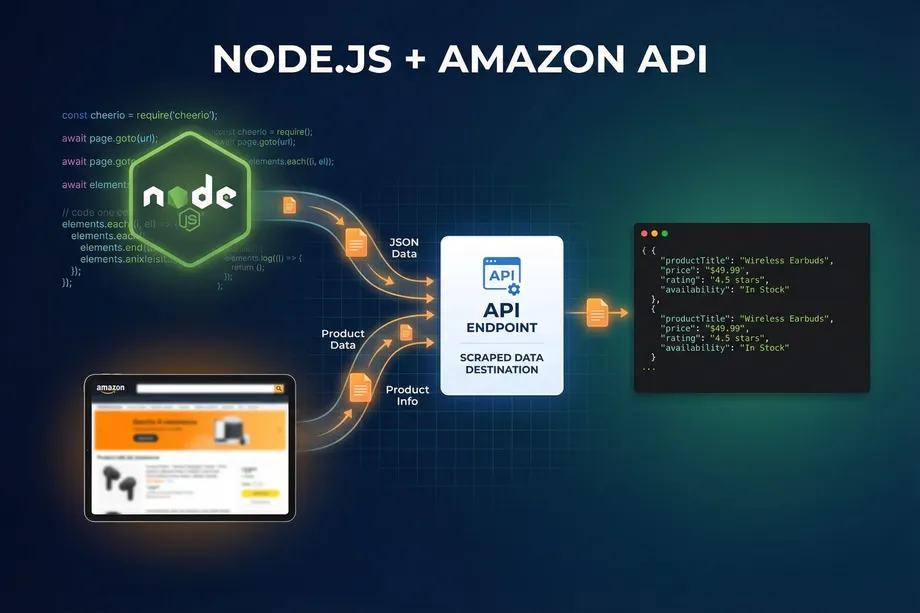
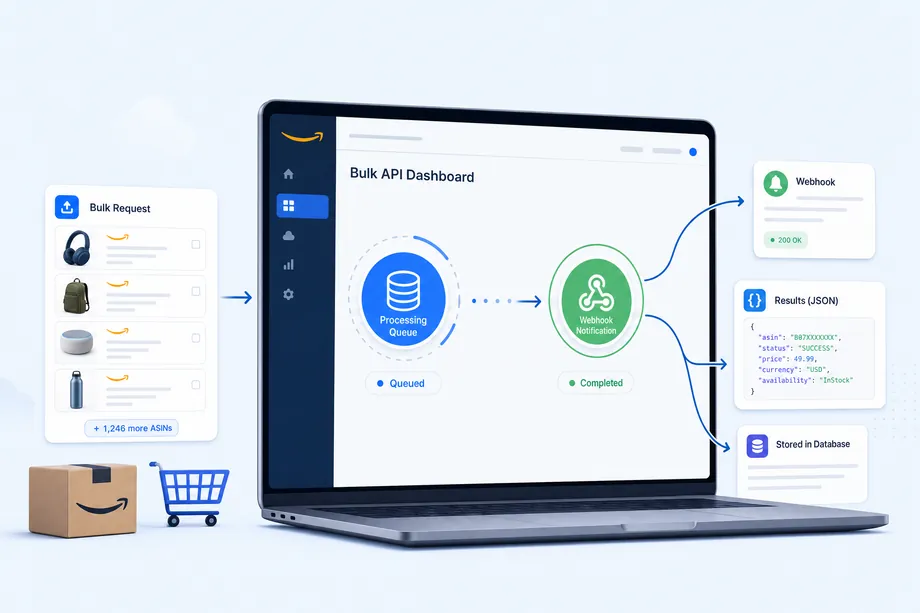
At 06:00, an e-commerce platform needs fresh data for 50,000 Amazon products. Buyers need current offers, sellers need catalog changes, and the pricing engine needs dependable inputs before the first customer arrives. A naive design sends 50,000 blocking requests, waits on every response, retries failures in the same process, and turns a routine refresh into a fragile all-day operation. The Easyparser Bulk API solves the coupling between submission, processing, notification and storage.
Instead of holding an HTTP connection open, your application submits a batch, records the identifiers returned by the Bulk Service, and continues. Easyparser processes each item asynchronously, calls your callback_url when result IDs are ready, and lets a worker retrieve final JSON from the Data Service. The official documentation specifies up to 5,000 items per request, a five-minute processing timeout and temporary result availability for up to 24 hours. [1] [2]
Quick Answer: When Should You Use the Easyparser Bulk API?
Use the Easyparser Bulk API for scheduled catalog refreshes, competitor monitoring, market research and enrichment jobs where nobody needs to wait for every item. Use Real-Time for one user-visible lookup, such as a product or offer request inside an interactive screen.
| Decision | Real-Time API | Bulk API |
|---|---|---|
| Best fit | One on-demand answer | Scheduled, high-volume work |
| Flow | Wait for the response | Submit, track, retrieve later |
| Notification | The HTTP response completes the call | Webhook signals readiness |
| Result | Returned in the same response | Fetched by result ID from Data Service |
How the Bulk API Model Works
An asynchronous API has two clocks: how fast your client submits work and how long the provider processes it. The Bulk Service creates the work, the background engine processes it, the callback announces readiness, and the Data Service exposes the completed record. The webhook is not the parsed Amazon data. It contains the query record and a links array pointing to the result, so the callback handler should enqueue retrieval rather than download thousands of documents itself.
The lifecycle is therefore: submit to POST https://bulk.easyparser.com/v1/bulk, persist the returned bulk_request_id and result IDs, accept the webhook, then call GET https://data.easyparser.com/v1/queries/{id}/results?format=json. This separation keeps schedulers responsive and makes result consumption restartable. [1] [3] [4]
When to Use Bulk API vs Real-Time API
Real-Time for Interactive Decisions
Real-Time is appropriate when the response directly controls a user-visible action. A comparison page may need one DETAIL record, or a repricing screen may need the current offers for one ASIN. It is also useful while validating an operation before moving it into a batch. Easyparser's Product Detail operation is a practical entry point for title, price, images, ratings and specifications.
Bulk for Scheduled Work
The Easyparser Bulk API is appropriate when the user does not need to wait. The batch boundary records input version, expected count and downstream status, while preserving successful work when some items are invalid or temporarily failed.
Submitting a Bulk Job: Request Structure and Parameters
The root identifies the platform, operation and Amazon marketplace domain. The nested payload contains plural arrays such as asins, urls or keywords, plus operation-specific options. The official request page lists optional controls such as language, currency, page, sorting, sponsored-result exclusion, cookies and offer filters. Validate the operation contract before submission. [2]
import requests
API_KEY = "YOUR_API_KEY"
payload = {
"platform": "AMZ", "operation": "DETAIL",
"domain": ".com",
"payload": {"asins": ["B098FKXT8L", "B0BR8J5M7X"]},
"callback_url": "https://api.example.com/easyparser/webhook"
}
response = requests.post("https://bulk.easyparser.com/v1/bulk", headers={"api-key": API_KEY}, json=payload, timeout=30)
response.raise_for_status()
The 5,000-item limit is an upper bound, not a target. Smaller batches isolate malformed input, while larger batches reduce overhead but increase timeout impact. For 50,000 products, ten batches of 5,000 are only one possible layout because DETAIL, OFFER and PACKAGE_DIMENSION create three operation items per product.
Reading the Initial Response: Accepted Items and Partial Success
The initial response is a control-plane document. meta_data reports bulk_request_id and counts, while data separates accepted, invalid, failed, insufficient_credit and rate_limit_exceeded. Accepted entries contain result IDs and credit values. A partially valid batch may still return success: true, so a boolean check alone is insufficient. [3]
| Outcome | Meaning | Action |
|---|---|---|
accepted | Queued with a result ID | Persist and retrieve later |
invalid | Validation rejected the input | Fix the value or field path |
failed | Server-side item failure | Retry with bounded attempts |
insufficient_credit | Not accepted for lack of credits | Resubmit after a funding decision |
rate_limit_exceeded | Plan per-minute limit was reached | Delay and resubmit affected items |
Persist the acceptance manifest before retrieval. Store input value, operation, domain, group ID, result ID, outcome, credit cost, attempts and timestamps. Credits are charged only for accepted items, so a nominal credit on a dropped item is not an actual charge.
Webhook Callbacks: Setting Up Your Endpoint
Your webhook endpoint must be public, HTTPS-enabled and able to return HTTP 200 within three seconds. Easyparser documents up to two additional deliveries at five-minute intervals when acknowledgement fails. The handler should read the raw body, verify the signature, record an event, enqueue result IDs and return. Do not fetch thousands of results before acknowledging the callback. [1]
Easyparser signs the raw body with HMAC-SHA256 using your API key and sends the hexadecimal digest in X-Easyparser-Signature. Re-serializing parsed JSON changes the bytes and can make a valid signature fail.
import hashlib, hmac
def valid(raw_body, received, api_key):
expected = hmac.new(api_key.encode("utf-8"), raw_body, hashlib.sha256).hexdigest()
return hmac.compare_digest(expected, received)
# Verify the untouched request bytes, not json.dumps(parsed_body)
Make the handler idempotent. Record a delivery fingerprint or query ID before returning 200, and make result upserts safe if the same event is delivered twice. HMAC protects integrity, but it does not replace authorization, TLS, secret management or access control.
Polling vs Webhooks: Which Approach Is Right?
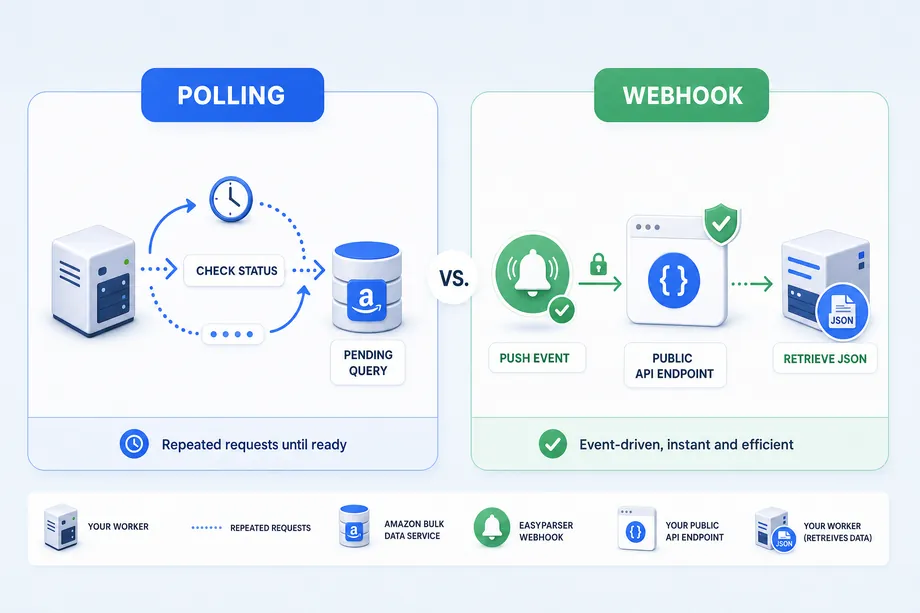
Polling asks for status at intervals; a webhook pushes a readiness event. Polling works when you cannot host an inbound endpoint, but it consumes calls and forces you to choose intervals and stop conditions. Webhooks reduce repeated checks and suit server-to-server pipelines, but the caller must operate a reachable endpoint. AWS summarizes the trade-off as simple polling versus faster, more operationally demanding callbacks. [6]
| Pattern | Use it when | Production rule |
|---|---|---|
| Polling | No inbound endpoint is possible | Use bounded backoff and keep stored IDs for recovery |
| Webhook | A service can receive callbacks | Verify, deduplicate, acknowledge fast, then queue retrieval |
| Hybrid | Reliability matters most | Use webhooks normally and reconcile missing events by ID |
Because query processing is independent of delivery, a reconciler can find accepted IDs with no stored result, check their status and enqueue only the missing work. Webhooks should be the normal path, not the only path.
Retrieving and Parsing Bulk Results
Use GET /v1/queries/{id} for the full query record and GET /v1/queries/{id}/results?format=json for only the parsed JSON. The documented statuses are pending, success and failure. Check status before reading result data. [4] [5]
import requests
def fetch_result(query_id, api_key):
headers = {"api-key": api_key}
record = requests.get(f"https://data.easyparser.com/v1/queries/{query_id}", headers=headers, timeout=30).json()
status = record["data"]["status"]
if status != "success": return {"status": status}
url = f"https://data.easyparser.com/v1/queries/{query_id}/results?format=json"
return requests.get(url, headers=headers, timeout=30).json()
Store both raw JSON and a normalized projection. Raw data allows reprocessing when your schema changes; normalized fields make price, availability and seller queries fast. Keep the marketplace domain and retrieval time because one ASIN can have different conditions across regions. The Product Offer operation is useful when seller, fulfillment and Buy Box data must stay separate from product identity.
Error Handling: Retrying Failed Items
Separate failure layers. A malformed request needs a code fix. An invalid item needs input correction. A server-side failure can be retried. A rate-limited item needs delay, while an insufficient-credit item needs a balance or plan decision. Never retry all 5,000 items because one value failed.
import time, random
def backoff(attempt):
return min(300, 2 ** attempt) + random.uniform(0, 1)
for attempt in range(4):
retryable = submit(only_failed_and_rate_limited)
if not retryable: break
time.sleep(backoff(attempt))
Keep a dead-letter queue for exhausted items and alert on a meaningful failure-rate threshold. Retries should be observable events with error details, not hidden loops. The official response arrays let you retry only the smallest useful set. [3]
Rate Limits and Concurrency Best Practices
Control submission, webhook handling and Data Service retrieval separately. The Data Service frequency limit is the plan's Bulk per-minute limit plus 20 percent, so an aggressive result worker can become the new bottleneck. Use a bounded worker pool, token bucket or queue, and add jitter so scheduled batches do not all start at the same second. For a five-minute job window, stop waiting at the boundary and let reconciliation handle missing IDs. [4]
Measure accepted operation items, successful results, retries, stored snapshots and unchanged records. Do not estimate credits from ASIN count alone when one product generates multiple operations.
Real-World Scale: Processing 50,000 ASINs Daily
For a marketplace refreshing 50,000 ASINs across the US, UK and Germany, an orchestrator first creates a versioned manifest, partitions it by operation and domain, submits batches within plan limits, and stores each bulk_request_id. It never waits for the data in the scheduler process.
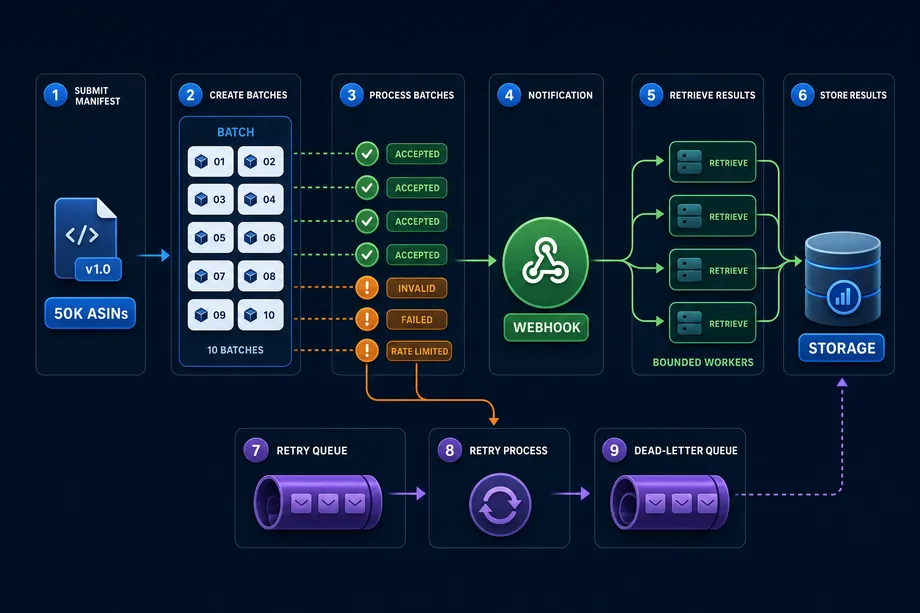
The callback layer verifies and deduplicates events, then publishes result IDs to a queue. Retrieval workers fetch JSON, store the raw object, update normalized tables and record freshness. Invalid, failed and rate-limited items go to separate queues. The Product Lookup operation can help reconcile EAN, UPC or GTIN values when an external catalog does not use ASINs.
| Layer | Record to keep | Question answered |
|---|---|---|
| Submission | Manifest version, batch ID, operation and domain | What did we send? |
| Acceptance | Outcome, result ID and credit cost | What was queued? |
| Delivery | Signature result, acknowledgement time and retry count | Did the callback arrive? |
| Retrieval | Status, attempts and storage key | Was JSON fetched before expiry? |
Cost Optimization: Credits and Batch Sizing
Cost optimization starts with accepted items, operation type and reprocessing rate. A two-pass workflow can use broad discovery first, then reserve richer DETAIL or OFFER calls for candidates. Version the input so an analyst can explain every second-pass decision.
Do not confuse requests, items and credits. The Bulk response separates accepted counts from dropped outcomes, and only accepted items are charged. Reconcile usage with the response instead of the length of the input array. [3]
Monitoring Jobs in the Easyparser Web App
Easyparser's frontend exposes /bulk-requests with filters for Bulk Request ID, operation, Amazon domain and status. The list shows total, completed, failed and invalid counts, refreshes every 30 seconds while focused, and links to Requests or Webhook Logs. Item detail exposes submitted value, status, errors, credit cost, completion time and successful result JSON.
The Webhook Logs view is separate because query success and delivery success are different signals. It exposes webhook URL, status, HTTP status code, response time, retry count, error details and sent time. This is a useful pattern for any operations console: show batch progress, item outcome, query status and callback health independently.
Production Checklist
- Submission: enforce the 5,000-item ceiling, validate plural payload keys and store a manifest.
- Tracking: persist bulk request IDs, group IDs, result IDs, outcomes and timestamps.
- Webhook: read raw bytes, verify
X-Easyparser-Signature, deduplicate and return 200 within three seconds. - Retrieval: check status, respect Data Service limits and fetch within the 24-hour availability window.
- Recovery: retry only retryable items, keep a dead-letter queue and reconcile missed callbacks.
- Security: keep the API key in a secret manager, require HTTPS and restrict raw-data access.
Conclusion: Design the Pipeline, Not Just the Request
The Easyparser Bulk API is a complete asynchronous system, not simply a larger synchronous call. Submit a bounded batch, persist its identifiers, accept a signed readiness event, retrieve through the Data Service, and separate invalid, failed and rate-limited items for targeted recovery.
For a 50,000-ASIN daily refresh, this design keeps schedulers responsive, makes webhook delivery measurable, limits retries to the smallest useful unit and preserves raw JSON for later analysis. Start with a small manifest, verify every transition in the Bulk Requests views, and increase batch and worker capacity only when plan limits, storage and quality checks are ready.
Start building with the Easyparser API today
Start Your Free Trial100 free credits, no credit card required.