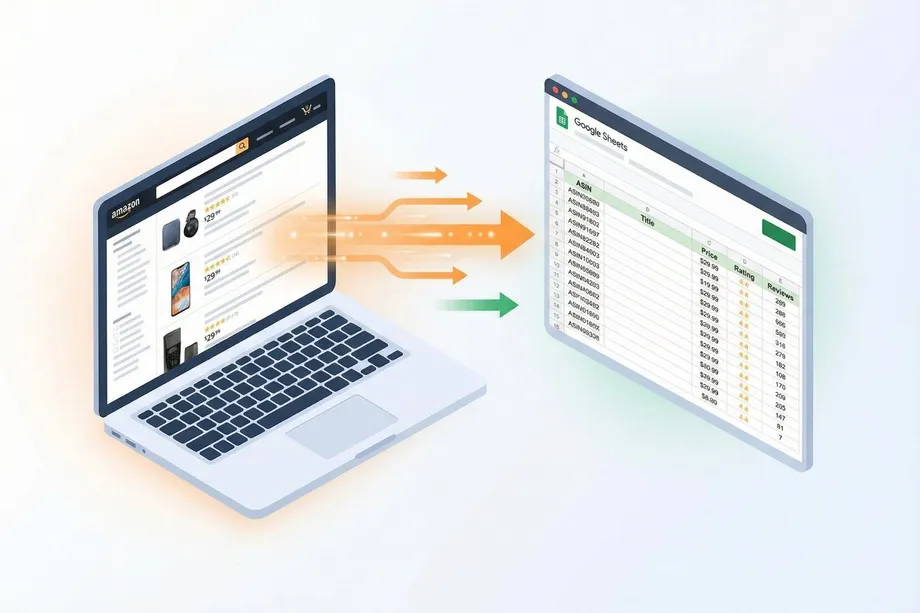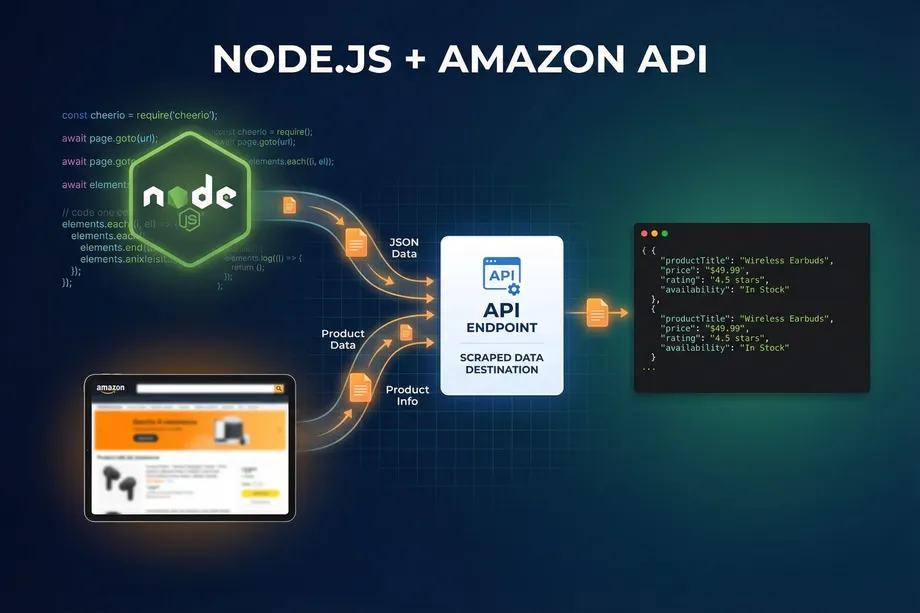
For developers and e-commerce businesses, programmatic access to Amazon's vast product catalog is a goldmine. Whether for competitive analysis, price tracking, or market research, effective node.js scraping amazon product data can provide a significant competitive edge. However, traditional web scraping methods that rely on parsing HTML are notoriously brittle, time-consuming, and frequently blocked by Amazon's sophisticated anti-bot measures. This tutorial provides a modern, reliable alternative: using a dedicated API to get structured JSON data directly, without the headaches of HTML parsing or proxy management.
This comprehensive guide covers everything you need to know about Amazon product data scraping with Node.js in 2026. We'll explain why direct API integration is superior to manual scraping and provide production-ready code examples using Axios, the native Fetch API, advanced async/await patterns, and scalable bulk data processing techniques. By the end, you'll have a complete toolkit for building a reliable Amazon data pipeline.
Why Traditional HTML Scraping Fails on Amazon
Before diving into the solution, it's worth understanding why the traditional approach to node.js scraping amazon pages is so problematic. When you attempt to scrape Amazon by fetching a product page and parsing the raw HTML with libraries like Cheerio or Puppeteer, you're fighting a losing battle on several fronts.
Amazon's HTML structure changes frequently and without notice. A CSS selector that correctly targets a product price today may return nothing tomorrow after a minor template update. This means your scraper requires constant maintenance, and any downtime in your data pipeline can have real business consequences. Beyond structural fragility, Amazon actively employs IP rate limiting, CAPTCHAs, browser fingerprinting, and JavaScript challenges to detect and block automated scrapers. Maintaining a fleet of rotating residential proxies and headless browsers is a complex and expensive infrastructure challenge that distracts from your core development goals.
A dedicated solution like Easyparser abstracts away this entire layer of complexity. Instead of fighting a constant battle with anti-scraping measures, you make a simple API call and receive clean, structured JSON data in return. The API provider handles all proxy management, anti-bot bypassing, and HTML parsing on their end. This approach is more reliable, scalable, and cost-effective for any serious data extraction project.
Setting Up Your Node.js Project
Before we start writing code for node.js scraping amazon data, make sure you have Node.js version 18 or higher installed. Node 18 is the minimum recommended version because it includes the native Fetch API, which we'll cover later. Let's create a new project directory and initialize it with the necessary dependencies.
mkdir node-amazon-api-project
cd node-amazon-api-project
npm init -y
npm install axios
We're installing Axios, a popular and powerful HTTP client for Node.js. While Node.js 18+ includes a built-in Fetch API, Axios offers a slightly more convenient syntax and more straightforward error handling out of the box, making it a great choice for API integration projects. We'll demonstrate both approaches in this tutorial so you can choose the one that fits your project best.
You'll also need an API key from Easyparser. You can get a free account with 100 credits per month at app.easyparser.com - no credit card required. This is enough to test all the examples in this tutorial.
Making Your First API Request with Axios
The Easyparser Real-Time API is the simplest way to start fetching Amazon product data. It accepts a GET request with your parameters as query strings and returns a structured JSON response immediately. Let's fetch the details for a single Amazon product using its ASIN (Amazon Standard Identification Number).
// product-detail.js
const axios = require('axios');
const API_KEY = 'YOUR_API_KEY'; // Get your key from app.easyparser.com
const BASE_URL = 'https://realtime.easyparser.com/v1/request';
async function getProductDetails(asin, domain = '.com') {
const params = {
api_key: API_KEY,
platform: 'AMZ',
operation: 'DETAIL',
domain: domain,
asin: asin
};
const response = await axios.get(BASE_URL, { params });
return response.data;
}
// Usage
getProductDetails('B098FKXT8L')
.then(data => {
console.log('Title:', data.product.title);
console.log('Price:', data.product.price);
console.log('Rating:', data.product.rating);
console.log('In Stock:', data.product.in_stock);
})
.catch(err => console.error(err.message));
The response from the DETAIL operation is a structured JSON object containing the product's title, price, brand, images, rating, review count, stock status, descriptions, and much more. All data points are consistently named across every request, so you can build your data pipeline with confidence that the schema won't change unexpectedly.
Using the Native Fetch API (Node.js 18+)
If you prefer to avoid external dependencies, Node.js 18 and above includes a built-in Fetch API that works very similarly to the browser's Fetch. Here's the same product detail request using native Fetch - no npm install required.
// product-detail-fetch.js (Node.js 18+, no dependencies)
const API_KEY = 'YOUR_API_KEY';
async function getProductDetailsFetch(asin) {
const params = new URLSearchParams({
api_key: API_KEY,
platform: 'AMZ',
operation: 'DETAIL',
domain: '.com',
asin: asin
});
const url = `https://realtime.easyparser.com/v1/request?${params}`;
const response = await fetch(url);
if (!response.ok) {
throw new Error(`HTTP error: ${response.status}`);
}
return response.json();
}
getProductDetailsFetch('B098FKXT8L')
.then(data => console.log(data.product.title));
Both Axios and Fetch are excellent choices for this use case. Axios automatically parses JSON responses and provides slightly more informative error messages when a request fails. The native Fetch requires you to check `response.ok` manually and call `response.json()` separately. For most production applications, Axios is the more convenient choice, but Fetch is perfectly capable for simpler scripts.
Async/Await Patterns for Fetching Multiple Products
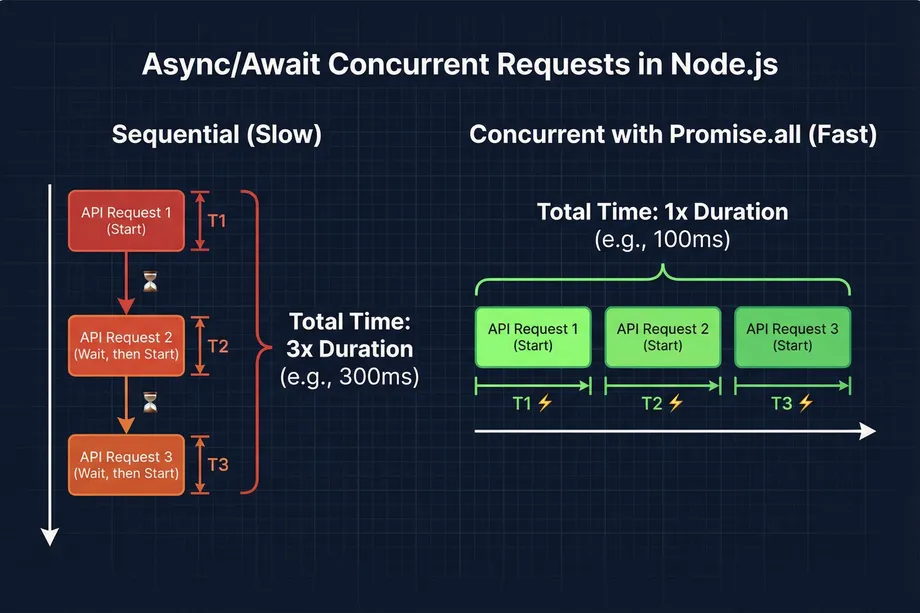
When you need to fetch data for a list of products, running requests sequentially is inefficient. Each request takes time to complete, and waiting for one to finish before starting the next means your total execution time grows linearly with the number of products. By using `Promise.all`, we can run multiple requests concurrently, dramatically speeding up the data collection process. This is a key pattern for any serious node.js scraping amazon workflow.
// concurrent-scraping.js
const axios = require('axios');
const API_KEY = 'YOUR_API_KEY';
const BASE_URL = 'https://realtime.easyparser.com/v1/request';
async function fetchProduct(asin) {
const response = await axios.get(BASE_URL, {
params: { api_key: API_KEY, platform: 'AMZ', operation: 'DETAIL', domain: '.com', asin }
});
return response.data.product;
}
async function scrapeMultipleProducts(asins) {
console.log(`Fetching ${asins.length} products concurrently...`);
// Run all requests in parallel with Promise.all
const products = await Promise.all(
asins.map(asin => fetchProduct(asin))
);
products.forEach(product => {
console.log(`- ${product.title}: $${product.price}`);
});
return products;
}
const productAsins = [
'B098FKXT8L',
'B08C7D7S3P',
'B08J5V63S3',
'B09G9FPHY6'
];
scrapeMultipleProducts(productAsins);
Using `Promise.all` means all four requests are dispatched simultaneously. If each request takes 500ms, the sequential approach would take 2,000ms total, while the concurrent approach takes approximately 500ms - the time of the single slowest request. For larger lists, this performance difference becomes even more pronounced.
Production Error Handling and Retry Logic
In a production environment, you must anticipate failures. Network issues, temporary API unavailability, or rate limit responses can cause requests to fail. Implementing a retry mechanism with exponential backoff is essential for building a resilient data pipeline. The following pattern retries a failed request up to three times, doubling the wait time between each attempt.
// retry-handler.js
async function fetchWithRetry(asin, maxRetries = 3) {
let lastError;
for (let attempt = 1; attempt <= maxRetries; attempt++) {
try {
const response = await axios.get(BASE_URL, {
params: { api_key: API_KEY, platform: 'AMZ', operation: 'DETAIL', domain: '.com', asin }
});
return response.data; // Success - return immediately
} catch (error) {
lastError = error;
if (attempt < maxRetries) {
const delay = 1000 * Math.pow(2, attempt - 1); // 1s, 2s, 4s
console.warn(`Attempt ${attempt} failed for ${asin}. Retrying in ${delay}ms...`);
await new Promise(res => setTimeout(res, delay));
}
}
}
throw lastError; // All retries exhausted
}
Bulk Data Processing with the Easyparser Bulk API
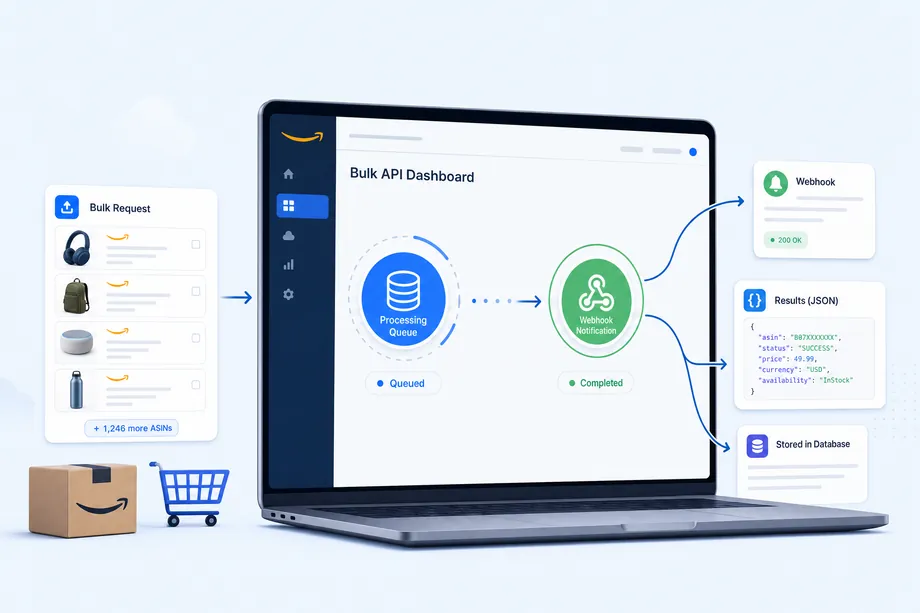
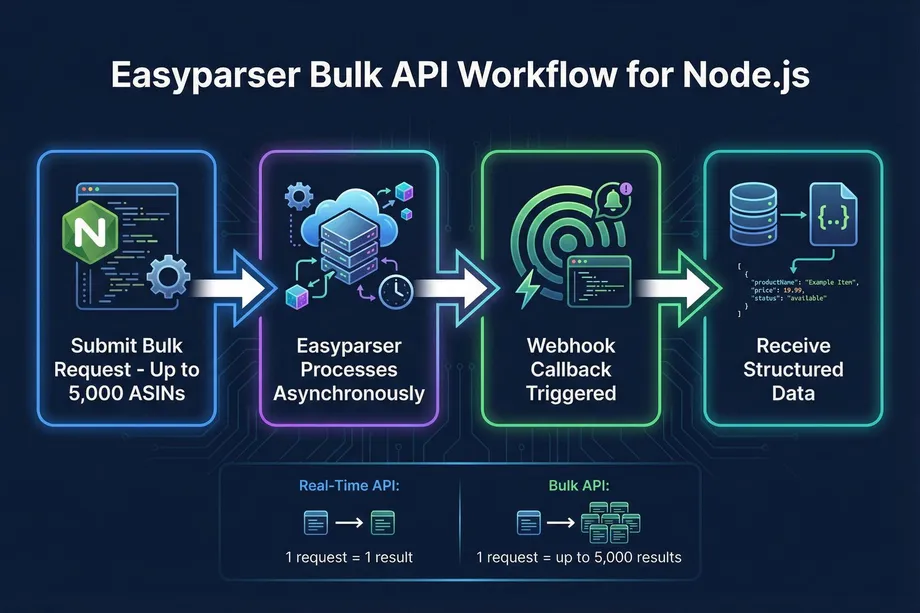
For very large-scale jobs involving hundreds or thousands of products, even concurrent real-time requests can be inefficient. This is where the Bulk API provides a significant advantage. You submit a single POST request with a list of up to 5,000 ASINs and provide a webhook URL. The API processes the job asynchronously and sends the results directly to your webhook endpoint once completed, eliminating the need for polling.
// bulk-scraper.js
const axios = require('axios');
const API_KEY = 'YOUR_API_KEY';
async function startBulkJob(asins, webhookUrl) {
const payload = [{
platform: 'AMZ',
operation: 'DETAIL',
domain: '.com',
payload: { asins: asins },
callback_url: webhookUrl
}];
const headers = {
'api-key': API_KEY,
'Content-Type': 'application/json'
};
try {
const response = await axios.post(
'https://bulk.easyparser.com/v1/bulk',
payload,
{ headers }
);
console.log('Bulk job submitted! Job IDs:', response.data);
return response.data;
} catch (error) {
console.error('Bulk job submission failed:', error.message);
throw error;
}
}
// Submit a job with up to 5,000 ASINs
const largeAsinList = ['B098FKXT8L', 'B08C7D7S3P', 'B08J5V63S3'];
startBulkJob(largeAsinList, 'https://your-app.com/webhook/results');
When the bulk job completes, Easyparser sends a POST request to your webhook URL with the structured product data. This webhook-driven pattern is ideal for scheduled data refresh jobs, nightly catalog updates, or any workflow where you don't need the data immediately. Your application simply listens for the webhook and processes the incoming data when it arrives.
Scraping Amazon Search Results with Node.js
Beyond product detail pages, the SEARCH operation lets you extract entire search result pages by keyword or URL. This is invaluable for market research, finding new products in a niche, or monitoring how your products rank for specific search terms. The following example demonstrates how to use the SEARCH operation in a node.js scraping amazon context.
// search-scraper.js
async function searchAmazonProducts(keyword, domain = '.com') {
const response = await axios.get(BASE_URL, {
params: {
api_key: API_KEY,
platform: 'AMZ',
operation: 'SEARCH',
domain: domain,
keyword: keyword
}
});
const results = response.data.results || [];
console.log(`Found ${results.length} products for: ${keyword}`);
results.forEach((item, index) => {
console.log(`${index + 1}. ${item.title} - $${item.price} (ASIN: ${item.asin})`);
});
return results;
}
searchAmazonProducts('wireless earbuds');
Multi-Marketplace Support: Scraping Amazon Globally
One of the most powerful features of the API-based approach is seamless multi-marketplace support. Easyparser supports all major Amazon marketplaces through the `domain` parameter. Switching from amazon.com to amazon.co.uk or amazon.de is a single parameter change - no proxy configuration, no geo-targeting setup, no additional infrastructure required.
| Marketplace | Domain Parameter | Use Case |
|---|---|---|
| United States | .com | Primary market, highest volume |
| United Kingdom | .co.uk | European English market |
| Germany | .de | Largest European market |
| Canada | .ca | North American expansion |
| France | .fr | French-speaking market |
| Japan | .co.jp | Asia-Pacific market |
| Italy | .it | Southern European market |
| Spain | .es | Spanish-speaking market |
For businesses operating across multiple Amazon marketplaces, this makes building a unified data pipeline straightforward. You can use the same Node.js code to collect product data from any supported marketplace, simply by changing the `domain` parameter in your request.
Available Amazon Data Operations
The Easyparser API provides a comprehensive set of operations that go far beyond basic product details. Each operation is designed for a specific data use case, and all are accessible through the same endpoint and authentication pattern. This consistency makes it easy to expand your node.js scraping amazon project to cover new data types without learning a new API or integration pattern.
| Operation | Data Returned | Best For |
|---|---|---|
DETAIL | Title, price, images, rating, stock, specs | Product enrichment, price tracking |
OFFER | All seller offers, prices, shipping details | Buy Box monitoring, competitive pricing |
SEARCH | Search result listings with summaries | Keyword research, market discovery |
SALES_ANALYSIS | 12-month price, BSR, and review history | Trend analysis, investment due diligence |
BEST_SELLERS_RANK | Best Sellers Rank in main and sub-categories | Sales velocity estimation, niche tracking |
PACKAGE_DIMENSION | Height, width, length, weight, fee category | FBA fee calculation, logistics planning |
PRODUCT_LOOKUP | EAN, UPC, GTIN to ASIN and ASIN to EAN, UPC, GTIN conversion, identifier-based lookup | Catalog matching, inventory sync, product identification |
SELLER_PROFILE | Seller legal info, feedback trends | Supplier verification, brand protection |
Storing and Processing Scraped Data
Once you have your product data, you'll want to store it for analysis or use it in your application. The following example shows how to save the results of a multi-product scrape to a JSON file, which can then be imported into a database, spreadsheet, or data analysis tool.
// save-to-json.js
const fs = require('fs');
async function scrapeAndSave(asins, outputFile) {
const products = await Promise.all(
asins.map(asin => fetchProduct(asin))
);
const output = {
scraped_at: new Date().toISOString(),
total_products: products.length,
products: products
};
fs.writeFileSync(outputFile, JSON.stringify(output, null, 2));
console.log(`Saved ${products.length} products to ${outputFile}`);
}
scrapeAndSave(['B098FKXT8L', 'B08C7D7S3P'], 'products.json');
Production Best Practices for Node.js Amazon Scraping
Building a reliable, long-running node.js scraping amazon pipeline requires attention to several production concerns beyond just making API calls. The following best practices will help you build a system that is maintainable, cost-efficient, and resilient to failures.
First, always store your API key in an environment variable rather than hardcoding it in your source code. Use a `.env` file with the `dotenv` package for local development, and use your deployment platform's secret management for production. This prevents accidental exposure of your credentials in version control.
Second, implement concurrency control when processing large lists of products with the Real-Time API. While `Promise.all` is efficient, firing hundreds of requests simultaneously can overwhelm your system's network connections. Use a library like `p-limit` to cap the number of concurrent requests at a sensible level, such as 10 to 20 at a time, while still processing much faster than sequential requests.
Third, for any job processing more than a few hundred products, prefer the Bulk API over the Real-Time API. The Bulk API is designed for high-volume workloads and is more efficient both in terms of your code's complexity and the API's processing capacity. The webhook-based callback pattern also means your application doesn't need to maintain a long-running connection while waiting for results.
Fourth, implement structured logging in your scraping scripts. Log the ASIN, the operation type, the response time, and any errors that occur. This makes it much easier to diagnose issues when something goes wrong in production and helps you identify patterns in failures.
Start Scraping Amazon with Node.js Today
Get structured Amazon product data in minutes with Easyparser's free plan - 100 credits per month, no credit card required. All the operations covered in this tutorial are available immediately after signup.
Get Free API KeyView DocumentationStart building with the Easyparser API today
Start Your Free Trial100 free credits, no credit card required.