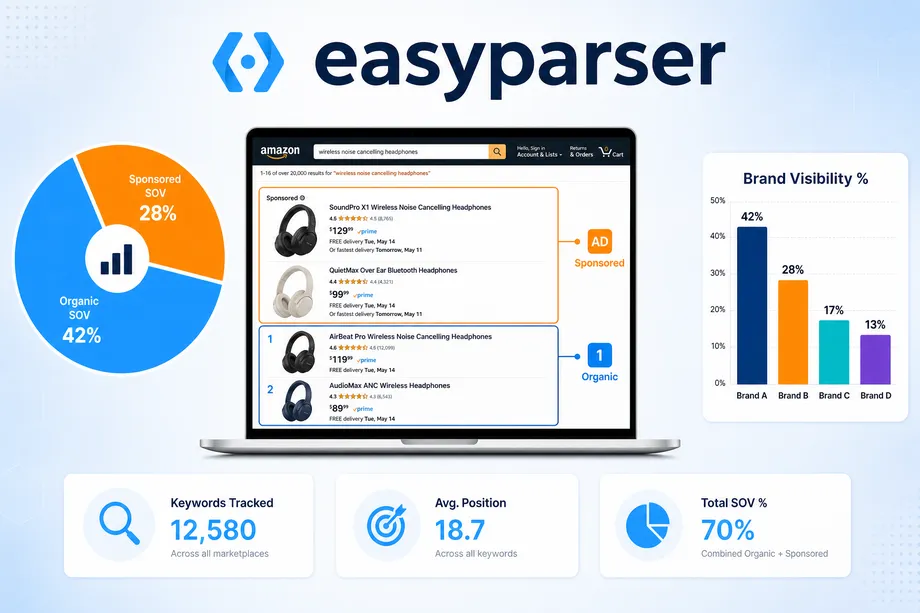

Amazon search is dynamic. A listing can move from position 4 to position 11 between two checks because of advertising, price changes, inventory pressure, delivery location, or shifts in conversion rate. Checking a few terms manually once a week is therefore not a reliable measurement system. It is a snapshot with no history, no comparable baseline, and no alert when an important competitor takes a valuable position.
A practical amazon keyword rank tracking api workflow solves this problem by collecting the same search results on a consistent schedule, storing the ranking positions, and highlighting movements that deserve action. This guide shows how to use Easyparser SEARCH data to track organic and sponsored positions, build a rank-history database, detect anomalies, connect ranking data to BSR and sales signals, and distribute a daily report to your team.
Why Amazon Keyword Rank Tracking Matters
For Amazon SEO, the first use case is validation. When a listing title, bullet point, image, price, or backend search term changes, a rank-history chart makes it possible to compare visibility before and after the change. The second use case is competitive intelligence. If a rival enters the top results or begins to occupy prominent sponsored placements, the team can assess the shift before it affects sales for an extended period.
How Easyparser's SEARCH API Returns Rank Data
The amazon keyword rank tracking api begins with a clean search-results snapshot. Easyparser's Amazon Search Results API retrieves ranked product listings for a keyword or search URL, including organic results, sponsored placements, ASINs, titles, prices, ratings, review counts, Prime indicators, availability, and position data. This gives you the full page context instead of a single isolated rank.
That context matters. If your ASIN moves from position 8 to position 12, the question is not only where your listing moved. You also need to know which items replaced it, whether they are sponsored, whether their price is lower, and whether they are out-of-stock tomorrow.
Use the same request settings for every snapshot. Choose the marketplace domain deliberately, use the same keyword spelling, and preserve the same address setting when testing local availability. Consistency reduces false movement caused by different inputs. The SEARCH operation supports a simple keyword input and can also use an Amazon search URL, but keywords are usually easier to standardize in automated schedules.

What to capture from every query
At a minimum, store the keyword, your ASIN, the observed position, the placement type, the timestamp, and the marketplace. For a stronger competitive view, also record the title, price, rating, review count, Prime status, availability, and the ASINs that appear above your product. These extra fields help explain why a rank changed instead of merely reporting that it did.
Tracking Organic vs Sponsored Positions
Organic and sponsored visibility must be measured separately. Organic positions are unpaid listings that Amazon displays based on its assessment of relevance and performance. Sponsored positions are paid placements. Both can generate visibility, but they describe different mechanisms and require different responses.
Imagine a product holding organic position 5 for a profitable term. If three new sponsored ads appear above it, the organic rank may remain 5 while the visible area above the fold becomes more crowded. A report that tracks only organic rank would miss this change. Conversely, a sponsored position can disappear because a campaign is paused even when the product's organic relevance is unchanged. Keeping two columns prevents these signals from being confused.
| Measure | Organic rank | Sponsored rank | Decision use |
|---|---|---|---|
| Source of visibility | Listing relevance and performance | PPC bid and campaign eligibility | Separate SEO from ad decisions |
| Cost per visit | No direct click cost | Paid per advertising model | Evaluate customer acquisition efficiency |
| Main change trigger | Conversion, inventory, relevance, competition | Bid, budget, targeting, competitor activity | Choose the right owner and action |
| Reporting cadence | Daily trend review | Daily for priority terms, weekly for the rest | Reduce blind spots in search visibility |
For each priority keyword, track your own product and a small group of direct competitors. A simple rule is to include competitors with similar price points, product features, ratings, and fulfillment method. Tracking unrelated leaders adds noise. Tracking only your own ASIN hides the reason you lost or gained ground.
Setting Up a Rank Tracking Database
A database does not need to be complicated to be useful. A Google Sheet or Airtable base is enough for a small brand. A SQL table is more appropriate when the portfolio contains thousands of keyword-ASIN pairs. In either case, append a new record for every observed keyword and date. Do not overwrite yesterday's position. The history is the asset.
Start with a simple model: one row per keyword, ASIN, placement type, and capture date. Add a unique key for those four fields to avoid duplicate snapshots. Keep a separate keyword table for priority, owner, category, and target rank. Keep an event log for changes such as a title rewrite, campaign launch, price adjustment, stockout, coupon, or holiday. The event log makes future analysis much more trustworthy.
| Field | Why store it | Example use |
|---|---|---|
| keyword | Defines the search demand being measured | Group changes by category or intent |
| asin | Identifies your listing or competitor | Compare the same products over time |
| placement_type | Separates organic and sponsored observations | Measure paid versus earned visibility |
| position | Stores the observed search order | Calculate daily and weekly movement |
| captured_at | Preserves the timing of the snapshot | Build rank-history charts |
| price and availability | Adds commercial context | Investigate movement after stock or price shifts |
Your keyword list should originate from a defined SEO strategy rather than a random collection of broad terms. Use the related Amazon SEO keyword research guide to organize terms by relevance, purchase intent, search volume, and stage of the customer journey. Then assign a priority tier. A top-tier keyword deserves a same-day alert; a long-tail discovery term may only need a weekly review.
Detecting Rank Changes and Anomalies
Once a dataset contains several days of history, calculate change metrics. The simplest is day-over-day movement: yesterday's position minus today's position. A positive value means an improvement because position 4 is better than position 10. Also calculate a seven-day average and a seven-day range. These measures make it easier to see whether a change is a one-day fluctuation or part of a sustained pattern.
Use thresholds that fit the keyword's business value. For a high-revenue term, an alert when organic rank drops five or more positions in a day can be appropriate. For a lower-priority term, a ten-position weekly drop may be enough. Add a persistence rule such as "alert only after two consecutive declines" if your category is volatile. This prevents teams from reacting to every small shift.
Rank volatility is another useful metric. A stable keyword has a narrow weekly range, while a volatile keyword changes frequently. Volatility can reveal aggressive competitor advertising, frequent stockouts, new product launches, or a category in which Amazon tests listings rapidly. It should change the confidence you place in each daily observation, not just the urgency of an alert.
A practical alert framework
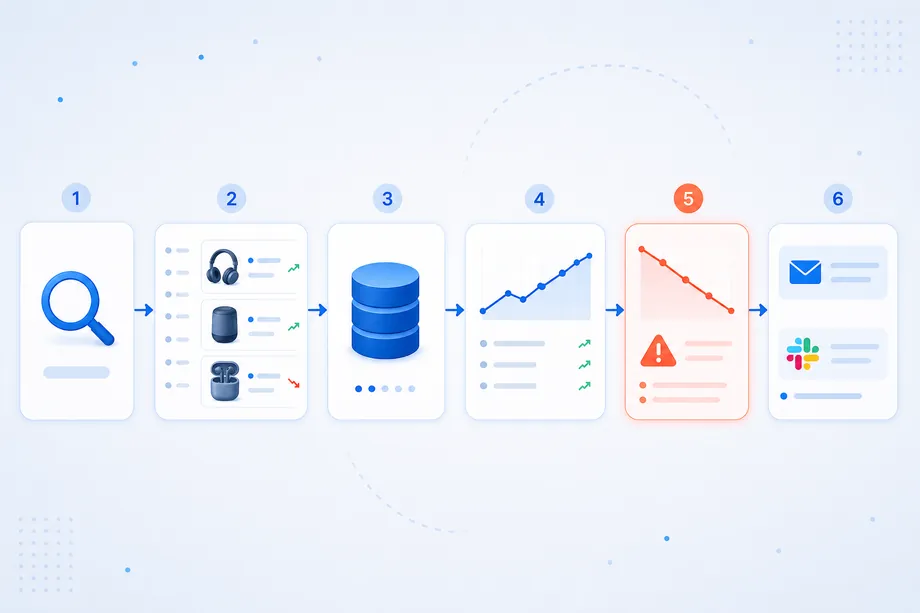
Flag a term when one of three events occurs: a priority ASIN falls beyond a target position, an organic rank drops by a threshold for multiple days, or a competitor enters the top ten after being absent. Include the old position, new position, placement type, competitor ASINs above the listing, and a link to the latest snapshot in the alert. An alert without context creates more work; an alert with context supports a decision.
Correlating Rank Changes with BSR and Sales
Rank is a visibility measure, not a complete performance measure. It becomes more useful when it is compared with business outcomes. An organic position may decline while sales and category performance improve. That could mean the algorithm is temporarily reordering listings, not that your product has become less attractive. In contrast, a rank decline combined with slower sales, lower conversion, or worse category standing requires attention.
Overlay keyword rank with price changes, inventory, advertising spend, conversion rate, units sold, and Best Sellers Rank. Easyparser's Best Sellers Rank operation can add category-level context for an ASIN. Capture both data points on the same schedule, then compare direction and timing. If rank drops but BSR improves, avoid assuming a visibility problem. If both worsen over several days, investigate the listing, stock, price, reviews, and competitor activity.
Correlation is not proof of causation. A rank change may follow a title update, but that does not prove the title caused it. Keep an event log and compare multiple observations before declaring a rule. The goal is to build an operational hypothesis: "When availability falls below our usual level, rankings decline for category terms within two days." That hypothesis can then be tested through future data.
Building a Keyword Rank Dashboard
Your dashboard should help someone decide what to do next in less than five minutes. Begin with four panels: the largest organic drops, the largest organic gains, new competitor entries in the top ten, and keywords where sponsored competitors have increased their presence. Add filters for marketplace, ASIN, category, owner, and priority tier.
Use trend lines instead of only current positions. A current rank of 8 means little by itself. A line that moves from 3 to 8 over seven days shows a persistent decline; a line that bounces between 6 and 9 suggests normal volatility. Add annotations for events such as price changes, PPC launches, image updates, or stock issues. This gives the team a way to connect action to observed results.
For a basic implementation, Google Sheets and Looker Studio are enough. For a larger portfolio, store the data in a warehouse that feeds a business-intelligence tool. Raw results should be stored, daily changes calculated, and meaningful movements ranked by impact.
Automating Daily Rank Reports
Automation prevents rank monitoring from becoming an abandoned spreadsheet. An n8n workflow can run on a daily schedule, read the priority keyword list, request a fresh SEARCH snapshot, find the tracked ASIN in each result set, write the normalized record to your database, compare it with the previous snapshot, and send a concise report to Slack or email.
Request example: collect one keyword snapshot
The request below uses the documented SEARCH operation. Keep the domain in top-level format, use the keyword exactly as it appears in your tracking list, and keep a single address setting for repeatable local testing.
import requests
API_KEY = "YOUR_API_KEY"
KEYWORD = "wireless earbuds"
params = {
"api_key": API_KEY,
"platform": "AMZ",
"operation": "SEARCH",
"domain": ".com",
"keyword": KEYWORD
}
response = requests.get("https://realtime.easyparser.com/v1/request", params=params, timeout=60)
response.raise_for_status()
snapshot = response.json()
Processing example: normalize before storing
Exact API response fields can evolve, so normalize them at the edge of your workflow. Map the returned product records to your own stable database columns, then keep the raw response separately for audit purposes. This means a dashboard query does not break when a source field is added or renamed.
def to_rank_record(keyword, product, position, captured_at):
return {
"keyword": keyword,
"asin": product.get("asin"),
"position": position,
"placement_type": "sponsored" if product.get("is_sponsored") else "organic",
"price": product.get("price"),
"available": product.get("availability"),
"captured_at": captured_at
}
For an amazon keyword rank tracking api workflow at scale, use a daily schedule for normal monitoring and queue the target keywords in batches. Save failed requests for retry, record the query parameters with every snapshot, and separate data collection from reporting. These safeguards make it easier to diagnose a missing report without confusing a technical failure with an actual rank change.
Case Study: Turning Daily Snapshots into Better Decisions
Consider an illustrative seller tracking 40 priority keywords across eight ASINs. Before automation, the seller checked rankings manually every Friday. A competitor entered the sponsored top results for three high-converting terms, but the change was not found until sales had been softer for more than a week. The seller knew the outcome but not the timing or cause.
After adding automated daily snapshots, the seller received an alert after two consecutive sponsored visibility changes. The report showed the new competitor ASINs, their price range, their placement type, and the affected keywords. Instead of raising bids across every campaign, the seller redirected PPC spend to the three threatened terms, reviewed the listing's title and images, and monitored the trend for seven days. At the same time, the dashboard identified keywords with stable high organic placement where paid spend could be reviewed.
The important result was not a universal ranking guarantee. It was a faster, evidence-based workflow. The team reduced manual checking, saw threats earlier, and had enough context to test a response deliberately instead of reacting to a single number.
Final Checklist for Amazon Keyword Rank Tracking
Before launching your system, confirm that your target keyword list is prioritized, your requests use stable marketplace and location settings, your database preserves every daily snapshot, organic and sponsored placements are separate, alert thresholds reflect keyword value and volatility, and the dashboard connects rank with price, inventory, BSR, sales, and advertising data. Review the workflow weekly at first and refine it as you learn how your category behaves.
A well-designed amazon keyword rank tracking api does not replace judgement. It gives that judgement timely evidence. Start with ten meaningful keywords and one or two products, validate that the snapshots match what you expect to see, then scale the system across your portfolio. Over time, the history will reveal the patterns, competitors, and listing opportunities that a manual weekly check cannot show.
Start monitoring your competitors for free
Start Your Free Trial100 free credits, no credit card required.