
Amazon seller research often begins with a familiar routine: search a keyword, open a few listings, compare prices, and read the first page of reviews. That routine feels productive, but it mixes several different entities. A seller is not a product, a product review is not seller feedback, and a low price is not proof of a healthy opportunity.
A useful study keeps each layer separate, records when and where the evidence was captured, and reconnects the layers only when making a decision. This guide presents seven methods for sellers, buyers, agencies, wholesalers, and data teams that need a research process they can repeat and defend.
Quick answer
- Best starting point: Define one marketplace, one customer intent, and one decision before collecting data.
- Best seller-level workflow: Use SellerExport to discover seller profiles, map known seller catalogs, and organize time-bounded seller feedback.
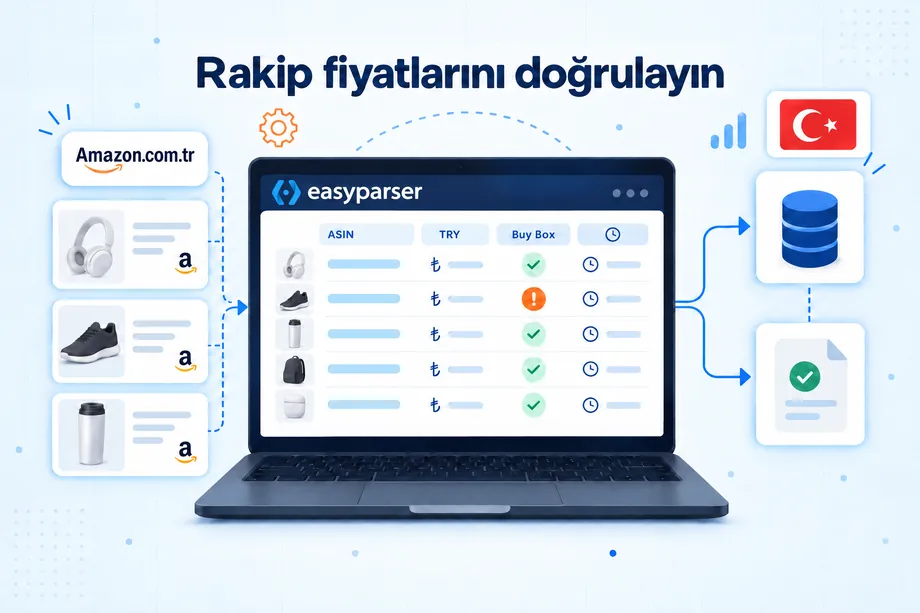
- Best product-level enrichment: Use Easyparser for selected ASIN identifiers, current listing details, and the active offer landscape.
- Best operating habit: Save source URLs, capture dates, confidence notes, and decision thresholds so each update can be compared with the last snapshot.
At a glance: a comparison
| Method | Question answered | Core evidence | Best for | Cadence |
|---|---|---|---|---|
| 1. Market definition | Which sellers belong in the study? | Keywords, categories, visible offers, buyer intent | Scoping | Quarterly or before a new project |
| 2. Seller Profiles | Who sells in the target search? | Seller identifiers, profile details, ratings, search context | Discovery and outreach lists | Monthly |
| 3. Seller Products | What does a known seller list? | ASINs, titles, brands, categories, prices, ratings | Assortment and overlap analysis | Monthly or quarterly |
| 4. Seller Feedbacks | What service risks appear recently? | Feedback text, rating, date, selected time window | Supplier and competitor vetting | Weekly for high-risk sellers |
| 5. ASIN enrichment | What is happening at product and offer level? | Identifiers, listing details, active offers, fulfillment | Shortlisted products | On demand or daily |
| 6. Scorecard | Which opportunity deserves action? | Normalized demand, competition, economics, risk | Prioritization | At each decision gate |
| 7. Monitoring loop | What changed enough to matter? | Dated snapshots and trigger rules | Ongoing operations | Weekly and monthly |
How we evaluated these methods
The strongest method is not the one that produces the most rows. It is the one that answers a defined question with enough context to support an action. We evaluated each method on coverage, freshness, exportability, repeatability, geographic scope, and the distance between a raw field and a business decision.
Keep an evidence ledger before interpreting any result. At minimum, record marketplace, query_or_seller_id, seller_id, asin, source_url, captured_at, observation, confidence, and next_action. Sales estimates, BSR-derived demand, and third-party scores should be labeled as estimates rather than facts. Pricing quoted in this article was checked on September 13, 2026 and may change.
1. Define the market before collecting seller data
Good Amazon seller research starts with a boundary. Choose one marketplace, a small set of buyer queries, the category or subcategory, and the decision you need to make. A wholesale buyer might ask which merchants appear consistently for a product family. A brand team might ask which sellers repeatedly offer its ASINs. A competing seller might ask which catalogs overlap with a planned assortment.
Build a seed set from Amazon keyword results, Best Sellers, New Releases, Movers & Shakers, or ASINs already known to the team. Do not combine every visible seller into one undifferentiated list. Preserve the query, result page, product, offer position, and capture date that led you to each seller. That provenance lets you explain why a merchant belongs in the study and reproduce the discovery later.
2. Build Seller Profiles with SellerExport
SellerExport's first research path, Seller Profiles, starts with an Amazon keyword or search URL. Before running the scan, you can select the marketplace and result-page count, then narrow the seller set by Featured Offer status, delivery method, new-condition offers, or Prime visibility.
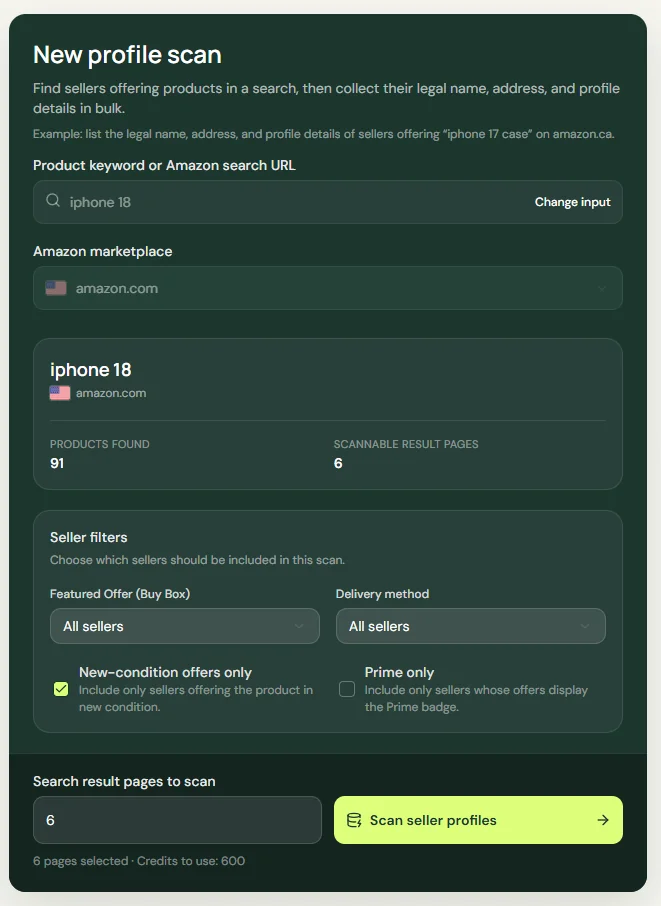
The setup screen makes the research scope visible before collection begins. Record the keyword, marketplace, selected pages, and filters in your evidence ledger so the scan can be reproduced. Seller Profiles charges 100 credits per completed Amazon search-result page, which makes a focused pilot more useful than an unbounded category scan.
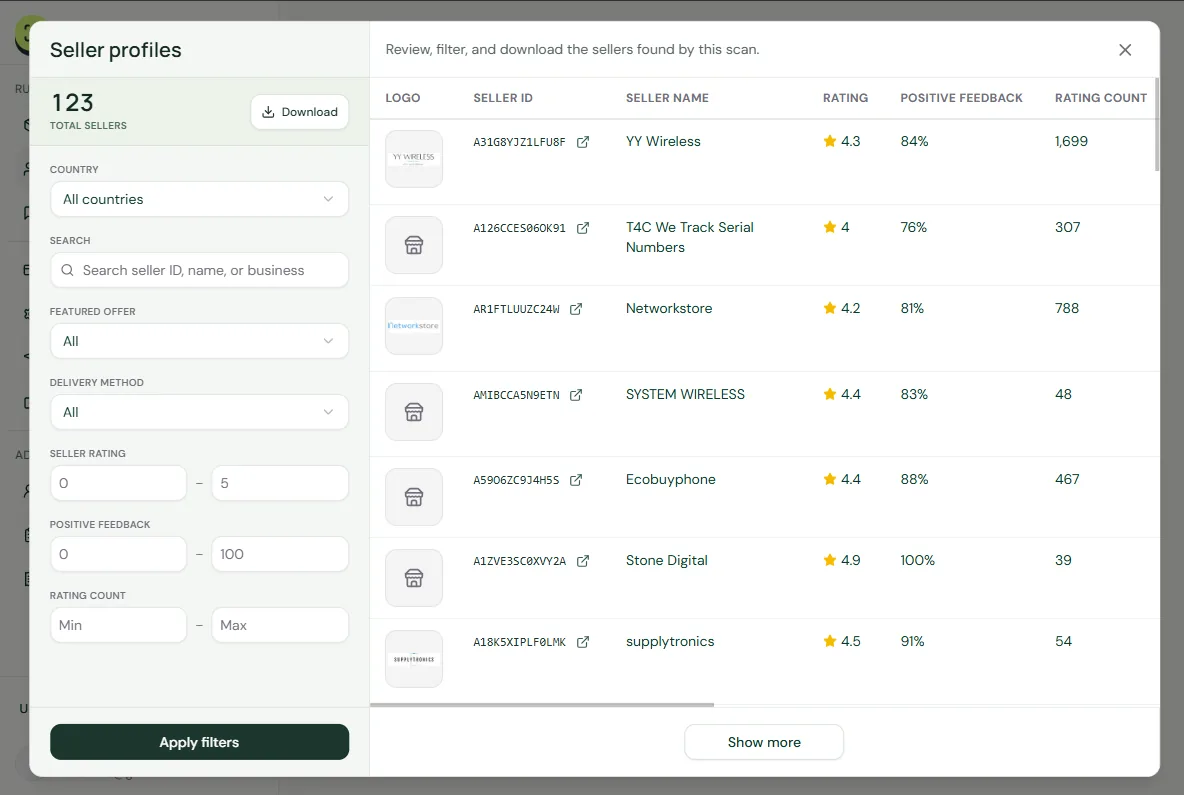
After the scan, the results view supports review, filtering, and download. Each visible row connects a Seller ID and seller name with rating, positive feedback, and rating count. The filter panel can narrow the table by country, seller identity or business text, Featured Offer status, delivery method, seller rating, positive feedback, and rating count.
This produces a category-level seller set instead of a shortlist based on one listing. Treat each profile as an index, not a verdict: preserve the discovery query and capture date, compare recent evidence, and route selected merchants into catalog and feedback analysis before making a sourcing, outreach, or competitive decision.
Start with 100 free credits every month
Create an account with no credit card and use the starter balance for your first seller research scan.
Explore SellerExportNew accounts currently receive 100 free credits every month, and the current pricing page lists a one-time pack of 50,000 credits for $5 with no subscription. Scope the query and offer conditions before running broader scans so each credit answers a defined research question.
3. Map a full catalog with Seller Products
The second SellerExport capability, Seller Products, starts from a Seller ID or Amazon seller profile URL. It verifies the storefront, lets the researcher choose marketplace and collection scope, and returns an export-ready catalog that can be filtered after collection. Typical fields include ASIN, title, brand, category, price, rating, review count, Prime status, availability, image URL, and scan timestamp.
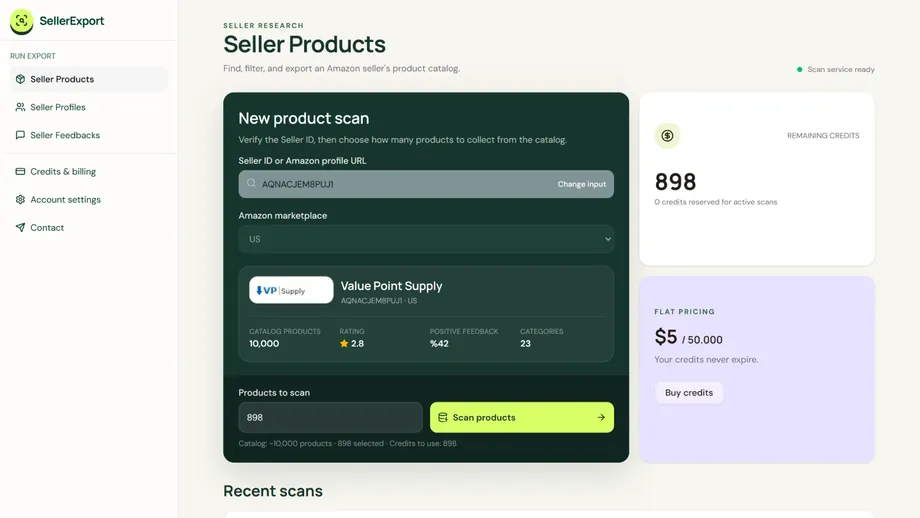
A full catalog view answers questions that isolated listing checks cannot. Calculate catalog breadth by distinct parent products, category concentration by share of ASINs, brand concentration by share of listings, and assortment overlap against your own catalog. Separate parent and child variations where the source exposes that relationship, and deduplicate repeated ASINs before counting breadth.
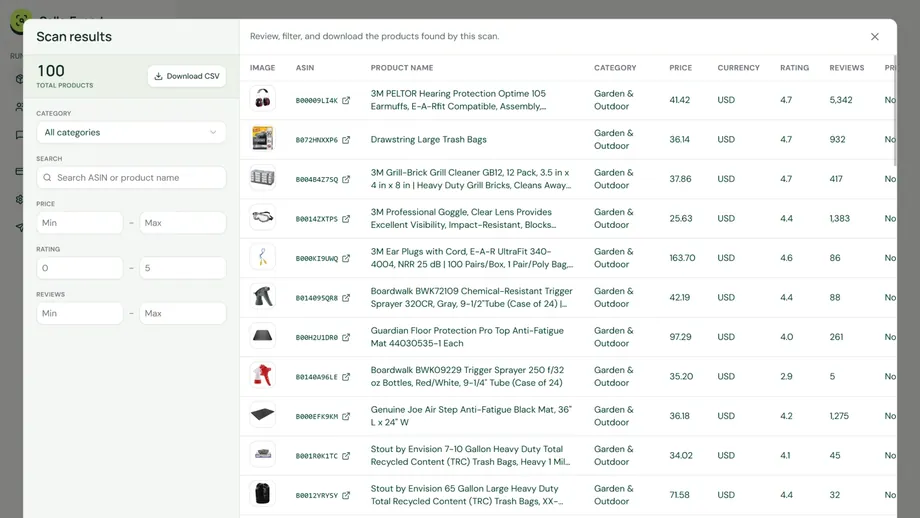
Seller Products is charged per unique product collected, so a controlled pilot is useful. Start with one known seller, collect enough rows to inspect the field quality, then expand the scope. Save the raw export unchanged, create a cleaned working table, and document every transformation. This prevents a later analyst from confusing missing products with products removed from the marketplace.
4. Separate Seller Feedbacks from product reviews
The third SellerExport capability, Seller Feedbacks, begins with a seller and a selected recent period, such as the last 30 or 90 days. It organizes feedback records by time range and rating group, with fields such as rating, date, message text, and seller context. Current pricing charges five credits per collected feedback record.
Seller feedback describes the transaction experience: delivery, packaging, communication, and service. Product reviews describe the item tied to an ASIN: quality, fit, durability, features, and value. Mixing the two creates bad conclusions. A weak product can be sold by an excellent operator, while a strong product can be handled by a seller with recurring fulfillment problems.
Use two evidence columns in your research table. The buyer column should capture product-review themes, objections, desired features, and use cases. The seller column should capture service themes, recent negative-feedback concentration, rating distribution, and the dates of the records reviewed. Do not infer a long-term trend from a short sample. Label the selected time window and the number of records behind every conclusion.
5. Enrich shortlisted ASINs with Easyparser
SellerExport is effective for building export-ready seller, catalog, and feedback datasets. Easyparser is useful when the shortlist needs current product and offer context. Keep this step narrow: enrich only the ASINs that survived the earlier filters, then write the returned fields back to the same evidence ledger.
The Easyparser Product Lookup operation can resolve ASIN, UPC, EAN, ISBN, JAN, MINSAN, and GTIN identifiers in both directions. It can also return title, brand, manufacturer, links, and images, which helps normalize supplier files against Amazon records.
Use the Product Detail operation for current listing evidence such as title, brand, pricing, availability, images, specifications, variations, category context, and Prime eligibility. Use the Product Offer operation when the decision depends on active sellers, pricing, fulfillment type, discounts, shipping details, seller ratings, or Buy Box ownership.
This creates a practical division of labor. SellerExport helps answer who the sellers are, what a known seller lists, and what recent feedback says. Easyparser adds targeted product and offer depth for the ASINs worth investigating. Both real-time and bulk modes are available in Easyparser, but the research design should decide the mode: use on-demand requests for a small shortlist and asynchronous collection for a scheduled high-volume dataset.
6. Turn observations into a seller scorecard
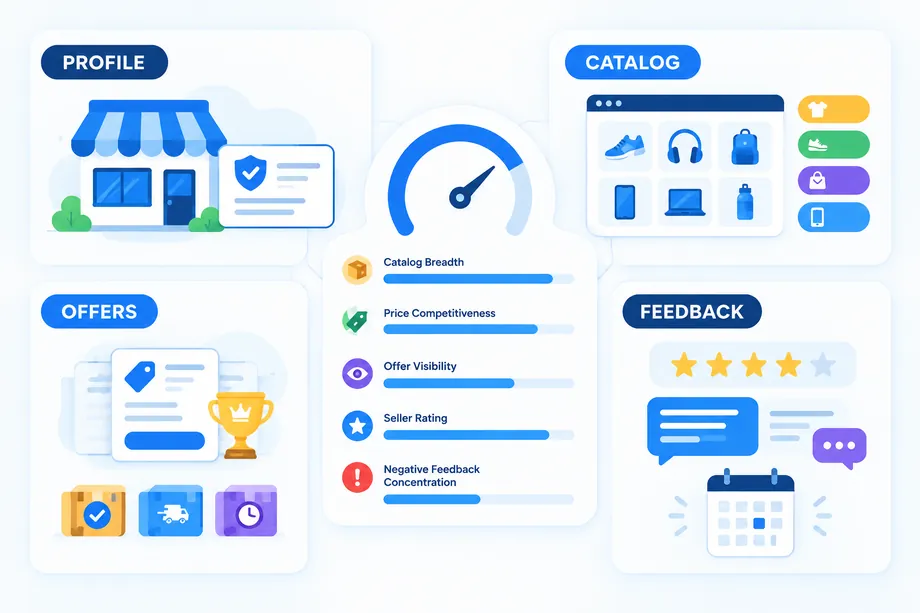
A scorecard prevents the loudest metric from controlling the decision. For a general competitor or supplier study, use six dimensions that total 100 points: demand 20, competitive position 15, catalog fit 15, offer economics 20, seller risk 20, and evidence confidence 10. Change the weights before collecting results, not after seeing which seller wins.
| Dimension | Weight | Example evidence | High score means |
|---|---|---|---|
| Demand | 20 | Keyword intent, BSR context, reviews, observed availability | The market has repeatable buyer interest |
| Competitive position | 15 | Search visibility, listing quality, seller density | The opportunity has a defensible entry point |
| Catalog fit | 15 | Assortment overlap, category focus, brand concentration | The seller or product fits the strategic thesis |
| Offer economics | 20 | Price spread, shipping, fulfillment, fees, landed cost | The expected margin survives realistic costs |
| Seller risk | 20 | Recent feedback, service themes, rating stability | Operational risk is controlled |
| Evidence confidence | 10 | Coverage, freshness, source agreement, missing fields | The conclusion is supported by current evidence |
Normalize each dimension to a 0-100 scale, multiply it by its weight, and sum the results. Treat missing data as lower confidence rather than silently replacing it with a favorable average. A useful decision policy might mark 75 and above as "advance to validation," 55-74 as "hold and collect missing evidence," and below 55 as "reject for now." These are workflow defaults, not universal market truths.
7. Make Amazon seller research a monitoring loop
One export is a snapshot. A repeatable Amazon seller research system compares snapshots and acts only when a change crosses a defined threshold. Keep weekly checks narrow: priority sellers, key ASINs, current offers, recent negative feedback, and stock or price changes. Use monthly checks for catalog breadth, category mix, seller discovery, and scorecard updates.
Define triggers before monitoring. Examples include a new seller appearing for three priority ASINs, a material increase in negative feedback concentration, a catalog moving into a protected category, an offer price falling below your margin floor, or a product disappearing from two consecutive snapshots. Assign each trigger an owner and one allowed response, such as investigate, reprice, contact a supplier, hold replenishment, or update a watchlist.
Buyer and seller decision guide
| Persona | Prioritize | Do not overvalue | Best next action |
|---|---|---|---|
| Wholesale buyer | Recent seller feedback, identity context, catalog consistency | One strong product rating | Shortlist, verify terms, and request a small test order |
| Private-label seller | Buyer complaints, feature gaps, price spread, offer density | A single BSR snapshot | Validate differentiation and full unit economics |
| Brand protection team | Seller discovery, catalog overlap, repeated offers | Storefront name alone | Preserve evidence and route cases by policy |
| Agency or aggregator | Repeatable exports, confidence notes, change history | Untraceable screenshots | Standardize the client-ready evidence schema |
| Marketplace buyer | Recent service feedback, fulfillment context, price | Lifetime rating without recency | Compare recent records and delivery terms |
For buyers, the most useful question is "What could go wrong in this transaction?" For sellers, it is "Where can I compete without copying a listing that already dominates?" The same dataset can support both questions, but the weights should differ. Buyers should raise the seller-risk weight; sellers should raise demand, differentiation, and economics.
If I started today
- Write one decision sentence. For example: "Identify three reliable sellers in the US marketplace for a wholesale outreach test."
- Choose five buyer queries. Save the marketplace, search URL, and capture date for each.
- Run one Seller Profiles pilot. Review whether the returned records support the decision before expanding pages.
- Export one known seller's catalog. Deduplicate ASINs and calculate category and brand concentration.
- Collect a recent feedback sample. Keep seller feedback separate from product reviews and label the time window.
- Enrich only the shortlist. Add identifiers, product details, and offer conditions where they change the decision.
- Score and document. Record assumptions, missing evidence, the decision, owner, and review date.
Bottom line
Amazon seller research becomes reliable when seller identity, catalog composition, active offers, product evidence, and seller feedback remain separate until the decision stage. SellerExport provides three practical, export-ready paths for discovering seller profiles, mapping catalogs, and reviewing recent feedback. Easyparser can then add current identifier, product, and offer context to the shortlisted ASINs.
The competitive advantage is not a larger spreadsheet. It is a dated, reproducible chain from question to evidence to score to action. Start with one marketplace and one decision, test the workflow on a small sample, and expand only after the output changes what your team does.
Start monitoring your competitors for free
Start Your Free Trial100 free credits, no credit card required.