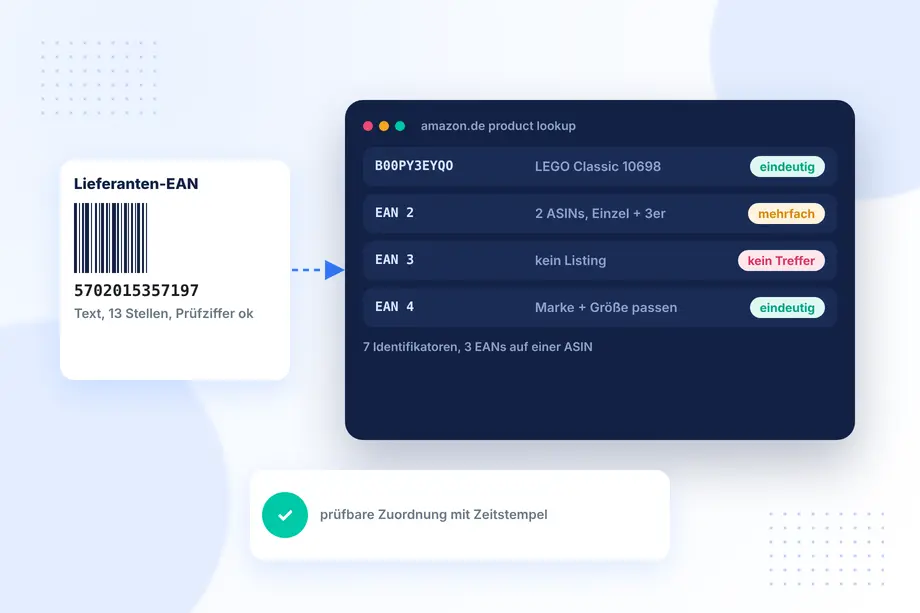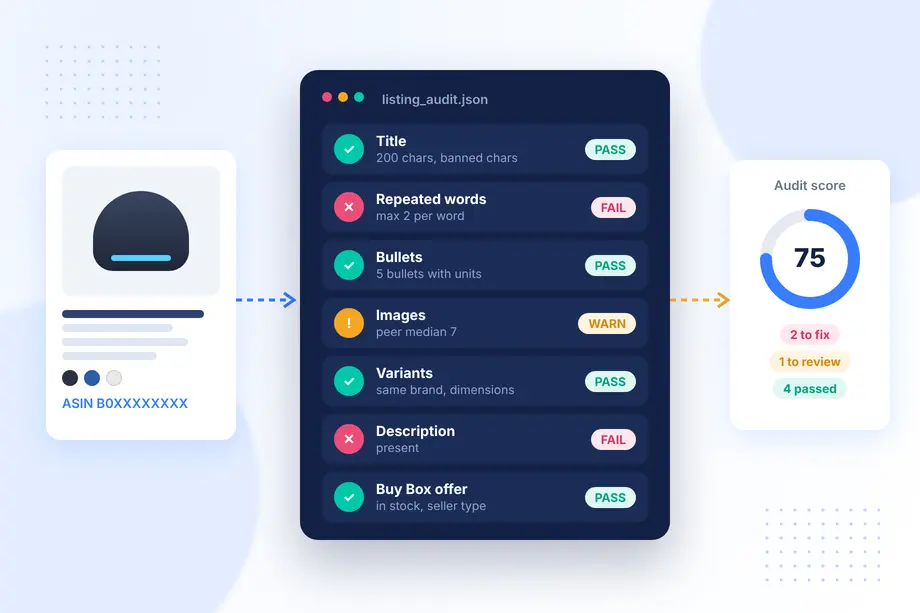
Most teams start an amazon listing audit the same way: someone opens a product page, scrolls through the title, bullets, and image carousel, and writes notes in a spreadsheet. That works for five ASINs. It breaks at fifty, and it becomes guesswork at five hundred, because nobody can prove later what the page actually showed on the day it was reviewed. Two reviewers looking at the same listing will also disagree about what "too long" or "missing" means.
This guide turns the audit into a repeatable data workflow. You will define an audit schema, collect comparable product and offer data for a sample of ASINs, run rule-based checks, rank the findings by evidence, and route the uncertain cases to a person. The goal is not a magic score. The goal is a defensible list of fixes that a brand, agency, or catalog team can act on and re-check next month.
Quick Answer: How to Run an Amazon Listing Audit at Scale
Treat every listing as a record, not a web page. Capture the same fields for every ASIN, timestamp the capture, and compare each field against explicit rules. Then sort the results by severity and confidence. The table below summarizes the workflow this article walks through.
| Stage | What you do | Output |
|---|---|---|
| 1. Scope | Pick marketplace, ASIN sample, and audit questions | Audit brief |
| 2. Schema | Define fields and rules for titles, bullets, images, variants, offers | Versioned rule set |
| 3. Collect | Pull structured product and selected-offer data per ASIN | Timestamped snapshots |
| 4. Check | Run rules and compare against peers in the same category | Flag list per ASIN |
| 5. Prioritize | Rank flags by severity, confidence, and business weight | Ordered fix queue |
| 6. Review | Send ambiguous flags to a human with the captured evidence | Approved fixes and exceptions |
What an Amazon Listing Audit Can and Cannot Prove
A listing audit compares what a product page shows against a standard. That standard can be a marketplace policy, a brand guideline, or the norm among close competitors. It can reliably prove that something is present, absent, inconsistent, or outside a defined limit. A title that runs past 200 characters, a listing with three images where peers average eight, a variant family where one child has a different brand name: these are facts you can show with a screenshot or a JSON field.
An audit cannot prove that fixing those issues will raise sales by a specific amount. Conversion depends on price, reviews, advertising, stock, and seasonality as well as content. Be explicit about this in your report. Present findings as "this field does not meet the rule" and "peers in this category do X," not as "this will add 20 percent revenue." That honesty is what makes the audit credible to the people who have to approve the work.
It also helps to separate two kinds of findings. Compliance findings are rule breaks that can lead to suppression or rewrites, such as banned characters in a title. Quality findings are gaps relative to best practice or competitors, such as thin bullets. Compliance findings usually go first because their risk is concrete.
Separate Product-Page Audits from Seller-Account Audits
The word "audit" covers two very different jobs on Amazon. A seller-account audit looks inside Seller Central: account health, inventory reports, advertising spend, search terms, fees, and reimbursements. It needs account access and is usually run by the seller or their agency.
A product-page audit, which this guide covers, looks at what shoppers can see on the public detail page. It does not need account credentials, so it works equally well for your own catalog, a client prospect, a retailer checking vendor listings, or a brand watching resellers. Because it is based on public data, you can run it on competitors too and use them as the benchmark.
| Product-page audit | Seller-account audit | |
|---|---|---|
| Data source | Public detail page and offers | Seller Central reports |
| Access needed | None beyond the ASIN | Account login or API authorization |
| Covers competitors | Yes | No |
| Typical questions | Is the content complete, compliant, consistent? | Is the account healthy and profitable? |
Keep the two separate in your deliverables. Mixing them leads to reports where half the recommendations cannot be verified by the reader.
Define a Reusable Audit Schema for Titles, Bullets, Images, and Variants
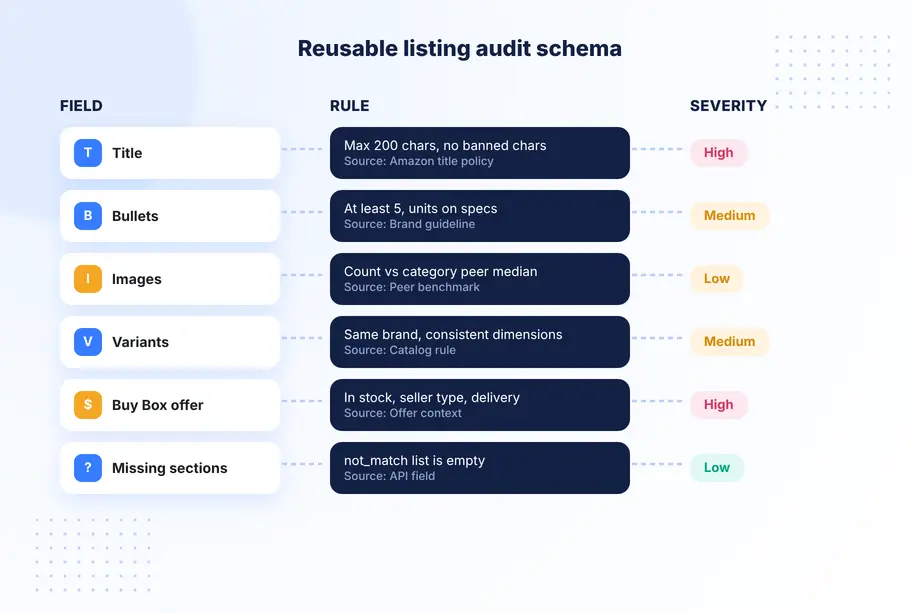
The schema is the heart of the workflow. It lists every field you check, the rule for that field, the severity if it fails, and where the value comes from. Write it once, version it, and reuse it for every audit so results stay comparable over time.
Title rules
Amazon's title policy for most categories caps titles at 200 characters including spaces, bans characters such as !, $, ?, _, {, } and ^ unless they are part of the brand name, and limits any single word to two appearances (articles, prepositions, and conjunctions excluded). Those three checks are easy to automate. Add your own quality rules on top: the brand appears at the start, the first 80 characters contain the product type, and the title does not repeat the variant name twice.
Bullet rules
Count the bullets, measure each one, and look for empty or duplicated text. Five bullets is the common standard. Check that units are present where specifications are claimed, and flag promotional phrases such as "best seller" or "free shipping" that do not belong in product content.
Image rules
Count images, confirm that a main image exists, and check whether a video or 360 view is present. Compare the image count against the category median of your peer set. A listing with three images in a category where peers use eight is a clear, evidence-backed finding.
Variant rules
Variant families hide many problems. Check that every child ASIN shares the same brand, that the variation dimensions (color, size, pack count) are named consistently, and that the current child is marked correctly. A family where one child has a different brand or an orphaned dimension value is worth a manual look.
Offer context
Content is not the whole page. Capture the selected Buy Box offer as well: price, availability, seller type (Amazon, FBA, or merchant fulfilled), and delivery promise. A perfect listing that shows "Currently unavailable" or a third-party seller with a slow delivery date still loses the sale, and the audit should say so.
Collect Comparable Product and Selected-Offer Context
Comparability is what turns a list of observations into an audit. Every ASIN should be captured from the same marketplace, with the same delivery location, in the same time window, using the same fields. Otherwise you end up comparing a US price with a UK price, or a page captured before a content update with one captured after.
The Easyparser Product Detail API returns the full detail page as structured JSON: title, feature_bullets with feature_bullets_count, the images array, variants, rating, ratings_total, bestsellers_rank, A+ content flags, and the buybox_winner object with price, availability, and seller type. It also returns a not_match list naming the sections that were not found on the page, which is very useful for audits because "missing" becomes an explicit field instead of an empty cell you have to interpret.
Here is a minimal Python collector that captures the audit fields for a list of ASINs and stores the capture time with each record.
import requests, json
from datetime import datetime, timezone
API_KEY = "YOUR_API_KEY" # Get your key from app.easyparser.com
ASINS = ["B09B8V1LZ3", "B0EXAMPLE1"]
def capture(asin):
params = {
"api_key": API_KEY,
"platform": "AMZ",
"operation": "DETAIL",
"asin": asin,
"domain": ".com"
}
r = requests.get("https://realtime.easyparser.com/v1/request", params=params, timeout=60)
detail = r.json()["result"]["detail"]
offer = detail.get("buybox_winner", {})
return {
"asin": asin,
"captured_at": datetime.now(timezone.utc).isoformat(),
"title": detail.get("title", ""),
"bullets": detail.get("feature_bullets", []),
"images_count": len(detail.get("images", [])),
"variants": detail.get("variants", []),
"missing": detail.get("not_match", []),
"price": offer.get("price", {}).get("value"),
"availability": offer.get("availability", {}).get("raw"),
"seller_type": offer.get("seller_type", {}).get("type"),
}
snapshots = [capture(a) for a in ASINS]
print(json.dumps(snapshots[0], indent=2)[:500])
When we ran this collector on the Echo Dot listing (ASIN B09B8V1LZ3) in November 2026, the snapshot showed a 118-character title, 6 bullets, 9 images, 6 variant ASINs (three colors in packs of one and two), a 4.7 rating from 202,248 ratings, an in-stock Buy Box offer at $79.99 sold by Amazon, and a not_match list that included videos, description, and specifications. That one record already answers most of the schema questions, and the missing sections are named for you.
For more than a few hundred ASINs, submit the same parameters through the Bulk API and collect results by webhook instead of calling the real-time endpoint in a loop. If you also need to compare every seller, not only the Buy Box winner, the Product Offer API returns the full offer list for each ASIN.
Flag Missing, Inconsistent, or High-Risk Fields
With snapshots in hand, the checks are ordinary code. Each rule takes a record and returns zero or more flags with a code, a severity, the observed value, and the expected value. Keeping the observed value in the flag is important: it is the evidence a reviewer will look at later.
import re
from collections import Counter
BANNED = re.compile(r"[!$?_{}^¬¦]")
STOP = {"a", "an", "and", "for", "of", "the", "to", "with", "in", "or"}
def check(rec, peer_median_images=7):
flags, title = [], rec["title"]
if len(title) > 200:
flags.append(("TITLE_TOO_LONG", "high", len(title)))
if BANNED.search(title):
flags.append(("TITLE_BANNED_CHAR", "high", BANNED.findall(title)))
words = [w for w in re.findall(r"[a-z0-9]+", title.lower()) if w not in STOP]
repeats = [w for w, n in Counter(words).items() if n > 2]
if repeats:
flags.append(("TITLE_REPEATED_WORD", "medium", repeats))
if len(rec["bullets"]) < 5:
flags.append(("FEW_BULLETS", "medium", len(rec["bullets"])))
if rec["images_count"] < peer_median_images:
flags.append(("FEW_IMAGES", "low", rec["images_count"]))
if "In Stock" not in (rec["availability"] or ""):
flags.append(("OFFER_NOT_IN_STOCK", "high", rec["availability"]))
for section in ("description", "videos"):
if section in rec["missing"]:
flags.append(("MISSING_" + section.upper(), "low", section))
return flags
Run the same function across your own ASINs and a peer set of close competitors. The peer set gives you the medians for soft rules such as image count and bullet length, so the thresholds come from the category instead of from opinion. Store every flag with the ASIN, rule version, and snapshot time.
Watch for false positives. A "Currently unavailable" status may be a temporary stockout rather than a content problem, and a missing description is normal for listings that use A+ content instead. These are exactly the cases the review step exists for.
Prioritize Findings with Evidence, Not a Conversion Guarantee
A long list of flags is not a plan. Rank them so the first items are the ones that are both certain and costly. A simple score works well in practice: severity (high 3, medium 2, low 1) multiplied by confidence (rule-based 1.0, peer-based 0.7, heuristic 0.4), multiplied by a business weight such as the ASIN's revenue share or its Best Sellers Rank tier.
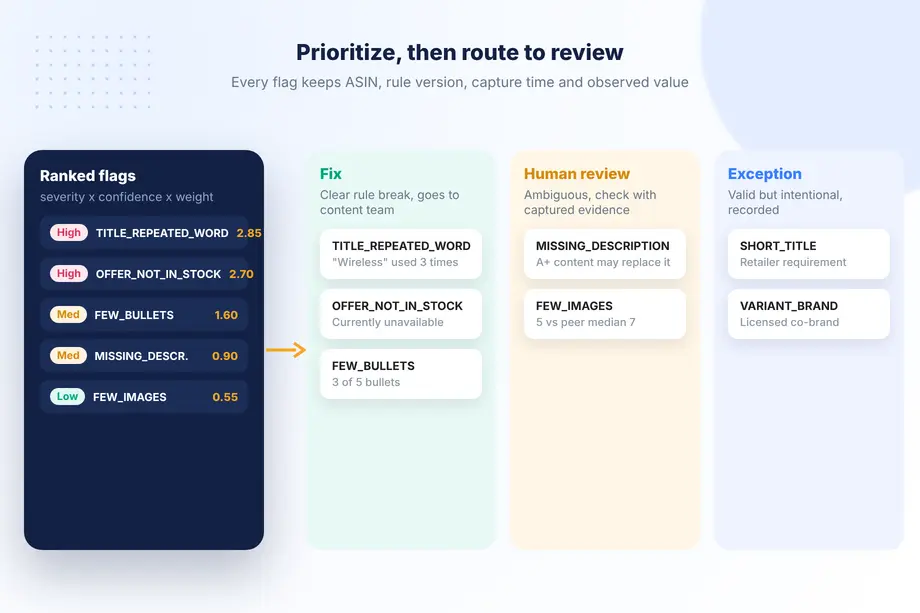
Present each finding with its evidence: the observed value, the rule, the snapshot date, and the peer benchmark where relevant. For example, "Title uses 'Wireless' three times (rule: max two, Amazon title policy, captured 2026-11-14)" is a finding a content manager can fix in minutes without debate. "Title could be better" is not.
Avoid promising outcomes. You can fairly say that compliance fixes reduce the risk of suppression and that closing gaps with peers removes a known disadvantage. You cannot honestly promise a conversion lift from a listing audit alone, and saying so protects your credibility when other factors move the numbers.
Route Exceptions to Human Review and Retain Capture Context
Automation should decide only the clear cases. Everything ambiguous goes to a person, together with the snapshot that triggered it. A useful review queue has three outcomes: fix (the flag is valid and goes to the content team), exception (the flag is valid but intentional, for example a short title required by a retailer), and false positive (the rule misfired and should be tuned).
Keep the capture context with every decision: marketplace, delivery location, capture time, rule version, and the raw values. When a stakeholder asks six weeks later why a listing was changed, you can show exactly what the page looked like and which rule applied. Retained snapshots also let you re-run the same audit after fixes go live and report the before and after difference on identical rules.
Finally, schedule the audit. A one-off review decays quickly as sellers, content, and offers change. Running the same schema monthly, or weekly for top sellers, turns the audit from a project into a monitoring routine, and the review queue gets shorter each cycle as exceptions are recorded and rules are tuned.
A Practical Checklist to Start This Week
- Pick one marketplace and 50 ASINs: 25 of your own and 25 close competitors.
- Write the schema as a short YAML or JSON file with field, rule, severity, and source.
- Capture all 50 listings in one session with the same delivery location.
- Run the rule checks, compute peer medians, and export flags to a sheet.
- Review only high-severity and low-confidence flags by hand.
- Fix, re-capture two weeks later, and compare on the same rule version.
With a free Easyparser account you can run this pilot on a small sample before committing to a full catalog.
Conclusion
A credible amazon listing audit is not about opinions on copy. It is about capturing every listing the same way, checking it against written rules, and keeping the evidence. Structured product data makes that practical: titles, bullets, images, variants, and Buy Box offers arrive as fields you can test, and missing sections are named instead of guessed. Start with a small, versioned schema, let automation handle the clear cases, send the rest to review, and run the same audit again after the fixes ship. That loop is what turns an amazon listing audit into a dependable part of catalog operations.
Sources
- Product title requirements and guidelines, Amazon Seller Central (accessed )
- Amazon limits product titles to 200 characters starting January 21, PPC Land (accessed )
- Product Detail response reference, Easyparser Documentation (accessed )
Start extracting Amazon data for free
Start Your Free Trial100 free credits, no credit card required.