A successful amazon repricing strategy answers a practical question: when a competitor changes price, should you match, beat, or hold? The wrong answer can cost the Buy Box or start a margin-destroying price war. The right answer combines landed price, fulfillment method, seller quality, stock position, and your own unit economics.
Imagine an FBA seller offering a popular accessory at $49.99. A new FBM competitor appears at $47.99, while the current Featured Offer remains at $50.49. Dropping immediately to $47.98 looks competitive, but it may be unnecessary. If your Prime delivery and account metrics justify a premium, holding at $49.99 can preserve $2 per unit while still earning Buy Box rotation. Repricing is therefore a decision system, not a lowest-price contest.
This guide builds that system from real-time offer data. It explains what to monitor, how to calculate a floor, when each rule should fire, how sales history improves decisions, and how Easyparser plus n8n can automate the workflow.
What Is Amazon Repricing and Why It Matters
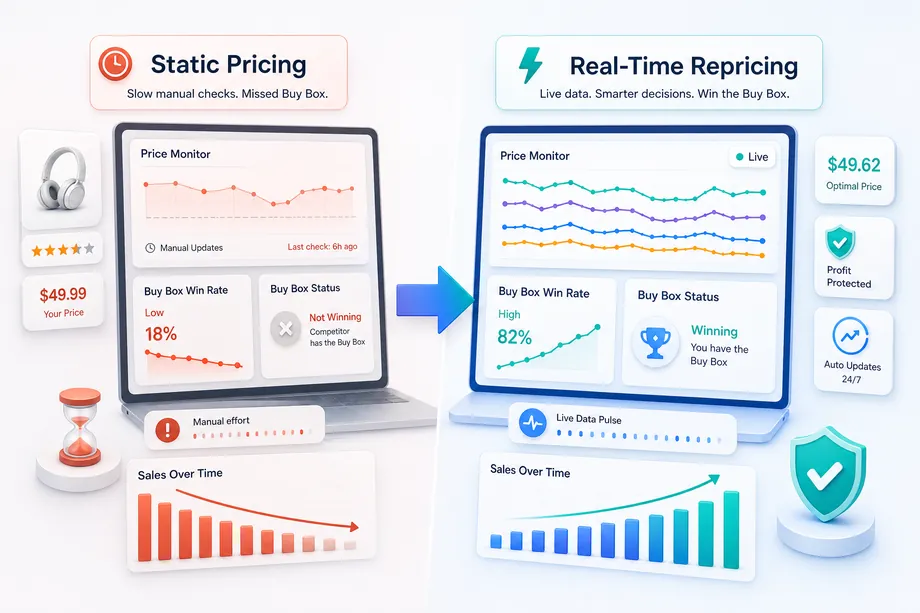
Amazon repricing is the controlled adjustment of a seller's offer price as marketplace conditions change. Static pricing waits for a person to notice a competitor, update a spreadsheet, and change the listing. Automated repricing evaluates fresh signals on a schedule and applies a defined rule within minutes.
The Featured Offer, commonly called the Buy Box, is not awarded by price alone. Amazon evaluates the total customer proposition, including landed price, fulfillment speed, availability, and seller performance. This is why an FBA seller can sometimes win at a higher price than an FBM seller. The objective is not to be cheapest at every moment. It is to offer the best price that still earns profitable Buy Box exposure.
Understanding Buy Box Eligibility Factors
Price works only after the offer is eligible to compete. Sellers should first maintain a Professional account, available inventory, reliable fulfillment, and healthy service metrics. Amazon recommends an Order Defect Rate below 1%, a Late Shipment Rate below 4%, and a Pre-fulfillment Cancel Rate below 2.5% in its seller performance guidance. Poor performance can neutralize even an aggressive price.
Use landed price rather than item price. A $45 item with $6 shipping is less competitive than a $49 Prime offer with free delivery because the customer sees $51 versus $49. Fulfillment also changes the value of a dollar: FBA and Seller Fulfilled Prime offers often need less discounting than standard FBM offers because delivery speed and trust improve the customer proposition.
Inventory depth matters too. A repricer that wins the Buy Box and then creates an early stockout may reduce total seasonal profit. The pricing rule should know whether stock is scarce, balanced, or excessive. Scarce stock supports a higher price, while aging or overstocked inventory may justify a more aggressive target.
Real-Time Offer Data: What You Need to Track
A useful amazon repricing strategy needs a complete offer snapshot rather than one visible price. The minimum record for each competitor should contain item price, shipping charge, landed price, seller identity, FBA or FBM status, Prime eligibility, seller rating, availability, delivery promise, and whether the offer holds the Buy Box.
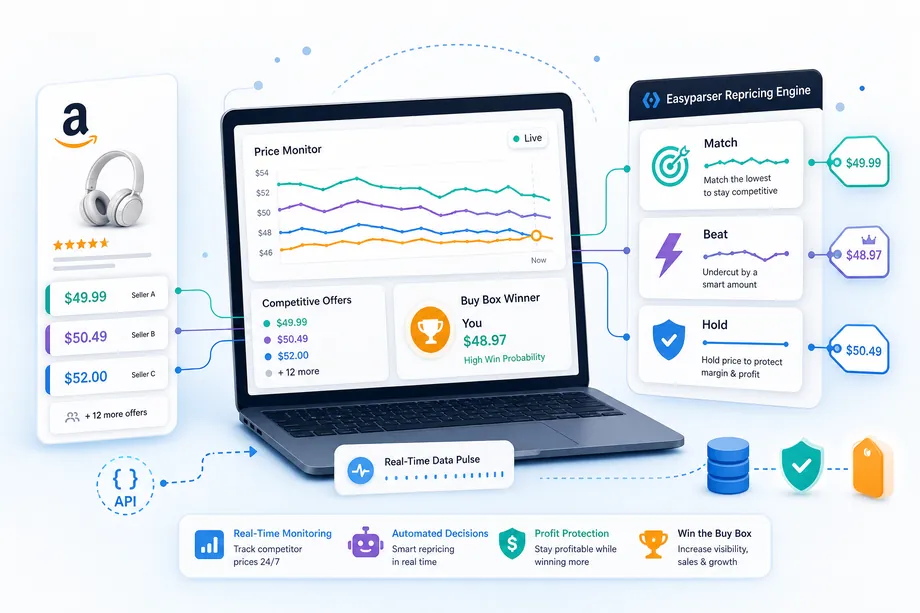
Easyparser's Product Offers API returns structured offer data for a target ASIN. That output can be normalized into four decision signals: the current Buy Box offer, the lowest comparable FBA offer, the lowest qualified FBM offer, and the lowest price that remains above your floor. Comparing like with like prevents an established Prime seller from chasing a low-rated merchant with slow delivery.
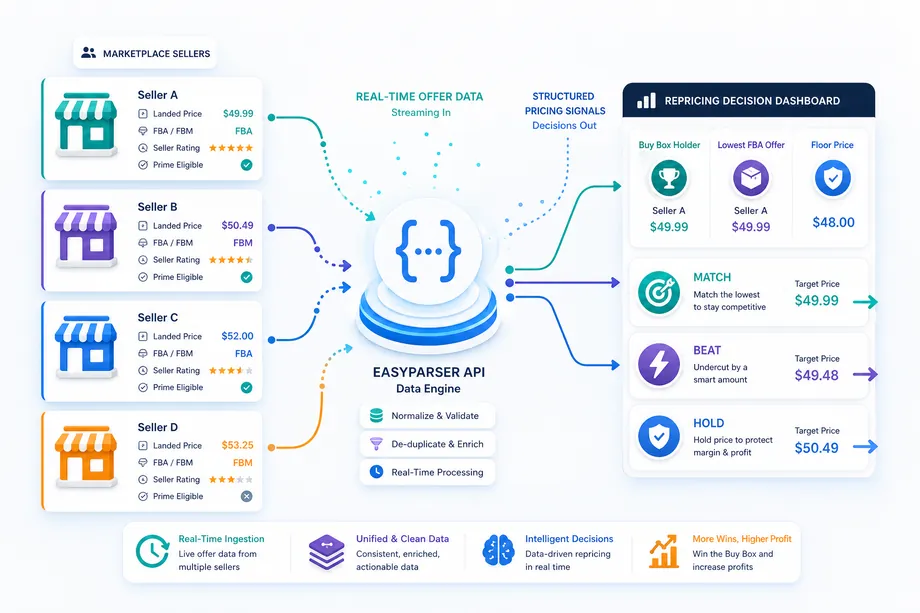
Location is another variable. Prices, shipping, availability, and delivery promises can change with the destination. If your customers are concentrated in a region, use the same address target consistently so that each observation is comparable. Store every snapshot with a timestamp; a single response describes the present, while a time series reveals competitor behavior.
Amazon Repricing Strategy Rules: MATCH, BEAT, or HOLD
The decision engine should choose among three actions. MATCH keeps your price aligned with a comparable offer. It is appropriate when both sellers use similar fulfillment, have similar service quality, and the matched price remains comfortably above your floor.
BEAT sets a small, deliberate advantage, such as $0.01, $0.50, or a percentage. Use it when the Buy Box is strategically valuable, your contribution margin can absorb the change, and the competitor is genuinely comparable. A fixed undercut should be capped; automatically beating every offer by $1 is an invitation to a price war.
HOLD protects the current price. Hold when you already win at a premium, when the competitor is not comparable, when stock is scarce, or when the competing offer falls below your floor. HOLD is not inaction. It is a positive choice to protect economics while accepting that another seller may receive temporary rotation.
| Signal | Recommended action | Reason |
|---|---|---|
| Comparable FBA offer within 1% | MATCH | Stay competitive without an unnecessary discount |
| Qualified rival holds Buy Box above your floor | BEAT slightly | Test whether a small advantage changes rotation |
| Low-rated or slow FBM seller undercuts | HOLD | Your delivery and trust may justify a premium |
| Any offer below your floor | HOLD | Protect contribution margin |
| Excess inventory with weak velocity | BEAT within guardrails | Trade some margin for faster sell-through |
A Practical Decision Sequence
Apply the rules in a fixed order so that one urgent signal does not override basic economics. First, reject any target below the current floor. Second, remove offers that are unavailable, geographically irrelevant, or outside the fulfillment class you intend to compete against. Third, compare your price with the current Buy Box and the strongest qualified rival. Fourth, adjust the target for inventory cover and recent sales velocity. Only then should the workflow select MATCH, BEAT, or HOLD.
This sequence also makes the amazon repricing strategy explainable. A pricing manager should be able to open the audit log and see that a $0.25 reduction occurred because a comparable FBA rival held the Buy Box, stock cover was 75 days, and the new target stayed $4 above the floor. If the log merely says "competitor price changed," the system is too opaque to govern safely.
Set escalation rules for unusual conditions. A competitor price drop greater than 15%, a new seller with no history, a sudden loss of Prime eligibility, or a target that moves more than 5% in one day should require manual review. These exceptions are rare, but they are where automated systems create the largest avoidable losses. Guardrails let routine decisions run quickly while keeping human judgment for events that do not resemble normal market movement.
Avoiding the Race to the Bottom with a Floor Price
A floor price is the lowest permitted selling price after every variable cost and the required contribution are included. A practical formula is: floor price = (cost of goods + fulfillment + fixed per-unit costs + target contribution) divided by (1 - percentage fees).
Suppose cost of goods is $18, fulfillment and inbound shipping are $7, other per-unit costs are $1, target contribution is $6, and percentage fees equal 15%. The floor is ($18 + $7 + $1 + $6) / 0.85 = $37.65. If a competitor drops to $35, the rule should HOLD at $37.65 or pause repricing, not follow the loss.
Recalculate the floor when supplier costs, FBA fees, return allowances, currency rates, or advertising costs change. Also separate an accounting break-even floor from a strategic floor that includes the contribution needed to fund overhead and growth. A repricer should never be allowed to infer this number from competitor prices.
Using Sales History to Find the Optimal Price
Competitor data explains the market, while your own history explains demand. For every price interval, store units sold, Buy Box share, conversion rate, advertising cost, returns, and contribution profit. The optimal point is the price that maximizes total contribution over time, not the price that produces the most orders.
For example, $47.99 may sell 70 units with $6 contribution, producing $420. A $49.99 price may sell 60 units with $8 contribution, producing $480. A $52.99 price may sell 42 units with $11 contribution, producing $462. The middle price wins even though it has neither the highest volume nor the highest margin per unit.
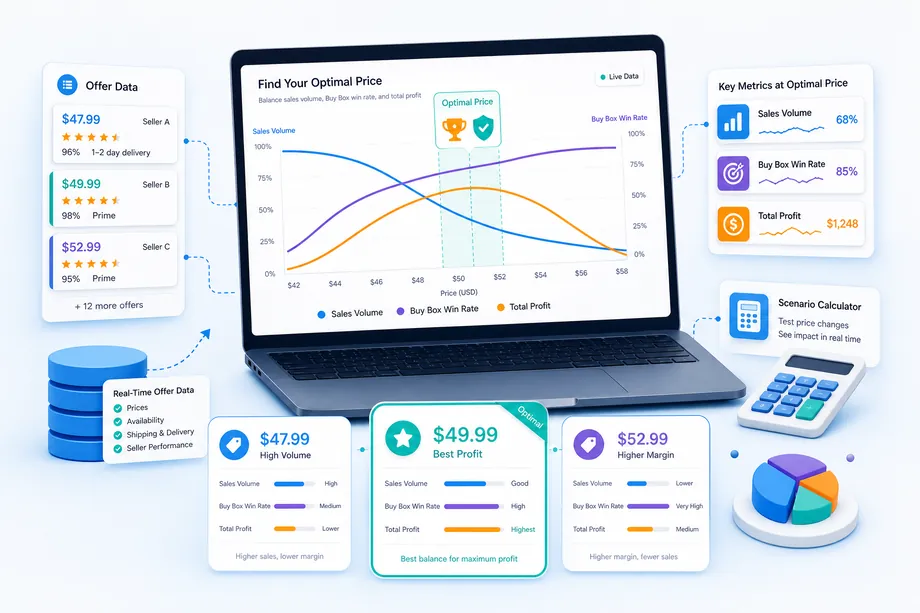
Use a rolling window and compare similar days. Prime Day, holidays, stockouts, coupons, and ad changes can distort results. The Product Detail operation can enrich the dataset with current listing information, while the Product Lookup operation helps teams organize product discovery and monitoring workflows without repeating URLs in the article.
Automating Repricing with Easyparser and n8n
Automation should separate observation, decision, execution, and audit. An n8n Schedule Trigger starts the workflow. The Easyparser node or an HTTP Request node fetches OFFER data for each ASIN. A Code or IF node applies the rule, and an Amazon-authorized pricing integration executes an approved change. Every decision is written to a table with the old price, new price, observed competitors, rule name, floor, and timestamp.
Request Example: Fetching Real-Time Offer Data
To retrieve current competitor offers for a product, send an HTTP GET request to the Easyparser API with the target ASIN, domain, and your API key. The request includes parameters that define which product data to fetch and in what format.
# Python Request to Easyparser Product Offers API
import requests
import json
api_url = "https://realtime.easyparser.com/v1/request"
# Define request parameters for OFFER operation
params = {
"api_key": "YOUR_API_KEY",
"platform": "AMZ", # Amazon platform
"operation": "OFFER", # Fetch all active offers
"asin": "B0EXAMPLE01", # Target product ASIN
"domain": ".com" # Amazon.com domain
}
# Send the request
response = requests.get(api_url, params=params)
data = response.json()
Response Example: Structured Offer Data
The API returns a JSON array of all active offers for the product. Each offer includes the seller's price, fulfillment method, ratings, Prime eligibility, and other competitive signals. This structured data becomes the input for your repricing decision logic.
# Sample JSON response from OFFER operation
{
"status": "success",
"data": {
"asin": "B0EXAMPLE01",
"offers": [
{
"seller_id": "SELLER_A123",
"seller_name": "Your Store",
"item_price": 49.99,
"shipping_price": 0, # FBA (free Prime shipping)
"landed_price": 49.99,
"fulfillment_type": "FBA",
"is_prime": true,
"seller_rating": 4.8,
"holds_buy_box": true
},
{
"seller_id": "SELLER_B456",
"seller_name": "Competitor Store",
"item_price": 47.99,
"shipping_price": 3.50, # FBM with shipping cost
"landed_price": 51.49,
"fulfillment_type": "FBM",
"is_prime": false,
"seller_rating": 3.9,
"holds_buy_box": false
},
{
"seller_id": "SELLER_C789",
"seller_name": "Prime Seller",
"item_price": 48.50,
"shipping_price": 0,
"landed_price": 48.50,
"fulfillment_type": "FBA",
"is_prime": true,
"seller_rating": 4.7,
"holds_buy_box": false
}
]
}
}
Processing the Response: Decision Logic
After receiving the offer data, your repricing workflow filters and analyzes the offers to determine the optimal action. The logic compares your current price against comparable FBA offers, checks the Buy Box holder, validates against your floor price, and applies the appropriate MATCH, BEAT, or HOLD rule.
# Extract and normalize offer data for repricing decision
def process_offers(offers, floor_price, current_price):
"""Analyze offers and recommend repricing action"""
# Filter for comparable FBA offers with good ratings
fba_offers = [
o for o in offers
if o["fulfillment_type"] == "FBA"
and o["seller_rating"] >= 4.0
]
# Find lowest comparable FBA price
lowest_fba = min(fba_offers, key=lambda x: x["landed_price"])
lowest_price = lowest_fba["landed_price"]
# Find current Buy Box holder
buy_box_holder = next(
(o for o in offers if o["holds_buy_box"]),
None
)
# Apply repricing decision logic
if lowest_price < floor_price:
return {"action": "HOLD", "reason": "Below floor"}
elif current_price == lowest_price:
return {"action": "HOLD", "reason": "Already competitive"}
elif buy_box_holder["landed_price"] > floor_price:
return {
"action": "BEAT",
"target_price": buy_box_holder["landed_price"] - 0.50,
"reason": "Undercut Buy Box by $0.50"
}
else:
return {"action": "MATCH", "target_price": lowest_price}
Start in recommendation-only mode. Let the workflow calculate a target and send it to Slack or email without changing Amazon. After one or two weeks, compare recommendations with actual outcomes. Then enable automatic execution for low-risk SKUs while retaining manual approval for thin-margin, high-value, or newly launched products.
Case Study: A 23% Buy Box Win Rate Improvement
Consider an illustrative accessories seller with 120 active SKUs. Manual checks once per day produced a 52% average Buy Box win rate. The team introduced a 30-minute monitoring cycle, separated FBA from FBM competitors, and refused every target below the SKU floor. It also used MATCH for comparable FBA offers, BEAT by no more than $0.50 when the expected contribution remained above target, and HOLD against unqualified sellers.
After four weeks, Buy Box win rate rose from 52% to 64%, a 23% relative improvement. Units increased 18%, while average contribution per unit declined only 2%. Total contribution increased because higher profitable volume outweighed the small discount. This example is a planning model, not a guaranteed result; actual performance depends on category, account metrics, inventory, and competition.
The most important finding was not the headline increase. Almost one-third of monitored price drops triggered HOLD. The system created value by avoiding bad reactions as often as by making aggressive ones.
Monitoring and Improving the System
Review Buy Box share, average selling price, units, contribution per unit, total contribution, stock cover, and rule frequency every week. If BEAT fires often but profit falls, narrow the eligible competitor set or raise the minimum contribution. If HOLD dominates while Buy Box share collapses, evaluate whether the floor is outdated or fulfillment performance has weakened.
Test rules on comparable SKU groups rather than changing the whole catalog at once. A simple experiment can compare MATCH against BEAT-by-$0.25 for four weeks. Keep inventory, ads, and listing content as stable as possible, then judge the winner on total contribution and stock health, not revenue alone.
Common mistakes are easy to recognize: using item price instead of landed price, treating FBA and FBM as equal, ignoring address-specific availability, repricing against every seller, changing prices too frequently, and optimizing for Buy Box percentage without a profit constraint. Logging every decision makes these errors visible and reversible.
Final Checklist
Before enabling automation, confirm that every SKU has a current floor, all percentage and fixed fees are included, offers are compared by fulfillment class, address targeting is consistent, stock cover influences the rule, and a kill switch can stop changes immediately. Keep maximum daily price movement and maximum number of daily changes as additional guardrails.
The best amazon repricing strategy is disciplined rather than aggressive. Real-time Easyparser offer data tells you what changed; floor prices define what is safe; sales history estimates what is profitable; and n8n executes the policy consistently. Start with a small SKU cohort, measure contribution for several weeks, and expand only after the rules prove that they can win Buy Box exposure without buying revenue through unsustainable discounts.
Start scaling your e-commerce business today
Start Your Free Trial100 free credits, no credit card required.