Extracting accurate data from Amazon is notoriously difficult due to complex HTML structures and aggressive anti-bot measures. Amazon constantly updates its page layouts and employs sophisticated fingerprinting techniques to block automated scrapers. This makes maintaining custom scraping scripts a resource-intensive nightmare. While developers can utilize raw APIs to bypass these issues, many data analysts, researchers, and e-commerce managers prefer a no-code solution that works straight out of the box without requiring engineering support. This is where easyparser apify actors bridge the gap, providing enterprise-grade data extraction through a simple, user-friendly interface. By abstracting away the technical complexities, these actors empower non-technical users to access the same high-quality data that large enterprises rely on.
In this guide, we will explore the complete suite of Easyparser's Apify actors. Whether you need to track Best Seller Rank (BSR) trends, calculate FBA fees based on package dimensions, or analyze competitor seller profiles, these actors provide structured, ready-to-use JSON data with zero coding required.
What Are Easyparser's Apify Actors?
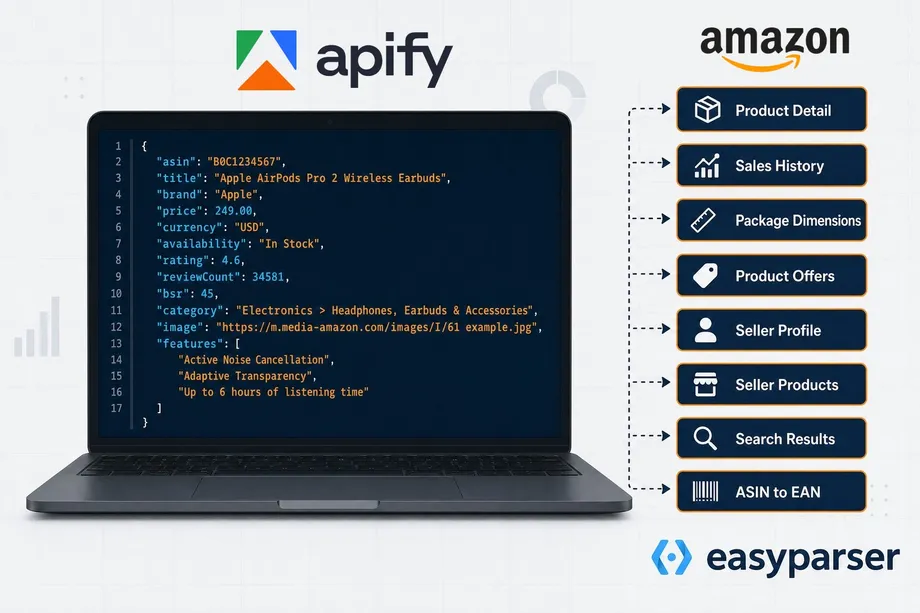
Apify is a leading platform for web scraping and automation, hosting hundreds of pre-built tools called "actors." Easyparser has published a suite of 8 specialized actors on the Apify Store, each designed to handle a specific Amazon data extraction task. Under the hood, these actors are powered by Easyparser's real-time scraping infrastructure, ensuring you never have to worry about CAPTCHAs, IP blocks, or changing page layouts.
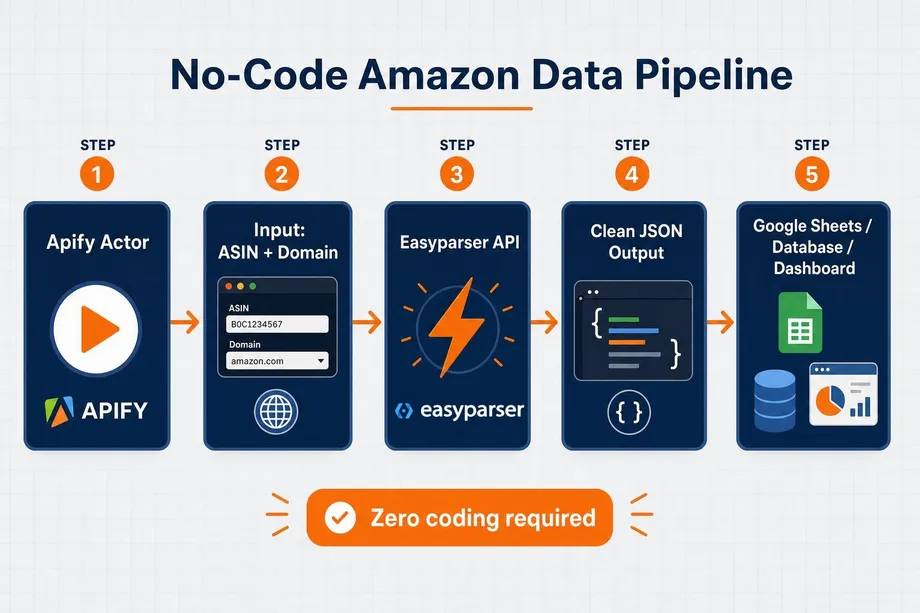
The primary advantage of using an apify amazon scraper easyparser is the seamless workflow integration it offers. Instead of just returning raw data that you must manually process, Apify provides a complete ecosystem around the extraction process. Apify allows you to schedule recurring runs at specific intervals, store large datasets securely in the cloud, and automatically push the extracted data to external services like Google Sheets, custom databases, or even email notifications. This means you can build fully automated data pipelines that run in the background, continuously feeding your business intelligence dashboards with fresh Amazon data without any manual intervention.
Amazon Product Detail Actor: What It Returns
The Amazon Product Detail Apify Actor is the foundational tool for catalog enrichment and competitor benchmarking. By simply providing an ASIN or product URL, this actor returns an exhaustive dataset covering every aspect of the listing.
Key fields returned in the JSON output include:
- Basic Info:
title,brand,description, and high-resolutionimages. - Pricing & Availability:
price,rrp,is_in_stock, andis_prime. - Performance Metrics:
rating,ratings_total, and detailedrating_breakdownpercentages. - Sales Velocity: The
bought_activityfield (e.g., "1K+ bought in past month"). - Variations: A complete list of child ASINs under the
variantsarray, including size and color differences.
This actor is ideal for building comprehensive product databases or monitoring subtle changes in competitor listings over time. Whether you are tracking a competitor's pricing strategy, analyzing how they optimize their bullet points, or monitoring their stock availability, the Product Detail Actor provides the granular data necessary for deep competitive intelligence. It is the cornerstone of any robust Amazon data strategy.
Amazon Sales History Actor: BSR Trends & Price Data
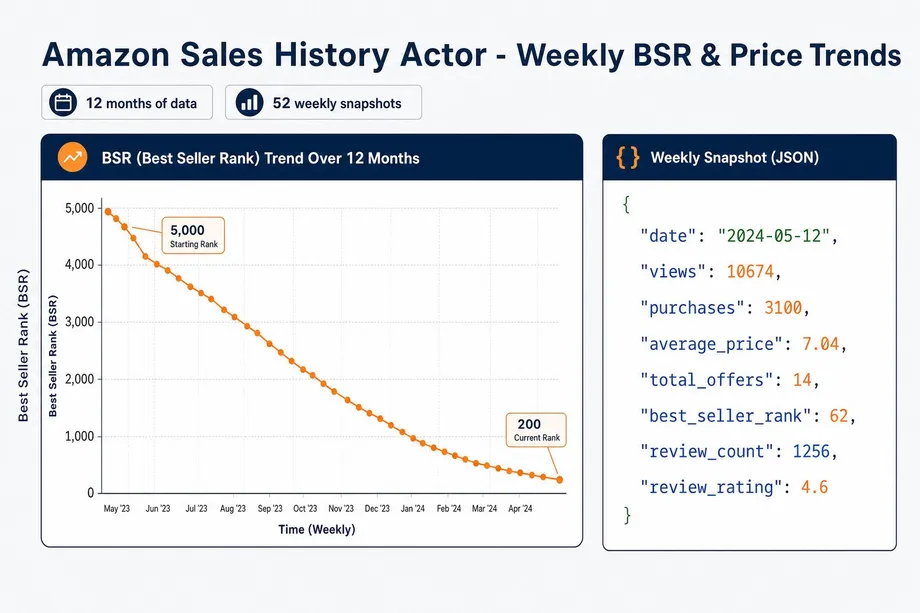
Understanding current pricing is useful, but analyzing historical trends is critical for demand forecasting and seasonal planning. The Amazon Sales History Apify Actor provides up to 12 months of weekly historical data for any ASIN.
When you run this actor, it returns a history array containing weekly snapshots. Each snapshot includes:
viewsandpurchasesfor that specific week.average_priceto track discounting strategies.best_seller_rankto monitor category performance.total_offersto identify when new competitors entered the listing.
By visualizing this data, you can pinpoint exactly when a competitor launched a promotional campaign or when seasonal demand peaked, allowing you to optimize your own sales analysis strategies.
Amazon Package Dimensions Actor: FBA Fee Optimization
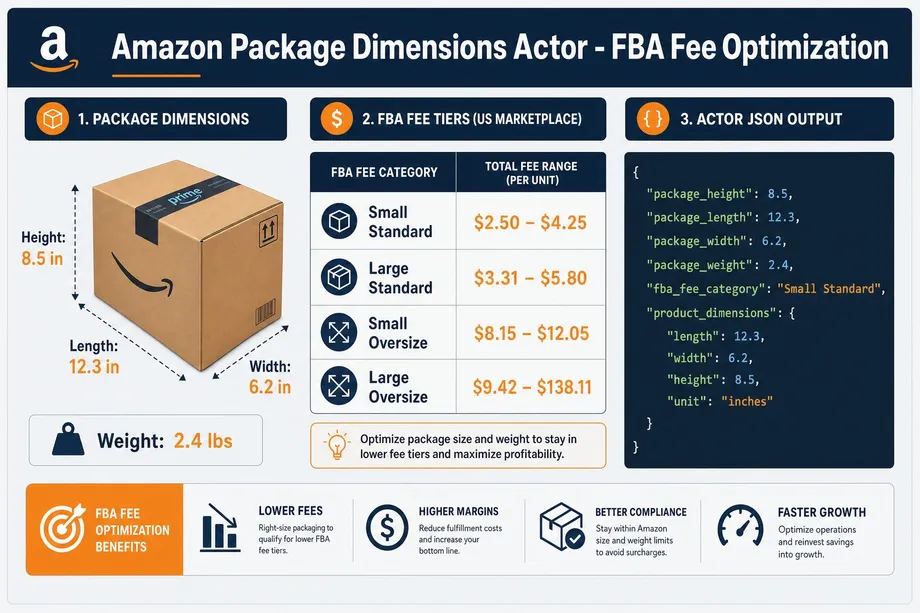
Fulfillment by Amazon (FBA) fees are strictly calculated based on a product's size tier and shipping weight. Even a fraction of an inch can push a product into a more expensive tier, destroying profit margins. The Amazon Package Dimensions Apify Actor is specifically designed to audit these metrics.
The actor returns precise measurements:
package_height,package_length,package_width, andpackage_weight.- The crucial
fba_fee_category(e.g., "Small Standard", "Large Oversize").
Sellers use this amazon data apify actor to audit their own listings for incorrect fee charges, or to analyze competitor packaging to find opportunities for margin improvement before launching a similar product.
Amazon Seller Profile & Products Actors
Monitoring the competitive landscape on Amazon requires looking beyond individual ASINs. You must also analyze the merchants selling those products. Easyparser provides two distinct actors for analyzing seller operations, allowing you to build a complete profile of your competitors.
Competitive intelligence extends beyond individual products to the sellers themselves. Easyparser provides two distinct actors for analyzing seller operations:
1. Amazon Seller Profile Actor
This actor extracts the business identity behind an Amazon storefront. By inputting a Seller ID, it returns the business_name, business_address, overall rating, and a breakdown of feedback_trends (positive, neutral, negative) over 30, 90, and 365 days. This is essential for verifying supplier legitimacy or auditing unauthorized resellers.
2. Amazon Seller Products Actor
To understand a competitor's entire catalog, the Seller Products actor scrapes their storefront. It returns an array of products, each containing the asin, title, price, and is_prime status. You can use this to map out a competitor's brand portfolio and identify their top-selling items.
ASIN to EAN Converter Actor
For multi-channel retailers and arbitrage professionals, bridging the gap between Amazon's proprietary ASIN system and universal barcodes (UPC/EAN) is a constant challenge. The ASIN to EAN Converter Apify Actor solves this bidirectionally.
You can input an ASIN to retrieve an array of identifiers containing the associated UPC, EAN, or GTIN values. Conversely, you can input a barcode scanned from a physical store to instantly find the matching Amazon listing. This is powered by Easyparser's robust product lookup capabilities, making it indispensable for inventory synchronization across platforms like Shopify and Walmart.
How to Run Actors Without an API Key
One of the biggest barriers to entry for data extraction is API key management. To make testing seamless and accessible for everyone, all Easyparser Apify actors come with a built-in shared demo key. This means you can go directly to the Apify Store, select an actor, input an ASIN, and click "Start" immediately without creating an Easyparser account or entering any payment details. This frictionless experience allows you to validate the data quality before making any commitments.
However, because this demo key is shared globally among all free users, it is subject to strict rate limits to ensure fair usage. For production workloads, bulk extraction tasks involving thousands of ASINs, or automated daily scheduling, it is highly recommended to sign up for a free Easyparser account. Upon registration, you receive 100 free credits every single month. By pasting your personal API key into the actor's input configuration, you instantly unlock dedicated throughput, higher request limits, and priority processing, ensuring your critical data pipelines run smoothly without interruptions.
Combining Multiple Actors in an Apify Workflow
The true power of easyparser apify actors is unlocked when you chain them together. Apify's platform allows you to pass the output of one actor as the input to another, creating complex data pipelines.
For example, you could start with the Amazon Search Results Apify Actor to scrape the top 100 products for a specific keyword. You can then pass that list of 100 ASINs into the Amazon Product Offers actor to extract the pricing and Buy Box details for every single seller on those listings. Finally, you could route the Seller IDs from those offers into the Seller Profile actor to build a comprehensive database of every merchant operating in that niche.
If you prefer to build these workflows programmatically outside of Apify, you can utilize the direct search results API endpoints provided by Easyparser.
From Apify to Google Sheets: A No-Code Pipeline
Once your apify amazon scraping actor has finished its run, the data resides securely in an Apify Dataset. While you can download this data manually as a JSON, CSV, or Excel file, the true value lies in automation. Apify provides native, one-click integrations to export this dataset directly into Google Sheets, databases, or cloud storage solutions.
By setting up a scheduled run (e.g., every morning at 8 AM) and configuring the Google Sheets integration to append new rows automatically, you create an automated, self-updating dashboard. You can track daily price changes, BSR fluctuations, or new competitor reviews without ever writing a line of code or manually downloading a CSV file. This no-code approach democratizes access to enterprise-grade Amazon data, allowing marketing teams and analysts to focus entirely on strategy and analysis rather than wrestling with scraping infrastructure and proxy management. The combination of Easyparser's robust extraction technology and Apify's seamless workflow automation provides a scalable, reliable solution for any e-commerce data need.
Start extracting Amazon data for free
Start Your Free Trial100 free credits, no credit card required.