Web scraping looks simple from the outside: send a request, receive a page, extract the data. In production, however, reliable data extraction requires far more than a basic HTTP client. Websites rate-limit traffic, block suspicious IPs, render content with JavaScript, change their HTML structure, and deploy anti-bot systems that can break a scraper overnight.
This is why developers use a web scraping API. Instead of building proxy rotation, browser rendering, CAPTCHA handling, retry logic, and parsing pipelines from scratch, your application sends one API request and receives clean data back. This guide explains how web scraping APIs work from request to JSON response, and where they fit compared with Selenium or a do-it-yourself scraper.
What Is a Web Scraping API?
A web scraping API is an infrastructure layer between your application and the website you want to collect data from. Your server does not directly request the target page. Instead, it sends the target URL or extraction parameters to the API. The API then handles the difficult parts of data acquisition: choosing the right proxy, preparing realistic browser headers, rendering JavaScript when needed, retrying failed requests, extracting the requested fields, and returning the result in a structured format.
You may also see this category described as a data scraping service, scraping as a service, a web data extraction platform, or managed scraping infrastructure. The wording changes, but the purpose is the same: move the operational burden of web data collection away from your internal engineering team.
The value is not just convenience. The main benefit is reliability at scale. A simple scraper might work for a few pages, but it usually fails when traffic volume grows, when websites introduce bot protection, or when page layouts change. A scraping API is designed to absorb those operational problems before they reach your application.
What Happens When You Call a Scraping API?
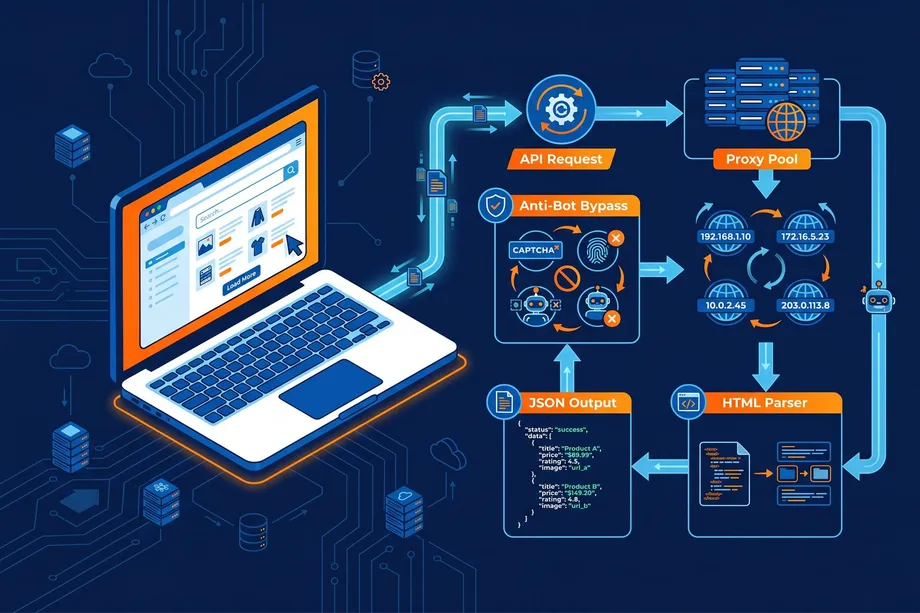
The clearest way to understand scraping API architecture is to follow a single request from start to finish.
Your application sends a request.
The request usually includes a target URL, API key, region, device type, extraction mode, or platform-specific parameters such as an Amazon ASIN.
The API validates and routes the job.
It checks authentication, applies rate limits, determines whether the target requires a browser, and chooses an execution strategy.
A proxy and browser profile are selected.
The system picks an IP address, region, headers, cookies, and fingerprint profile that match the target website's expectations.
The page is fetched or rendered.
Static pages can be retrieved with an HTTP client. JavaScript-heavy pages may require a headless browser session.
Failures are retried intelligently.
If the page returns a block, CAPTCHA, timeout, or incomplete response, the API can rotate IPs, change fingerprints, adjust timing, and try again.
The content is parsed and normalized.
Raw HTML, rendered DOM, or platform data is transformed into clean fields such as title, price, rating, availability, reviews, or image URLs.
Your application receives structured output.
Instead of maintaining brittle parsing logic, you receive JSON that can be stored, analyzed, or passed into another workflow.
This sequence is the core answer to how web scraping APIs work: they turn a fragile chain of scraping tasks into a managed request pipeline.
The Infrastructure Behind Reliable Scraping APIs
At scale, the hardest part of scraping is not writing a parser. It is maintaining the infrastructure that keeps requests successful. A robust scraping API usually combines proxy management, browser automation, retry queues, monitoring, and data extraction engines.
Proxy rotation is one of the most important components. Websites can block traffic when too many requests come from the same IP address. Scraping APIs reduce that risk by routing traffic through datacenter, residential, or mobile proxy pools. Datacenter proxies are fast and cost-effective, while residential proxies are harder to identify because they resemble normal consumer traffic. The API chooses the best option based on the target, volume, geography, and block rate.
Good infrastructure also includes request scheduling, concurrency control, timeout handling, health checks, and automatic failover. Without these systems, a scraper may appear to work during testing but become unstable when processing thousands or millions of pages.
JavaScript Rendering and Headless Browsers
Many modern websites do not include all useful data in the first HTML response. Product details, prices, reviews, and availability may load after JavaScript executes in the browser. In these cases, a basic HTTP request may return an empty shell instead of the data you need.
Scraping APIs solve this with headless browser rendering. A headless browser loads the page like Chrome or another real browser, executes JavaScript, waits for network activity or target elements, and then captures the final DOM. This is useful for single-page applications, dynamic e-commerce pages, infinite scroll pages, and sites that rely heavily on client-side rendering.
Browser rendering is more expensive than simple HTML fetching, so a good API does not use it for every request. It decides when rendering is necessary and when a faster lightweight request is enough.
Anti-Bot Detection and Bypass Techniques
Modern websites use anti-bot systems such as Cloudflare, Akamai, DataDome, and custom fraud detection layers. These systems evaluate much more than the IP address. They inspect TLS fingerprints, HTTP headers, browser properties, cookies, timing patterns, JavaScript challenges, and user behavior signals.
A scraping API reduces blocks by making automated requests behave more like legitimate browser traffic. That can include realistic User-Agent strings, matching browser headers, TLS fingerprint alignment, cookie handling, session reuse, device profiles, and controlled request timing. For more protected targets, the API may combine browser rendering with proxy rotation and challenge handling.
This is also where operational experience matters. Anti-bot bypass is not a single trick. It is a continuous feedback loop: detect failures, classify the block, change the request strategy, and retry without exposing that complexity to the developer.
From Raw HTML to Structured Data
Fetching the page is only half of the job. The real business value comes from extracting specific fields reliably. Traditional scrapers often use CSS selectors, XPath expressions, or regular expressions to pull values from HTML. This can work well for stable pages, but it is fragile when class names, layouts, or nested structures change.
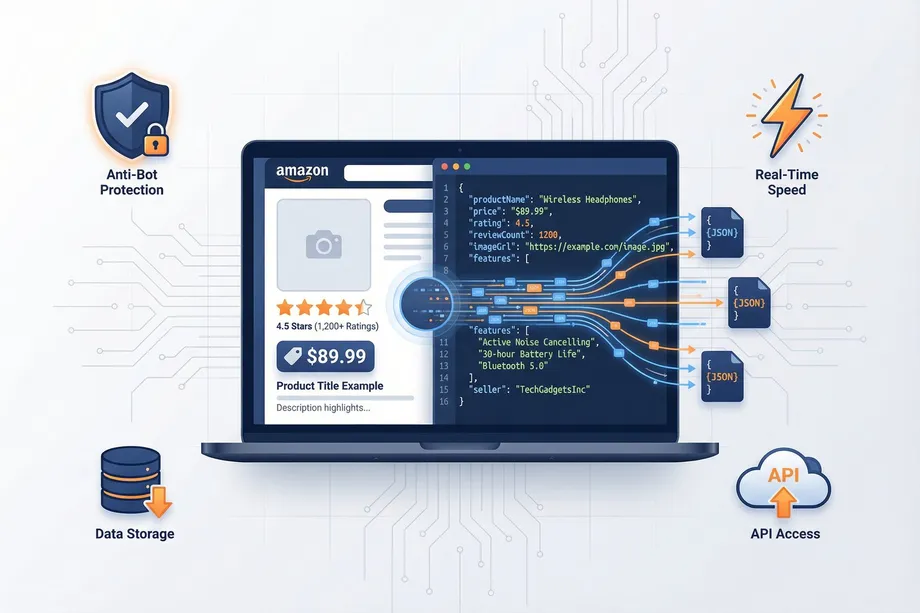
A modern data extraction API can provide structured output directly. For example, an e-commerce scraping API may return fields like product title, price, currency, availability, seller, rating, reviews count, image URLs, and product variations. This removes a large amount of custom parsing code from your application.
For developers, structured output is often the difference between a scraper and a usable data pipeline. Raw HTML still needs cleaning, parsing, validation, and monitoring. Clean JSON can move directly into databases, dashboards, AI agents, pricing systems, or catalog enrichment workflows.
AI-Native Scraping and Semantic Extraction
AI-native scraping is becoming an important part of web data extraction in 2026. Instead of relying only on fixed selectors, AI-assisted systems can use machine learning or Large Language Models to understand the meaning of page content. A prompt such as "extract the product features and compatibility list" can be easier to maintain than a long chain of site-specific selectors.
This approach is especially useful when extracting data from many differently structured websites. If every site has a different layout, maintaining thousands of custom parsers becomes expensive. AI-native extraction can identify relevant information based on labels, context, visual hierarchy, and semantic meaning.
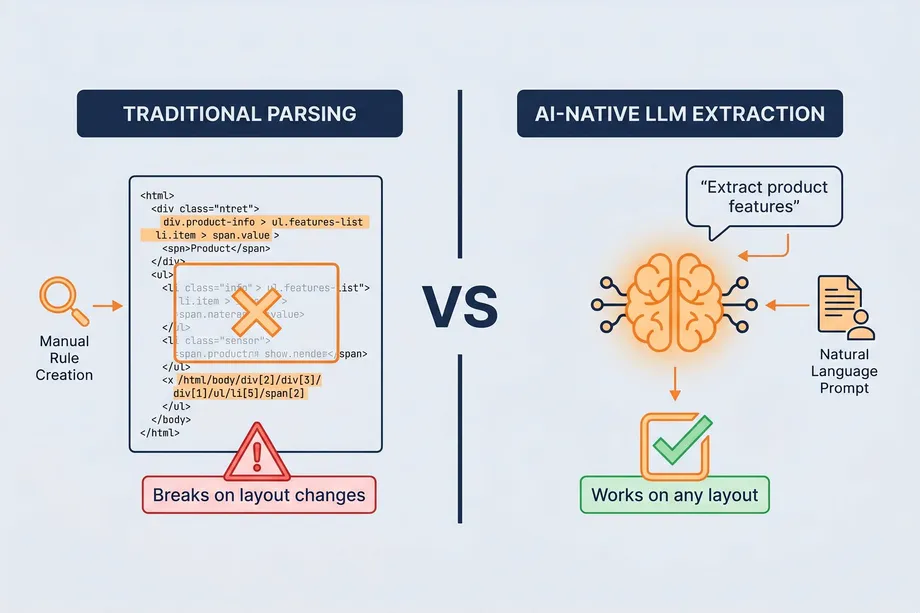
AI is not always the cheapest option for high-volume, standardized extraction. For predictable sources like Amazon product data, a dedicated structured API is usually faster and more cost-effective. AI-native extraction is strongest when the input is messy, inconsistent, or spread across many website templates.
Real-Time vs Asynchronous Scraping APIs
Scraping APIs usually support two delivery models: real-time requests and asynchronous bulk jobs. The right choice depends on latency, volume, and how your application consumes data.
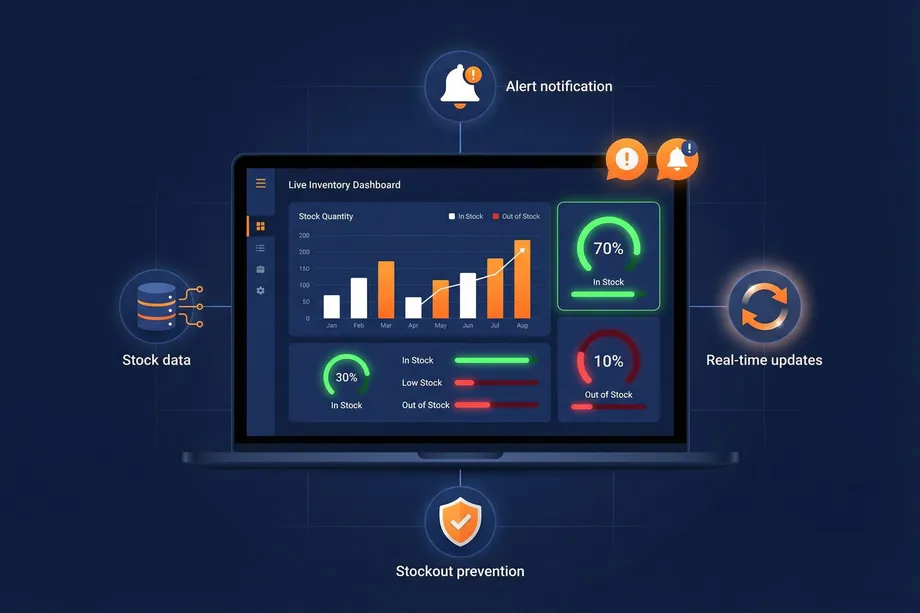
Real-time scraping APIs return data during a single HTTP request. They are a good fit for live price checks, product lookup, inventory validation, enrichment during user workflows, and systems that need immediate responses.
Asynchronous or bulk scraping APIs are better for large workloads. You submit many URLs or identifiers, the API processes them in the background, and the results are delivered through a webhook, export file, or results endpoint. This model is better for catalog extraction, recurring monitoring, large competitor datasets, and scheduled analytics pipelines.
In practice, many data teams use both. Real-time APIs power product features that need fresh data immediately, while bulk workflows handle large recurring extraction jobs.
JSON Output: The Final Product of a Scraping API
The end goal of a scraping API is not simply to fetch a page. The goal is to deliver data that your application can use without heavy post-processing. JSON is the most common format because it is easy to store, validate, transform, and pass between services.
For example, if you are building an e-commerce monitoring tool, Easyparser's Amazon Scraping API can retrieve product data and return consistent JSON fields. The API handles proxy rotation, anti-bot handling, and extraction, while your application focuses on pricing rules, alerts, dashboards, or analysis.
All the complexity described above, from proxy selection and browser rendering to retry logic and structured extraction, is managed on the Easyparser API side. From your application, the required request can be as simple as this:
import requests
API_KEY = "YOUR_API_KEY" # Get your key from app.easyparser.com
ASIN = "B098FKXT8L"
params = {
"api_key": API_KEY,
"platform": "AMZ",
"operation": "DETAIL",
"asin": ASIN,
"domain": ".com"
}
response = requests.get("https://realtime.easyparser.com/v1/request", params=params)
data = response.json()
product = data.get("product", {})
print(f"Title: {product.get('title')}")
print(f"Price: ${product.get('price')}")
Web Scraping API vs Selenium vs DIY Scraper
A common question is whether you should use a scraping API, Selenium, or a custom scraper. The answer depends on the job.
Use a DIY scraper
When the target site is simple, stable, low volume, and not heavily protected. This is the cheapest option, but it requires maintenance.
Use Selenium
When you need browser automation, user flow testing, login workflows, or UI interaction. Selenium can scrape data, but managing it at scale requires browser clusters, proxies, retries, and monitoring.
Use a web scraping API
When reliability, scale, anti-bot handling, and structured output matter more than controlling every low-level browser step.
For most production data pipelines, the API model is the most practical because it turns scraping infrastructure into a service instead of an internal maintenance burden.
A Practical Example: When Price Monitoring Breaks
One real customer described a workflow that connected their store POS, Wix website, and Google Shopping feed, then compared internal product costs against current Amazon prices to decide where ordering from Amazon could save money. The first version was a custom Claude-assisted script built to replace a paid product research subscription, but after a full day of work the 1400-line script still failed to retrieve current Amazon prices for about 85% of a 180-line report.
The technical problem was not the reporting logic. It was the acquisition layer: getting fresh Amazon prices reliably, normalizing the output, and keeping the workflow stable enough for business use. This is the kind of case where a web scraping API or web data extraction platform becomes useful. The internal system can keep handling POS data, product matching, and purchasing decisions, while the scraping API handles the unstable parts of Amazon data collection.
Conclusion
Web scraping APIs work by combining many moving parts behind a simple interface: proxy rotation, request routing, browser rendering, anti-bot handling, retries, parsing, structured extraction, and JSON delivery. That infrastructure is what makes them useful for real production workloads.
If you only need to scrape a few simple pages, a custom script may be enough. If you need reliable data at scale, especially from dynamic or protected websites, a scraping API saves development time and reduces operational risk. The best API is not just the one that fetches HTML, but the one that returns clean, consistent data your application can use immediately.
Start building your Amazon data pipeline today
Start Your Free Trial100 free credits, no credit card required.