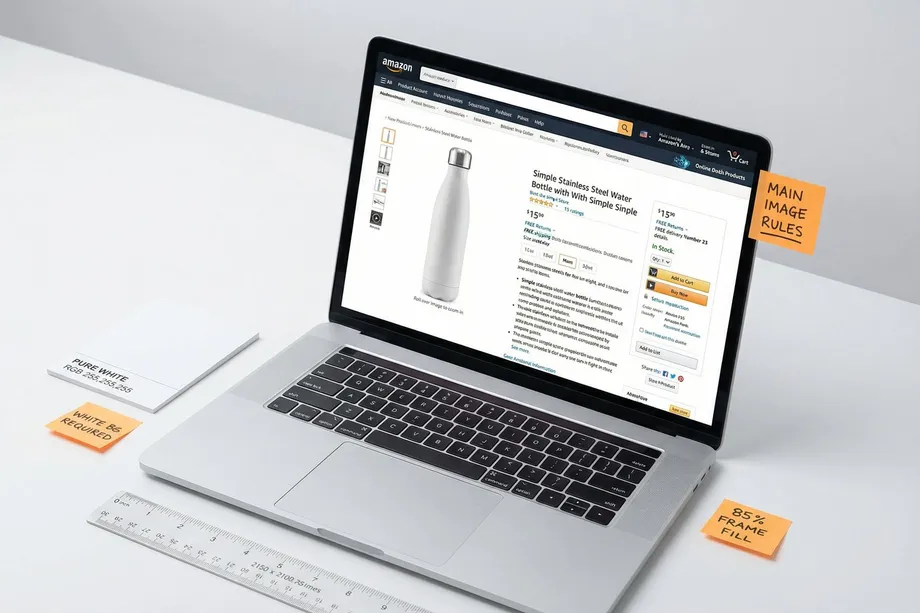
In the highly competitive landscape of Amazon in 2026, your product images serve as your digital storefront. While you might have optimized your keywords and priced your product competitively, failing to meet the strict Amazon product image guidelines can lead to an immediate loss of sales or, worse, a suppressed listing. As mobile shopping dominates the platform, high-quality, compliant images are the primary driver of click-through rates (CTR) and conversions.
This comprehensive guide breaks down the latest Amazon image requirements, technical specifications, category-specific rules, and the new 2026 policies regarding AI-generated imagery. Whether you are launching a new product or auditing an existing catalog, understanding these rules is non-negotiable for success on the marketplace.
What Are Amazon's Product Image Requirements? (Quick Checklist)
Before diving into the specifics, every seller must understand the baseline rules that apply to all product images across the platform. Amazon's primary goal is to provide a clean, consistent, and trustworthy shopping experience. To achieve this, all images must accurately represent the product being sold and match the product title exactly.
Furthermore, Amazon strictly prohibits nudity, sexually suggestive content, or any imagery that violates their community standards. While these general rules seem obvious, the technical execution is where many sellers stumble. Let's explore the strict rules governing your most important asset: the main image.
Main Image Rules: What Amazon Strictly Enforces
The main image is the first thing a shopper sees in the search results. It is the single biggest factor influencing your CTR. Because of its prominence, Amazon enforces the strictest guidelines on this specific image slot. Non-compliance here is the fastest way to get your listing suppressed.
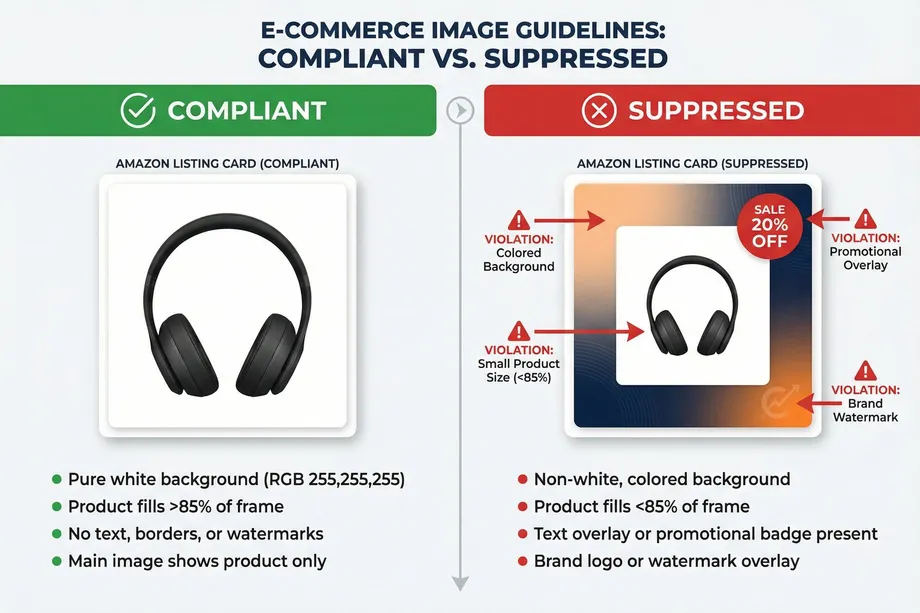
The golden rule of the main image is the pure white background. The background must have RGB color values of 255, 255, 255. This ensures the image blends seamlessly into Amazon's search and product detail pages. Off-white, grey, or textured backgrounds will trigger an automated rejection.
Additionally, the product itself must fill at least 85% of the image frame. This prevents sellers from uploading tiny products surrounded by massive white space, which looks unprofessional and hurts mobile visibility. The main image must only show the actual product being sold. You cannot include props, accessories that aren't included in the purchase, or the product's packaging (unless the packaging is an essential part of the product itself).
Crucially, the main image must be free of any text overlays, promotional graphics (like "Sale" or "Best Seller" badges), watermarks, or inset images. It must be a clean, unobstructed view of the item.
Secondary Images: What You Can (and Can't) Do
Once a shopper clicks your main image, your secondary images (the image stack) must do the heavy lifting of converting that click into a sale. Unlike the main image, secondary images offer much more creative freedom, though they still have rules.
Secondary images can, and should, include lifestyle images. These show the product in use within a relevant environment, helping the buyer visualize owning the item. Unlike the main image, lifestyle photos can have colored or natural backgrounds. You are also permitted to use props in these shots, provided they help demonstrate the product's scale or utility and don't mislead the buyer about what is included in the purchase.
Infographic images are another powerful tool allowed in the secondary slots. You can use text overlays, arrows, and graphics to highlight key features, dimensions, or materials. For example, an infographic is the perfect place to explicitly state "BPA Free" or show the exact dimensions of a travel mug.
While creativity is encouraged, secondary images must still maintain high quality. Blurry, pixelated, or poorly lit images will damage buyer trust and can still be flagged by Amazon's quality control systems.

Amazon Image Size & Technical Specifications
Beyond the content of the photos, Amazon has strict technical requirements for the image files themselves. Failing to meet these specifications will result in upload errors or poor display quality.
To enable Amazon's crucial zoom functionality, images must be a minimum of 1,000 pixels on the longest side. However, the recommended best practice for 2026 is to aim for 2,000 to 3,000 pixels on the longest side. This ensures crystal-clear detail on high-resolution displays and mobile devices. Images exceeding 10,000 pixels on the longest side will be rejected.
The maximum file size allowed is 10 MB per image. Amazon accepts JPEG (.jpg), PNG, TIFF, and non-animated GIF formats. However, JPEG is strongly preferred for its balance of quality and compression. When saving your files, ensure you are using the sRGB color space, not CMYK, as CMYK can cause significant color shifts when displayed on web browsers.
Finally, Amazon strongly recommends a 1:1 square aspect ratio. Square images display consistently across desktop and mobile layouts without awkward cropping.
Category-Specific Rules (Clothing, Shoes, Kids & Baby)
While the general rules apply broadly, certain categories have unique requirements that sellers must navigate.
In the Clothing and Apparel category, main images for adult clothing must be photographed on a live model or using the "ghost mannequin" technique (where the mannequin is edited out). The garment must be shown flat or draped naturally. For Children's and Baby clothing, however, the rules differ: flat-lay photography is preferred, and using live models for the main image is often restricted.
For the Shoes category, the main image must show a single shoe (usually the left shoe) facing left at a 45-degree angle. This standardized view allows shoppers to quickly compare styles across the search results.
Always consult the specific style guide for your category in Seller Central, as these nuances can be the difference between a live listing and a suppressed one.
Amazon's AI Image Policy in 2026: What's Allowed?
The landscape of product photography has shifted dramatically with the rise of generative AI. In 2026, Amazon has clarified its stance on AI-generated imagery, creating a hybrid model for sellers.
Amazon allows the use of AI tools to enhance and edit product photos, provided the final image accurately represents the physical product. You can use AI to generate lifestyle backgrounds, create infographic overlays, or perform background swaps. This dramatically reduces the cost and time associated with traditional photoshoots.
However, you cannot use AI to generate the product itself from scratch if it misrepresents the item's physical characteristics. The core product shown must be a true photographic representation (or a highly accurate 3D render). Using AI to create a completely fabricated main image that misleads buyers will result in immediate listing suppression and potential account suspension.
How to Name Your Image Files Correctly
A frequently overlooked technical requirement is file naming. Amazon's system relies on specific naming conventions to map images to the correct ASINs and variants.
The standard format requires the product identifier (ASIN, UPC, or EAN), followed by a period, followed by the variant code (like MAIN, PT01, PT02), and ending with the file extension. For example, your main image should be named exactly B012345678.MAIN.jpg.
Crucially, you must avoid using spaces, dashes, or special characters in the file name, as these will prevent the image from processing correctly.
Why Is My Amazon Listing Suppressed? (Image Mistakes)
If your listing suddenly disappears from search results, an image violation is a common culprit. The most frequent reasons for image-based suppression include:
- Non-White Background: The main image background is off-white, grey, or transparent instead of pure RGB 255,255,255.
- Size Violations: The product fills less than 85% of the frame, or the image resolution is below the 1,000-pixel minimum.
- Prohibited Text/Graphics: The main image contains logos, watermarks, or promotional text like "Free Shipping."
- Showing Excluded Items: The main image displays props or accessories that are not included in the box.
To fix a suppressed listing, navigate to the "Manage Inventory" section in Seller Central, identify the flagged ASIN, and upload a compliant replacement image immediately.
Best Practices: How to Build a High-Converting Image Stack
Compliance is just the baseline; conversion is the goal. To build an image stack that drives sales, you need a strategic approach.
First, utilize all available image slots (typically 6 to 8). A complete stack signals quality and thoroughness to the buyer. Start with a pristine, high-resolution main image to maximize CTR. Follow this with 2-3 alternate angles to provide a comprehensive view.
Next, integrate 1-2 lifestyle images that show the product in its intended environment, helping the buyer visualize ownership. Dedicate at least one slot to a clear, easy-to-read infographic that highlights key benefits or dimensions, addressing common pre-purchase questions.
For sellers managing large catalogs and monitoring competitor strategies, automating the extraction of product data and images is crucial. This is where tools like Easyparser excel. By utilizing the Easyparser Amazon Product Detail API, you can programmatically monitor competitor listings, track their image strategies, and ensure your own catalog remains competitive. You can also benchmark listing assets directly against live market data from the Amazon Product Detail API endpoint when planning image refresh cycles.
If you also want to go deeper on high-resolution URL patterns, variant image extraction, and bulk download automation, review this Amazon product image extraction guide. It complements this policy-focused article with practical extraction workflows.
Here is how you can use Python to quickly retrieve product details, including image URLs, using Easyparser's Real-Time API:
import requests
params = {
"api_key": "YOUR_API_KEY",
"platform": "AMZ",
"operation": "DETAIL",
"asin": "B098FKXT8L",
"domain": ".com"
}
response = requests.get("https://realtime.easyparser.com/v1/request", params=params)
data = response.json()
product = data.get("product", {})
print(f"Title: {product.get('title')}")
print(f"Main Image: {product.get('main_image', {}).get('link')}")
By combining strict adherence to Amazon's guidelines with a strategic approach to visual storytelling, you transform your product images from a compliance hurdle into your most powerful sales asset.
Start building your Amazon data pipeline today
Start Your Free Trial100 free credits, no credit card required.