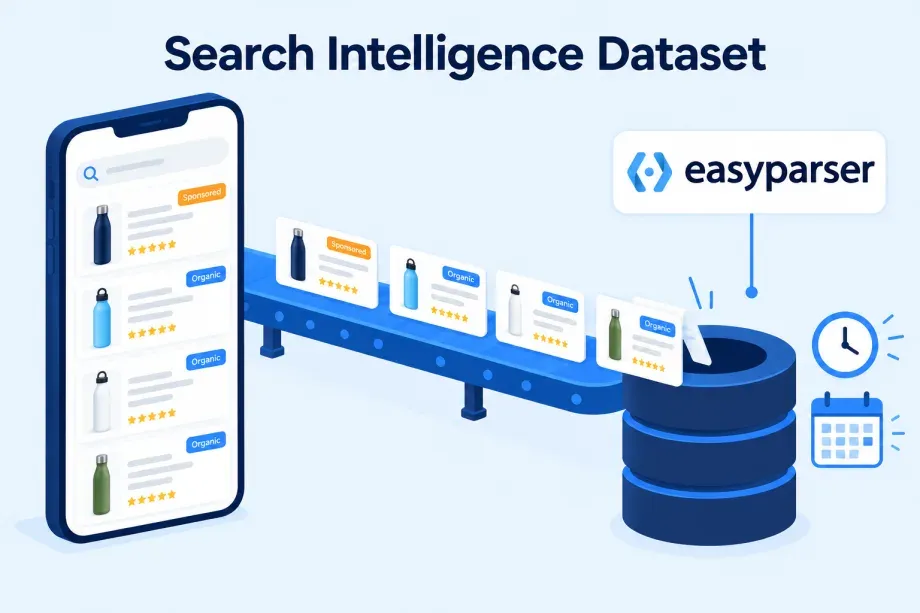
An Amazon search API gives you the result page for a keyword as data: which ASINs appear, in what order, which placements are ads, and what each listing shows for price, rating and recent purchase activity. One response is a snapshot. A search intelligence dataset is what you get when you collect those snapshots the same way every time, label them properly and keep them long enough to compare. This guide is for developers, data teams and agencies who want that dataset to be repeatable and auditable, not a folder of screenshots.
If you need the parsing side (how sponsored and organic blocks look in the page and how to separate them), read our guide to extracting sponsored vs organic Amazon search results. Here we start one step later: you already have structured results and you need to turn them into something a team can trust.
What an Amazon Search Intelligence Dataset Is (and Is Not)
A search intelligence dataset is a table of observations. Each row says: at this time, on this marketplace, for this delivery location and this keyword, this ASIN appeared at this position, with this placement type and these visible attributes. Everything else (share of shelf, brand counts, gap lists) is derived from those rows.
It is useful for questions such as:
- Which brands occupy the first page for the keywords that matter to us, and how often?
- Are we visible organically, only through ads, or not at all?
- Which price bands, pack sizes or features appear in results where our catalog has nothing?
- What changed since last week, and does any change need a human to look at it?
It is not a sales database, not a full catalog and not a measure of search volume. A results page shows what Amazon chose to display to one location at one moment. Keep that limit in the schema from day one and most analysis mistakes never happen.
Where Amazon Search Data Can Come From
Before choosing a pipeline, it helps to know which official interfaces exist and what they are built for. We checked each source below on 2026-11-25.
| Source | What it is for | Limits for this use case |
|---|---|---|
| Amazon Creators API (SearchItems) | Associates searching the Amazon catalog to build affiliate content | Requires an Associates partner tag; up to 10 items per request and item pages 1 to 10; the documented response has no sponsored flag |
| Product Advertising API 5 | The older Associates API | Amazon marks it deprecated and replaced by the Creators API |
| Amazon Business Product Search API | Procurement systems searching the Amazon Business selection | Built for business buying; it does not describe consumer search ranking or ad placements |
| Manual exports and screenshots | One-off checks | No consistent timestamps or location, hard to diff, does not scale past a handful of keywords |
| Own scraper | Full control of the page you see | You maintain parsers, proxies, CAPTCHA handling and location cookies |
| Managed search results API | Ranked consumer results as JSON, including sponsored flags | Costs credits per page; you still own scope, storage and review rules |
The practical consequence: official APIs answer catalog questions well, but if your question is "what does a shopper in this ZIP code see for this keyword, ads included", you need the rendered results page, either from your own scraper or from a managed Amazon search API.
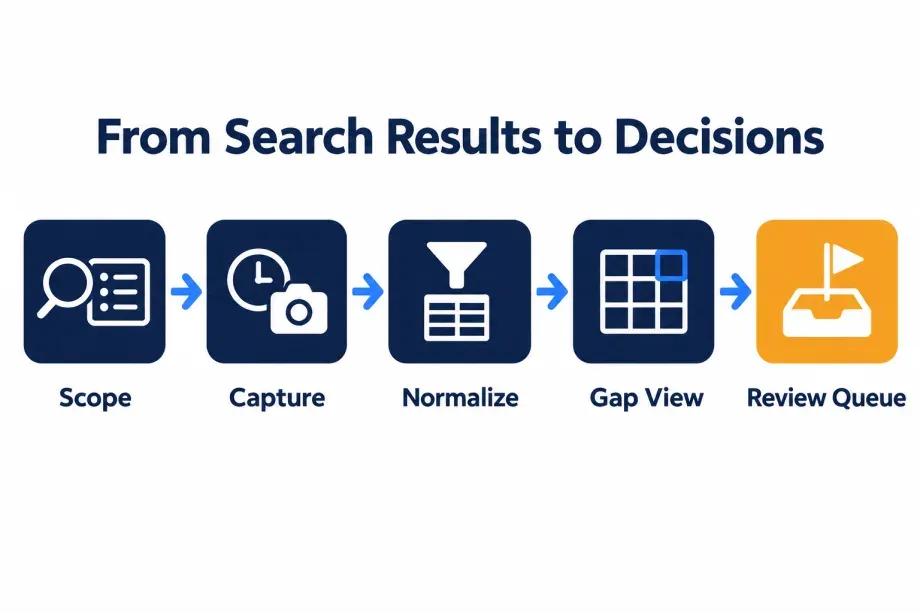
Define Keywords, Marketplace, and Location Scope
Scope is the part teams skip and later regret. Results differ by marketplace, by delivery location and by sort order, so a keyword alone is not an identifier. Write the scope down as configuration, version it, and store the scope version with every row.
| Scope field | Example | Why it matters |
|---|---|---|
| Keyword set | 40 head terms plus 120 long-tail terms, grouped by product line | Groups let you report by category instead of by single query |
| Marketplace | .com, .co.uk, .de | Each domain has its own ranking, ads and currency |
| Delivery location | ZIP 10001 for US East, 90001 for US West | Availability, delivery promises and some prices change by address |
| Sort order | featured (default) | Only the default order reflects what most shoppers see |
| Page depth | Pages 1 and 2 | Most visibility sits on page 1; deeper pages cost more for less signal |
| Cadence | Daily for head terms, weekly for long tail | Match cost to how fast decisions are made |
Keep the keyword list small at first. Twenty well-chosen terms captured consistently beat two thousand captured whenever someone remembers.
Capture Organic and Sponsored Results Separately
Every row needs a placement type. Sponsored listings are bought, organic listings are earned, and mixing them makes visibility metrics meaningless. Store the flag as returned, never infer it later from position. Also store both a raw position (as the source returned it) and your own normalized rank, for example a 1-based organic rank that skips ads and a separate overall slot number.
Do not assume a fixed ad share. In a test capture for "insulated water bottle" on amazon.com (Easyparser data, captured November 2026, page 1, 48 results, default delivery location Wilmington 19805), every one of the 48 results came back with the sponsored flag set to false. On another day or keyword the same page can carry several ad slots. That is exactly why the flag belongs in each row: the ratio is something you measure, not a constant.
If you want ad placements removed entirely for organic-only studies, prefer a request option that excludes them over filtering afterwards, and record that choice in the scope so nobody compares an organic-only capture with a mixed one.
Normalize ASINs, Ranks, Prices, and Listing Attributes
Raw search results are messy in predictable ways. The same capture above showed four of them:
- Brand was empty on all 48 results. Search cards often do not carry a clean brand field, so derive brand from the title or, better, join to product detail data by ASIN.
- Variants crowd the page. One brand held 10 of the 48 slots and another held 6, mostly different colors or sizes of the same bottle family.
- Review counts repeat. 23 of the 48 listings shared a review total with at least one other listing, because variants in one family share reviews. Summing reviews across a page double counts.
- Prices arrive as text. The price value was a string such as "24.00" next to a separate list price, so cast it and keep the currency.
A workable normalized row looks like this:
| Column | Type | Note |
|---|---|---|
| run_id, run_at | text, UTC timestamp | One run per scheduled capture |
| scope_version | text | Which keyword list and settings were used |
| domain, delivered_to | text | Marketplace and the location Amazon applied |
| keyword, keyword_group | text | Exact query string and your grouping |
| page, raw_position, organic_rank | integer | Keep the raw value and your own rank |
| placement | organic or sponsored | From the returned flag only |
| asin, family_key, brand_norm | text | Family key groups variants; brand from a lookup table |
| price, list_price, currency | decimal, text | Null when no price is shown |
| rating, reviews, bought_badge | decimal, integer, text | Badge kept as shown, not converted to sales |
Deduplicate on run_id, keyword, page and raw_position. Never deduplicate on ASIN alone: the same ASIN can legitimately appear twice on one page, once as an ad and once organically.
Build a Competitor and Assortment-Gap View
Once rows are clean, the useful views are simple aggregations:
- Share of first page. Per keyword group, count organic slots by brand_norm and divide by organic slots. Use family_key counts too, so a brand with many colors is not mistaken for a brand with many products.
- Presence matrix. Keywords as rows, your brand and the top competitors as columns, values as best organic rank or blank. Blanks in head terms are the first conversation to have.
- Attribute gaps. Bucket results by price band, size or feature parsed from the title. A band that holds many well-reviewed results and none of yours is a candidate for review, not an automatic launch decision.
- Paid versus earned. For your own ASINs, how often you appear only as sponsored. That points to listings that rely on ads for visibility.
If your main question is the daily rank of specific ASINs, a narrower rank tracker is the better tool; our keyword rank tracking API guide covers that design. The dataset here is broader: it looks at the whole page, including brands you do not track yet.
Track Changes with Timestamps and Review Rules
A dataset becomes intelligence when changes reach the right person. Compare each run with the previous run of the same scope and send only meaningful changes to an exception queue:
- A new brand enters the top organic slots of a head term.
- One of your ASINs drops off page 1 for two consecutive runs (one run is often noise).
- A competitor appears in many keywords as sponsored in the same week, which can signal a launch or campaign.
- Delivered_to differs from the requested location; drop or flag the run instead of comparing it.
Keep raw responses for a short period next to the normalized table. When someone asks why a number moved, the raw page answers faster than any log.
Avoid Treating Search Rank as Sales Data
Rank tells you visibility, not volume. A listing at position 2 might sell less than one at position 9 that has a lower price or a better image. Badges such as "1K+ bought in past month" are rounded ranges shown by Amazon; they help sort products into rough tiers but do not add up to a sales figure, and variants can share them. Search results also cannot prove demand for a keyword: the count of results says how many products match, not how many people search. For demand, use keyword volume tools and your own Seller Central or advertising reports; use search results to see who wins the shelf.
When to Use an Amazon Search API Instead of Manual Exports
Manual checks are fine for five keywords once a month. Move to an Amazon search API when you need any of these: more than a few dozen keywords, fixed delivery locations, consistent timestamps, several marketplaces, or results that feed a dashboard or alert. The decision is less about tools than about repeatability.
| Need | Manual export | Own scraper | Managed search API |
|---|---|---|---|
| Location control | Browser setting, easy to forget | Cookies and address flows to maintain | Request parameter |
| Sponsored flag | Read by eye | Parser you maintain | Returned per result |
| Scale | A few keywords | Limited by your infrastructure | Limited by credits and plan rate limits |
| Maintenance | None, but no history | High when page layouts change | Low; you own storage and rules |
Building the Dataset with Easyparser Search
Easyparser's Search operation is a managed Amazon search API for the capture step. A request with operation=SEARCH and a keyword (or a full search URL) returns results in Amazon's order under result.search_results, with position, asin, title, is_sponsored, is_prime, price, prices, rating, ratings_total, bought_activity and source_page, plus refinements, pagination and the applied delivered_to location. Inline zip_code sets the delivery location, exclude_sponsored removes ads, and min_page/max_page fetch up to 5 pages in one request at 1 credit per page. The Search Listing API page has the full parameter list.
This minimal capture function writes normalized rows with a timestamp and the applied location:
import requests, datetime
API_KEY = "YOUR_API_KEY" # from app.easyparser.com
ENDPOINT = "https://realtime.easyparser.com/v1/request"
def capture(keyword, domain=".com", zip_code="10001"):
params = {"api_key": API_KEY, "platform": "AMZ",
"operation": "SEARCH", "keyword": keyword,
"domain": domain, "zip_code": zip_code,
"min_page": 1, "max_page": 2}
r = requests.get(ENDPOINT, params=params, timeout=90)
r.raise_for_status()
result = r.json()["result"]
run_at = datetime.datetime.now(datetime.timezone.utc).isoformat()
rows = []
for item in result.get("search_results", []):
price = (item.get("price") or {}).get("value")
rows.append({
"run_at": run_at, "keyword": keyword, "domain": domain,
"delivered_to": result.get("delivered_to"),
"page": item.get("source_page"), "position": item.get("position"),
"asin": item["asin"], "sponsored": item.get("is_sponsored", False),
"price": float(price) if price else None,
"rating": item.get("rating"), "reviews": item.get("ratings_total"),
"bought_badge": (item.get("bought_activity") or {}).get("raw"),
"title": item.get("title")})
return rows
for kw in ["insulated water bottle", "kids water bottle"]:
print(kw, len(capture(kw)), "rows")
From there, insert the rows into your warehouse table and run the views above. For hundreds or thousands of keywords, the bulk endpoint (POST https://bulk.easyparser.com/v1/bulk) accepts up to 5,000 keywords per Search job; its callback only signals that results are ready, and you fetch the parsed data afterwards.
Honest limits: each response is a snapshot of one location and moment, a page is not the full catalog, there is no historical ranking series in the response (you build history by storing runs), and request frequency depends on your plan's credits and rate limits. Brand and family grouping remain your job, usually by joining search rows to product detail data by ASIN.
Conclusion
A good search intelligence dataset is mostly discipline: fixed scope, a placement flag on every row, normalized ranks and prices, variant-aware counts, and a review queue for real changes. The data source matters less than consistency, but an Amazon search API removes the parsing and location work so your team can spend its time on the views and decisions. Start with twenty keywords, two locations and one marketplace, keep the raw pages for a while, and widen the scope only when the first reports are being used.
Sources
- SearchItems - Creators API Documentation, Amazon Associates (accessed )
- PA-API 5 Deprecation Notice, Amazon Associates (accessed )
- Product Search API overview, Amazon Business (accessed )
- Search, Easyparser Documentation (accessed )
Start extracting Amazon data for free
Start Your Free Trial100 free credits, no credit card required.