Amazon.sg is a compact marketplace with a mix of local listings, products shipped by Amazon from other regions, and third-party sellers. For pricing analysts, brand teams, and product researchers in Singapore, that mix makes manual checks slow and error-prone. Collecting bulk Amazon.sg product and offer data through an API solves the speed problem, but only a controlled workflow solves the quality problem.
This guide shows a practical workflow: set the ASIN scope and output fields, run a small manual pilot, discover candidates, collect product and variant records in bulk, add SGD offer and seller context, normalise the fields, route problem records to review, and publish a validated dataset. Examples come from a real Amazon.sg capture made in November 2026 with a Singapore postcode.
Quick Answer: The Amazon.sg Data Workflow
| Stage | Easyparser operation | Output |
|---|---|---|
| Discover candidates | SEARCH | ASIN list per query |
| Product records | DETAIL | Title, brand, category, variants |
| Offer context | OFFER | SGD price, seller, fulfilment, delivery |
| Seller catalogue (optional) | SELLER_PRODUCTS | Public listings of a given seller |
| Scale | Bulk API with webhook | Thousands of records per job |
| Quality | Your validation rules | Clean dataset plus exception queue |
Set the Amazon.sg ASIN Scope and Required Output Fields
Start by writing down which products you need and which fields each record must contain. A pricing team might need ASIN, title, brand, variant, Buy Box price in SGD, seller name, fulfilment type, and delivery promise. A research team may add category, rating, and review count. Every extra field adds parsing and validation work, so keep the first version lean.
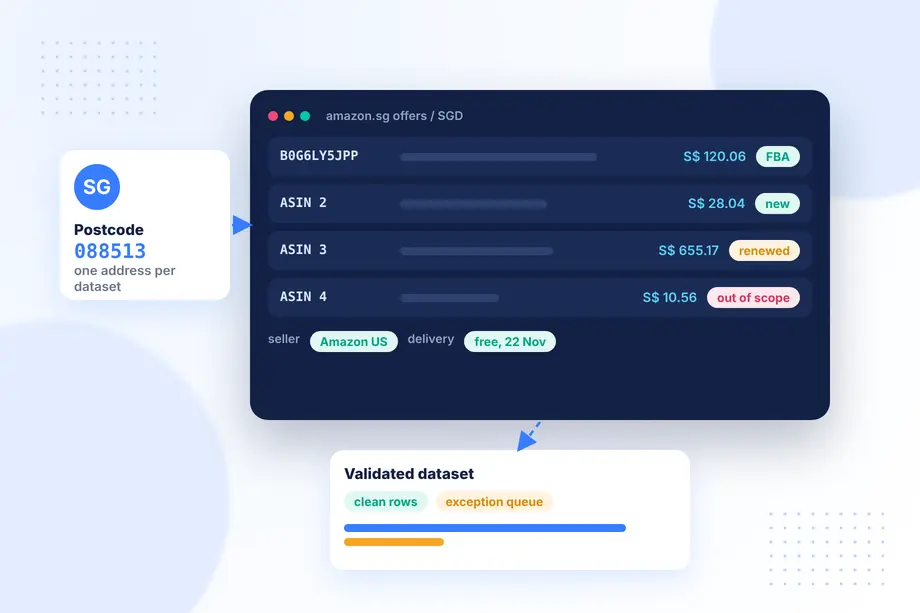
Fix the delivery context as well. Amazon.sg shows prices and delivery dates for a postcode. Use one postcode for the whole dataset unless comparing regions is the goal. In our capture we used postcode 088513 in central Singapore, and every response confirmed it in the applied address field.
Run a Small Manual Pilot Before Automating Collection
Before collecting thousands of ASINs, collect twenty and compare them with what you see in a browser. The pilot catches wrong assumptions early: a field that is often empty on Amazon.sg, a category where prices are hidden, or products that are sold by a seller you did not expect.
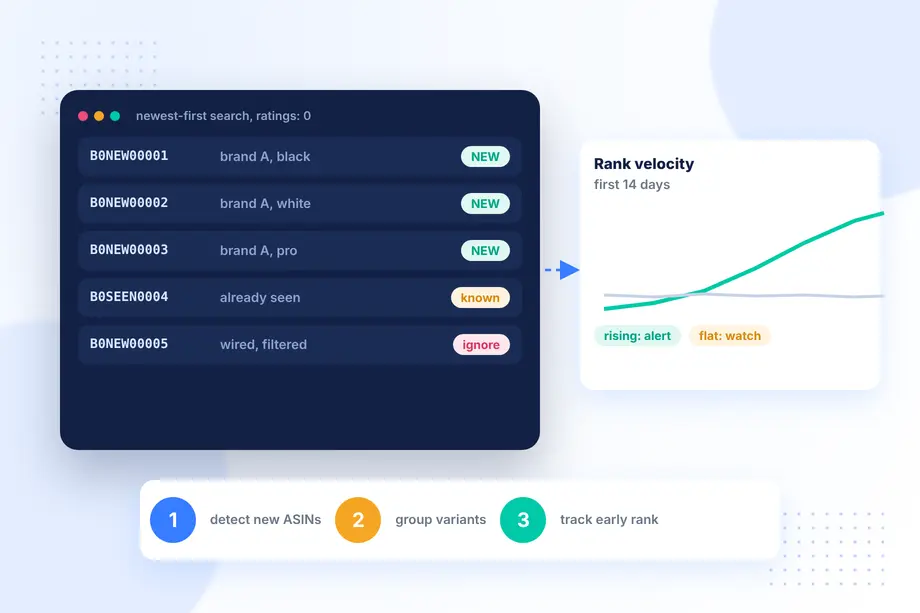
Our pilot surfaced three such points in one query. A search for "air fryer" returned 48 organic results, but 25 of them had no ratings at all and 36 had fewer than 50, so rating-based filters would remove most of the shelf. One result was a cookbook, not an appliance, and another was a certified remanufactured oven, which needs a condition flag. None of this is an error in the data; it is the reality of the marketplace, and your rules need to handle it.
Discover Candidate Products and Capture ASINs
If you already have an ASIN list, skip to the next step. Otherwise, use search to discover candidates. The Easyparser Search Listing API returns ASIN, title, price, rating, review count, and position for every result, with the option to exclude sponsored placements. Run a fixed set of queries, deduplicate ASINs, and keep the query that found each one so you can explain later why a product is in the dataset.
In the air fryer sample, page one prices ranged from S$10.56 to S$655.17 with a median of S$28.04. That wide spread, driven by accessories and books at the low end, is a reminder to classify candidates before treating them as competitors.
Collect Public Product and Variant Records in Bulk
For each candidate ASIN, request the product record. It returns the title, brand, category path, images, variant ASINs, ratings, and the current Buy Box offer. For more than a few hundred ASINs, submit the requests through the Bulk API and receive results by webhook instead of looping over the real-time endpoint.
import requests
API_KEY = "YOUR_API_KEY" # Get your key from app.easyparser.com
ASINS = ["B0G6LY5JPP", "B0H4GMMGFS"]
def offer_record(asin):
params = {
"api_key": API_KEY, "platform": "AMZ",
"operation": "OFFER", "domain": ".sg",
"asin": asin, "zip_code": "088513"
}
res = requests.get("https://realtime.easyparser.com/v1/request", params=params, timeout=60).json()
offers = res["result"]["offer"]["offer_results"]
return [{
"asin": asin,
"price_sgd": float(o["price"]["value"]),
"currency": o["price"]["currency"],
"seller": o["seller"]["name"],
"buybox": o.get("buybox_winner", False),
"fba": o["delivery"].get("fulfilled_by_amazon"),
"condition": o["condition"]["title"],
} for o in offers]
Add Public SGD Offer and Seller Context
Product records tell you what is listed; offer records tell you who sells it, at what price, and how it arrives. The Product Offer API returns every visible offer with price in SGD, seller name and ID, condition, Prime eligibility, fulfilment, and delivery dates.
For the 5-quart air fryer in our pilot (ASIN B0G6LY5JPP), the offer list held a single new offer at S$120.06, sold and shipped by "Amazon US", fulfilled by Amazon, Prime eligible, with free delivery quoted for 22 November and a faster option for 20 November. That one record already answers several pricing questions: there is no price competition on the listing, the seller is Amazon's cross-border store rather than a local seller, and delivery is free. For seller-level research, the SELLER_PRODUCTS operation lists the public catalogue of a given seller ID.
Normalise Product, Offer and Currency Fields
Normalisation makes records comparable across runs and products:
- Store prices as decimals with an explicit currency column, even if everything is SGD today.
- Keep the raw price string as well, so formatting changes do not silently corrupt values.
- Map seller names to stable seller IDs; names can change, IDs rarely do.
- Convert delivery text into dates relative to the capture date.
- Tag condition (new, used, renewed) and exclude non-new offers from price comparisons unless they are the subject.
- Link variants to their parent ASIN so colours and sizes roll up correctly.
Keep a capture timestamp on every row. Historical price series start from your first capture; Amazon.sg does not hand you a ready-made history for every product, so the sooner you start a regular run, the sooner you can analyse trends.
Route Missing or Conflicting Records to Review
Write explicit rules for records that should not flow straight into analysis. Typical exception rules for Amazon.sg are: no Buy Box offer, price missing, currency other than SGD, product type outside scope (books, accessories), non-new condition, or a seller that changed between runs. Each rule sends the record to a review queue with the raw response attached.
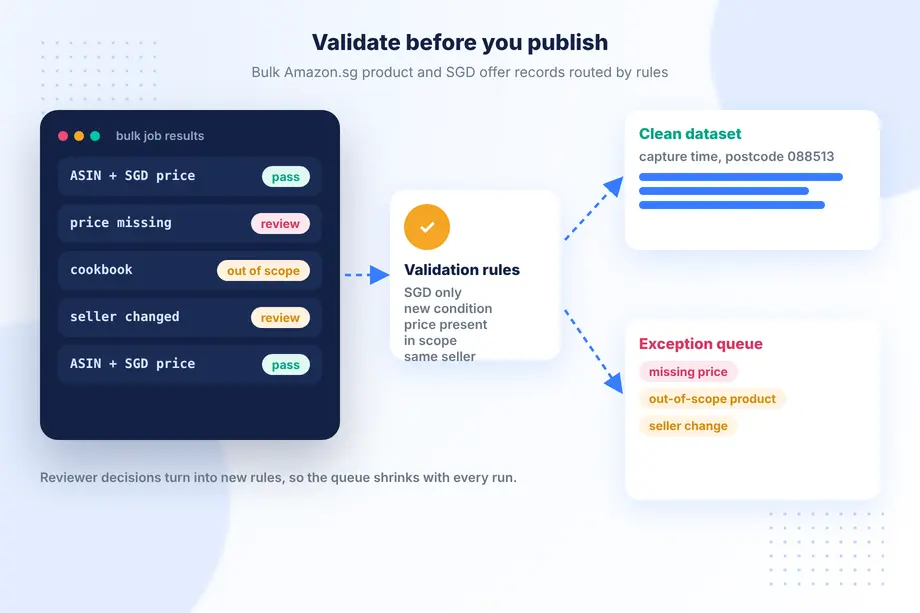
Reviewers decide whether to fix, exclude, or accept each record, and their decisions become new rules. Over a few cycles the queue shrinks and the dataset becomes trustworthy enough for automated reporting.
Publish a Validated Dataset for Pricing and Research Teams
The final output is a versioned table, or a set of files, with a short data dictionary: what each field means, where it came from, the capture window, the postcode, and the known limits. Be explicit about what the data does not include. It is public marketplace data, not Seller Central data; it does not provide exact stock, sales, taxes, or profit; and Best Sellers Rank is a relative signal, not a sales figure.
Delivered this way, bulk Amazon.sg product and offer data becomes a reliable input for repricing, assortment reviews, and market entry studies. A free Easyparser plan is enough to run the pilot before scaling to a full catalogue.
Common Mistakes With Amazon.sg Data Projects
Most problems with bulk Amazon.sg product and offer data come from workflow shortcuts rather than from the API. These are the ones worth guarding against from the first run:
- Mixing postcodes. Delivery promises and sometimes offers differ by address. A dataset that mixes postcodes cannot be compared week to week.
- Treating cross-border offers as local competition. An offer from Amazon's US store and an offer from a Singapore seller behave differently on delivery time and returns. Keep the seller and fulfilment fields next to the price.
- Dropping unrated products. On a smaller marketplace many relevant listings have few or no ratings. Filter by category and title rules instead of review counts.
- Ignoring condition. Renewed and used offers sit in the same offer list as new ones. Without a condition tag they pull average prices down.
- Overwriting history. Each run should append rows with a capture timestamp, not replace yesterday's values.
How Often to Refresh the Dataset
The right refresh rate depends on the decision the data supports. Repricing teams usually need offer snapshots daily for their core ASINs and weekly for the long tail. Assortment and market entry studies can work with a monthly product refresh plus a weekly offer check for the shortlisted items. Whatever the cadence, keep it fixed and documented, because irregular gaps make trend charts misleading. When you schedule bulk Amazon.sg product and offer data collection, align the job with the time your team reviews the output, so analysts always look at the freshest complete run rather than a half-finished one.
Finally, keep a short run log with the job ID, the number of ASINs requested, the number returned, and the number routed to review. A sudden change in those counts is often the first sign that scope or listings have shifted.
Conclusion
Collecting bulk Amazon.sg product and offer data is straightforward with an API; turning it into a dataset people trust takes a workflow. Define the scope and fields, pilot on a small sample, discover and collect in bulk, add SGD offer and seller context, normalise every field, and route exceptions to review. With Easyparser handling search, product, offer, and seller catalogue data for Amazon.sg, your team can focus on the rules and the decisions rather than on scraping.
Sources
- Search response reference, Easyparser Documentation (accessed )
- Offer response reference, Easyparser Documentation (accessed )
- Bulk API overview, Easyparser Documentation (accessed )
- Supported marketplaces, Easyparser Documentation (accessed )
Start monitoring your competitors for free
Start Your Free Trial100 free credits, no credit card required.