A competitor launch rarely announces itself. One day a new listing appears with a familiar brand, a sharp price, and a few early reviews; a few weeks later it sits in the top results for your best keyword. Sellers who notice in the first week can adjust price, advertising, and content while the newcomer is still building momentum. Sellers who notice in the second month are reacting to a finished fact.
This guide shows how to track Amazon competitor product launches with data: which signals indicate a launch, how to detect new listings from search and seller catalogs, how to read early rank velocity, how to automate alerts, and how to respond.
Why Tracking Competitor Launches Matters
New products compete hardest in their first weeks. Amazon gives fresh listings room to prove themselves, and launch strategies often combine coupons, aggressive pricing, and heavy sponsored placements. If a launch targets your keywords, your conversion rate and organic rank can drop before you understand why.
Launch tracking turns that surprise into an early warning. It also has strategic value beyond defence: a steady record of competitor launches shows which segments rivals are investing in, how they price new items, and how quickly their products gain traction.
Signals That Indicate a New Product Launch
| Signal | Where it comes from | Strength |
|---|---|---|
| ASIN not seen in previous runs | Search results, seller catalog | Strong |
| Zero or very few reviews | Search or product record | Medium |
| Recent first-available date | Product detail record | Strong when present |
| Several sibling ASINs appearing together | Search results, variants | Medium |
| Rapid rank improvement in the first weeks | Rank or sales history | Strong for traction |
| Sponsored placements on your keywords | Search results | Context |
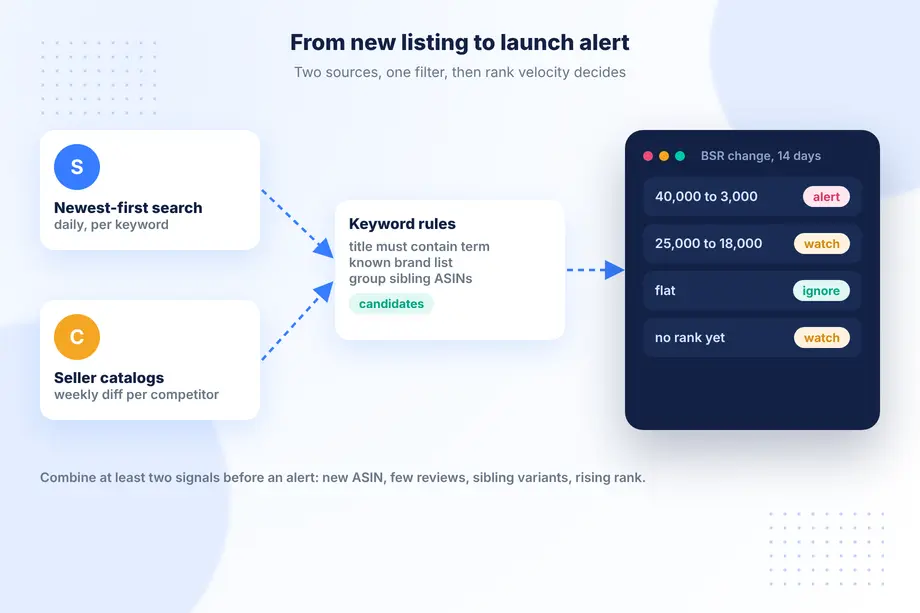
No single signal is conclusive. A relisted old product can look new, and a new ASIN can be a minor variant. Combine at least two signals before raising an alert.
Using Search Data to Detect New Listings
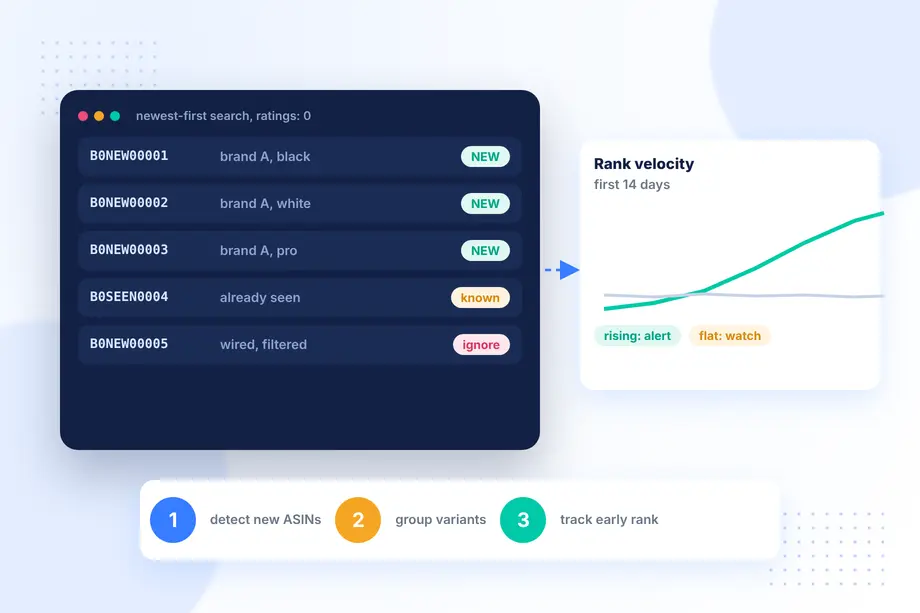
Amazon search can be sorted by newest arrivals. The Easyparser Search Listing API accepts that sort order, so a daily request per keyword returns the latest listings with ASIN, title, price, rating count, and sponsored flag.
We ran this for "wireless earbuds" on Amazon.com in November 2026, sorted by newest and excluding sponsored results. The first page held 16 results, and none had a single rating yet, which is exactly what fresh listings look like. Three of the top results were the same brand in different colours and features with almost consecutive ASINs, a typical pattern for a multi-variant launch. The same page also included wired earbuds, so keyword filtering on the title is needed to avoid false alarms.
import requests, json, pathlib
API_KEY = "YOUR_API_KEY" # Get your key from app.easyparser.com
SEEN = pathlib.Path("seen_asins.json")
def new_listings(keyword, must_contain):
params = {
"api_key": API_KEY, "platform": "AMZ",
"operation": "SEARCH", "domain": ".com",
"keyword": keyword, "sort_by": "date-desc-rank",
"exclude_sponsored": True
}
res = requests.get("https://realtime.easyparser.com/v1/request", params=params, timeout=60).json()
seen = set(json.loads(SEEN.read_text())) if SEEN.exists() else set()
fresh = [r for r in res["result"]["search_results"]
if r["asin"] not in seen
and must_contain in r.get("title", "").lower()]
SEEN.write_text(json.dumps(sorted(seen | {r["asin"] for r in fresh})))
return fresh
for r in new_listings("wireless earbuds", "wireless"):
print(r["asin"], r.get("title", "")[:60])
The first run only builds the baseline. From the second run on, anything not in the seen set is a candidate launch.
BSR Velocity: Spotting Fast-Rising Products
Detecting a new listing is half the job; the other half is knowing which launches matter. Most new ASINs never gain traction. The ones that do show it in their rank. Track Best Sellers Rank for each candidate daily or weekly and compute velocity: the change in rank over the period. A product that moves from rank 40,000 to 3,000 in its category within two weeks deserves attention; one that stays flat does not.
For a richer picture, weekly history from the Sales Analysis data adds estimated purchases, views, and offer counts over time, which helps separate a coupon-driven spike from steady growth. Our guide on how to see competitor sales on Amazon covers those metrics in detail.
Monitoring Competitor Seller Catalogs
Search finds launches on your keywords. Seller catalogs find launches by the competitors you already know, even when they target a new keyword. Easyparser's seller products data lists the public catalog of a seller ID. Capture it weekly for each key competitor and diff it against the previous capture. New ASINs in the catalog are launch candidates; removed ASINs can indicate discontinued lines or stock-outs.
Seller catalogs also reveal launch patterns. Some brands release several variants at once, others test one item before expanding. A few months of history tells you how each competitor launches, which makes future alerts easier to interpret.
Setting Up Automated Launch Alerts
Put the pieces on a schedule:
- Daily: newest-first search for your top keywords; record new ASINs that pass title rules.
- Weekly: seller catalog diff for your top competitors.
- Daily for candidates: rank and price snapshots for every candidate during its first 30 days.
- Alert rule: notify when a candidate from a known competitor appears, or when any candidate improves rank by more than a set percentage within a week.
Send alerts where the team already works, such as Slack, email, or a shared sheet. Workflow tools like n8n can run the whole loop without custom servers, and the Easyparser node handles the API calls.
Responding to a Competitor Launch: Data-Driven Tactics
When an alert fires, check the facts before reacting. Compare the newcomer's price, content, and reviews with your listing. Look at the keywords where it appears and whether it is sponsored or organic there. Then choose a response that fits: defend key keywords with advertising for a few weeks, review your price or coupon, strengthen your listing content, or simply watch if the launch shows no traction. Our product launch competitive analysis guide covers these tactics from the launching side.
Avoid automatic price matching on launch signals alone. New products often launch at temporary prices, and matching them can start an unnecessary price war.
Case Study: Catching a Competitor Launch Before It Scaled
Consider a home goods seller tracking 25 keywords and 8 competitors with the setup above. In week one, the daily search finds three new ASINs from a known competitor on two core keywords, all with zero reviews. The seller catalog diff confirms them. Rank snapshots show one of the three climbing quickly in its first ten days while the other two stay flat. The team focuses on that one: they review their own listing images and bullets for the overlapping keyword, run a short sponsored campaign to protect visibility, and hold price. A month later the competitor product settles at a stable rank without displacing them. This is an illustrative scenario, not a measured result, but it shows how a few cheap daily requests can turn a surprise into a planned response.
Common Mistakes in Launch Tracking
Teams that start to track Amazon competitor product launches often run into the same problems in the first month:
- Alerting on every new ASIN. Newest-first results include accessories, resellers and unrelated items. Without title rules and a known-brand list, the alert channel fills with noise and people stop reading it.
- Ignoring variants. A single launch often appears as several sibling ASINs. Group them by brand and title stem so one launch produces one alert.
- Judging too early. A new listing can look weak in its first days and then accelerate after reviews arrive. Keep candidates on the watch list for at least two to four weeks.
- Forgetting the baseline. The first run of any tracker reports everything as new. Mark it as a baseline run and do not send alerts from it.
- Reacting with price alone. A launch price is often temporary. Content, advertising and stock depth are usually better levers.
Building a Launch Log Your Team Can Use
Every confirmed launch deserves a short record: detection date, ASINs, brand, keywords where it appeared, launch price, review count at detection, and rank after two and four weeks. Over a quarter this log becomes a competitive history. It shows which rivals launch often, which segments attract new entrants, and how long a typical launch takes to reach a stable rank. That history makes it easier to track Amazon competitor product launches with calm judgement instead of alarm, because each new alert can be compared with what similar launches did before. Store the log next to your own launch records so product and marketing teams look at the same evidence.
Choosing Keywords and Competitors to Watch
Coverage decides what you can catch. Start with the ten to thirty keywords that drive most of your sales and the competitors who appear on them most often, then expand once the alert volume feels manageable. Review the list each quarter: new rivals enter, and keywords that mattered last year may no longer convert. A focused list is the cheapest way to track Amazon competitor product launches without drowning the team in alerts, and it keeps daily request volume predictable.
Conclusion
To track Amazon competitor product launches reliably, watch for new ASINs in newest-first search results and competitor seller catalogs, filter them with simple title rules, and follow early rank velocity to see which launches gain traction. Automate the loop, alert only on meaningful signals, and respond with evidence. With Easyparser providing search, seller catalog, and rank data as structured JSON, the whole system can run on a schedule from day one.
Sources
- Search request reference, Easyparser Documentation (accessed )
- Seller products response reference, Easyparser Documentation (accessed )
- Best Sellers Rank response reference, Easyparser Documentation (accessed )
- n8n integration, Easyparser Documentation (accessed )
Start monitoring your competitors for free
Start Your Free Trial100 free credits, no credit card required.